
Customer Feedback Forms: Types, Templates, and How to Build One
Read the guide to customer feedback forms, see a customer feedback form template and sample questions, and find the right type for your business.


A customer feedback form provide businesses with a structured way to find out what customers really think. However, many forms get abandoned halfway through. They ask too many questions, the wrong questions, poorly worded questions, or questions that don't map to what the business actually needs to learn.
This guide breaks down the main types of customer feedback forms, from general satisfaction surveys to website and client feedback forms, and shows you how to build one that people actually finish.
You'll find a customer feedback form template, real sample questions, and practical tips for getting more responses.
What is a customer feedback form?
A customer feedback form is a structured set of questions that enables businesses to collect customer or user feedback about a product, service, or experience. It usually mixes rating scales and multiple-choice questions with a few open-ended ones, so customers can explain things in their own words.
Unlike a generic contact form, a feedback form has a specific goal, such as measuring overall satisfaction, evaluating the decision process of new users, testing a new feature, or understanding why customers churn.
The questions and format you use follow from that goal, as does the length of the form.
Why use a customer feedback form?
A feedback form turns scattered opinions into structured data you can act on. Instead of guessing what customers think, you get quantitative and qualitative data you can compare over time, along with valuable insights into the overall customer experience.
A well-built feedback form helps you:
- Measure customer satisfaction. Rating scales give you a satisfaction score you can track each month.
- Identify trends and pain points. Patterns across responses point to the same friction point again and again.
- Gather actionable insights for decision-making. Detailed, specific feedback is far more useful than a general impression when you're prioritizing what to fix next.
- Support continuous improvement. A regular feedback survey builds a feedback loop that keeps your product, service, or website improving over time.
Businesses that make it easy to provide feedback, and that consistently follow up to gather feedback rather than collecting it once and moving on, tend to build stronger customer loyalty over time. According to Forrester, organizations that act on customer feedback report 41% faster revenue growth, 49% faster profit growth, and 51% better customer retention than those that don't.
Types of customer feedback forms
Not every feedback form should look the same. The right format depends on what you're measuring and who's answering, and most businesses end up using a mix of the types below rather than just one.
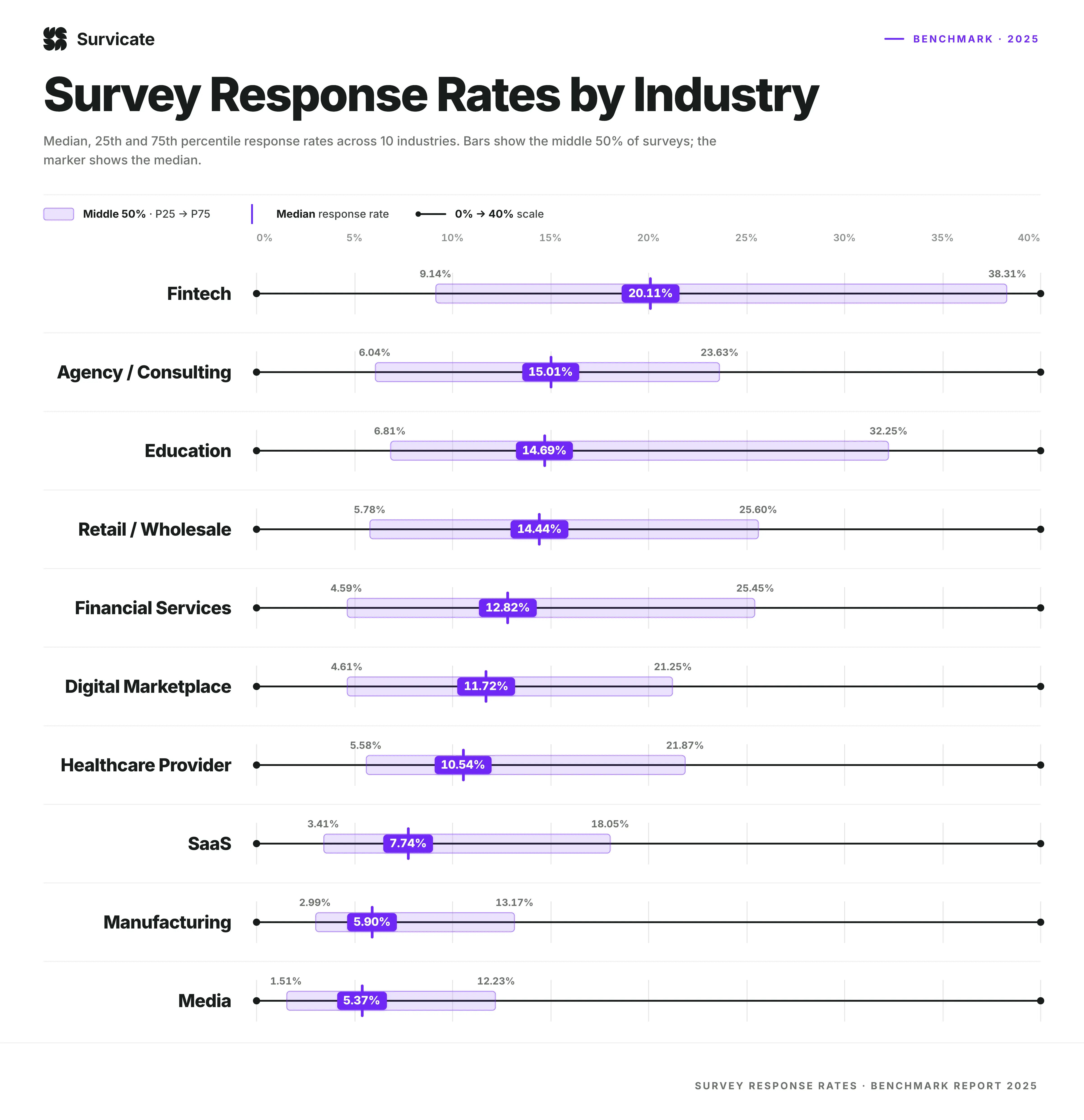
Creating the right feedback form is important, especially as roughly 25% of surveys don’t get completed, according to Survicate data, with variance by industry.
General customer feedback form
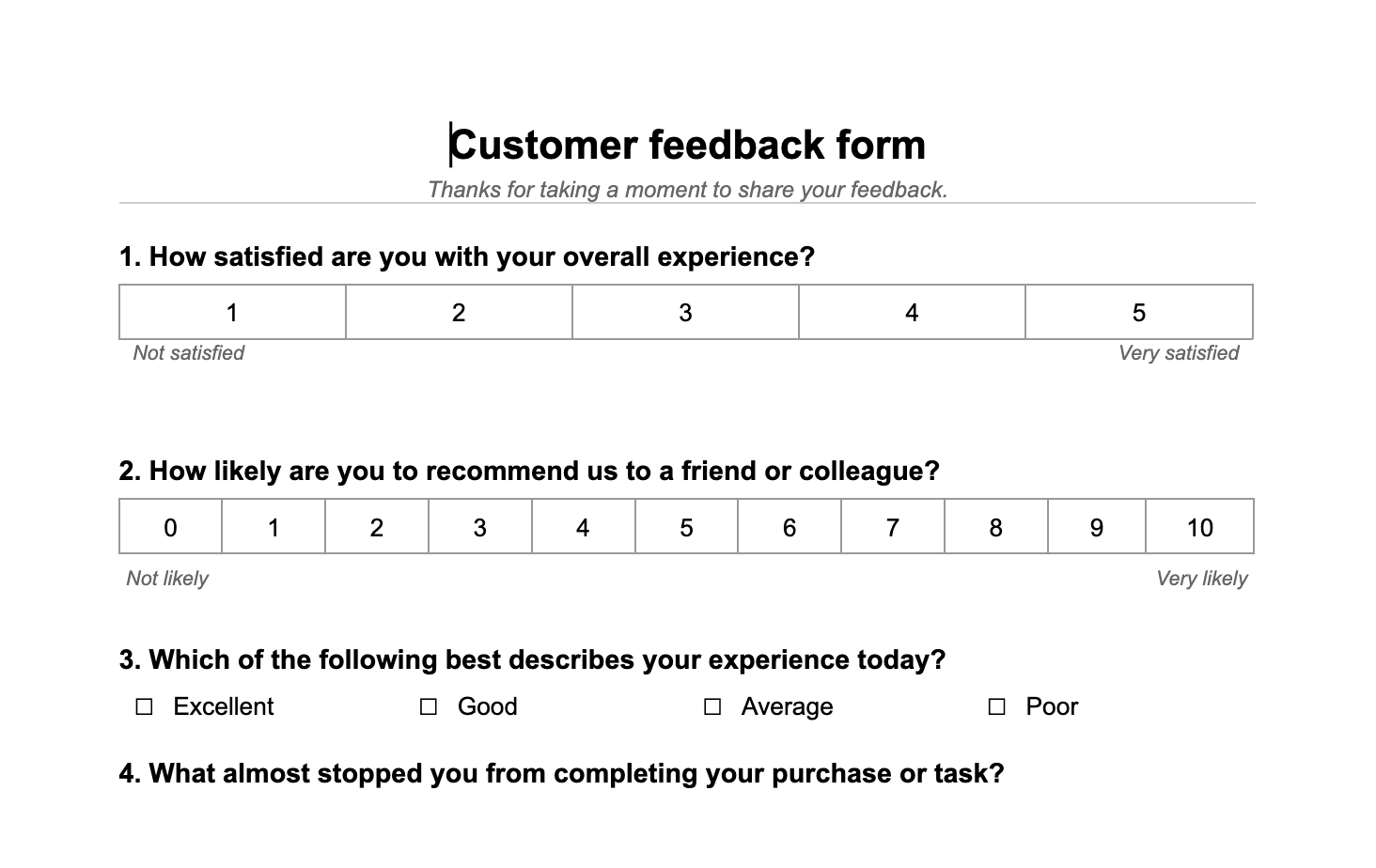
This form is the broadest way of getting voice-of-the-customer feedback: a short set of questions about overall satisfaction, usually sent after a support interaction or on a regular cadence. It typically combines one or two rating scales with an open-ended question asking for suggestions.
A support team might send this after closing a ticket, while a retail business might run the same customer feedback survey quarterly across its whole list. The questions barely change, but both the timing and audience do.
You can download our customer feedback form sample to get started.
Website feedback form
The questions on a website feedback form ask visitors about navigation, page speed, and overall usability.
They’re helpful when it comes to getting a general impression from a customer. However, website feedback is frequently more specific: a button that doesn't work, a layout that breaks on mobile, or text that's cut off on a smaller screen.
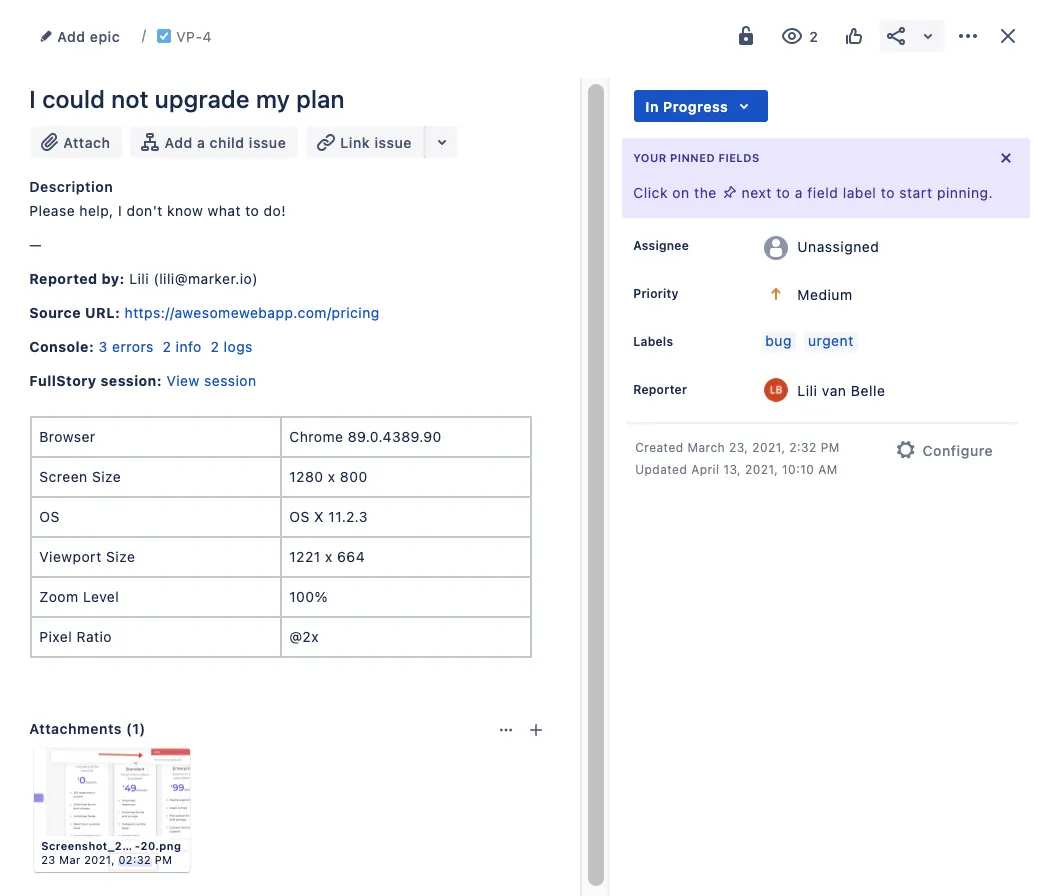
That kind of feedback is hard to describe in a text box. A visitor who spots a broken element usually can't explain exactly where it is or what browser and screen size triggered it, and a typed description forces a developer to go hunting for the problem.
Visual feedback tools provide a solution by letting people click directly on the page and pin a comment to the exact spot, capturing a screenshot with the technical details attached automatically.
This type of website feedback overlaps with bug and issue tracking. A standard form can collect the feedback, but it can't route a broken button to a developer's queue the way a dedicated bug report template or visual feedback tool like Marker.io can.
Here’s a bug report template you can use to help customers provide feedback on your website.
Product feedback form
A product feedback form focuses on a specific feature or the product as a whole, asking customers what they like, what's missing, and what would make them recommend it.
These forms often mix rating scales with an open field for feature requests.
A software company shipping a new feature might send this a week after launch, once customers have had time to actually use it rather than just click around.
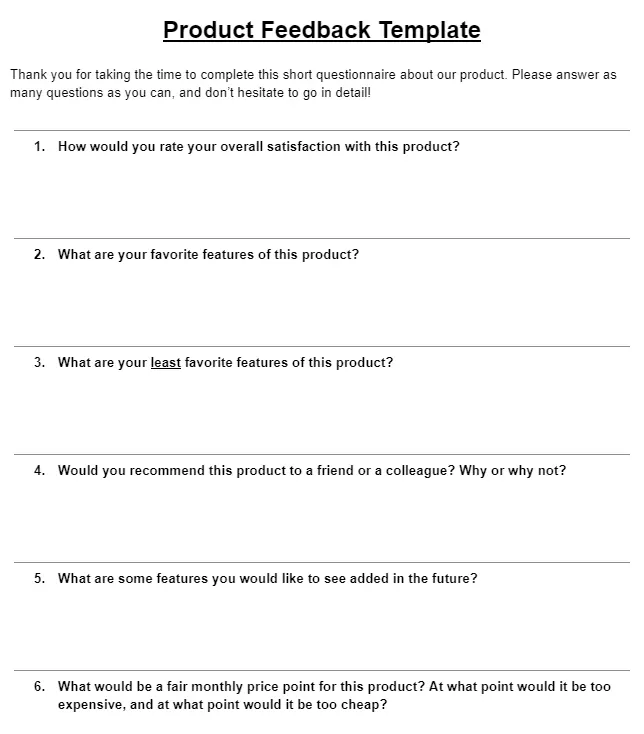
You can download this basic product feedback template as a PDF.
Post-purchase and customer satisfaction survey
Sent right after a transaction, you can use this form to ask about the buying experience: ease of checkout, delivery timeliness, and whether the product matched expectations. Keep it short, as customers will feel that their task is complete after a purchase, so won’t want to fill out a long survey.
Include a single rating question and one optional comment field. You could also use a star rating field and then connect it with a website like G2 so that any four- or five-star reviews get posted to your profile on the platform.
Net Promoter Score (NPS) form
An NPS form asks a single core question: “How likely are you to recommend this business to a friend or colleague?” It provides respondents with a 0-10 scale to provide a rating of that likelihood.
A short open-ended follow-up, asking why someone gave that score, turns a single number into real qualitative data about customer loyalty.
Responses typically get grouped into promoters, those scoring 9 or 10, passives, scoring 7 or 8, and detractors, scoring 6 or below. Tracking how that split shifts over time tells you more than the score on its own.
Client feedback form
A client feedback form is usually used by an agency to survey the client that it's building a website or product for, or providing a service to.
If the company is building a website, these forms can become a combination of customer feedback and bug reporting. A client reviewing a site mid-project rarely wants to write a paragraph describing an issue. They want to point at the page and say what's wrong.
Marker.io was built for this workflow.
Clients and internal reviewers leave comments and annotated screenshots directly on the live site during website design feedback or user acceptance testing, and each comment becomes an issue that syncs straight to the team's project management tool.
How to create a customer feedback form
A few decisions you make while building a feedback form impact whether people finish it and the data that you get:
- Define the goal. Decide what you're measuring before you write a single question. A form built to catch website bugs looks nothing like one built to measure overall satisfaction.
- Choose a mix of question types. Combine rating scales and multiple-choice questions with one or two open-ended ones. Structured questions are quick to answer and easy to analyze. Open-ended questions capture detailed feedback you wouldn't have thought to ask for.
- Keep it short and make fields optional. Every extra question lowers your response rate. Make anything beyond the essential fields optional, and cut whatever doesn't serve the goal you defined in step one.
- Design for mobile and make it visually appealing. Most customers will open the form on a phone. Use plenty of white space, a mobile-friendly layout, and a clean, uncluttered design.
- Order questions with a logical flow. Start broad, then move to specific questions. Jumping between topics breaks the flow and increases drop-off.
- Decide where responses go. A satisfaction score might route to a dashboard. A report of something broken on the site needs to reach a developer or designer directly, which is why teams that expect this kind of feedback often connect their feedback widget straight to their existing dev tools rather than a spreadsheet.
Customer feedback form template and sample questions
Use this structure as a starting point for a customer feedback form template, then adjust the questions to match your goal. It's one of the simplest feedback form templates to adapt, whether you're building it in a form tool or a basic survey template.
Template structure:
- Name and email (optional)
- One to two rating-scale questions on overall satisfaction
- One to two multiple-choice questions on specific aspects of the experience
- One open-ended question for suggestions or detailed feedback
Here's a customer feedback form sample built on that structure, with real questions you can copy directly.
Sample questions:
- How satisfied are you with your overall experience, on a scale of 1-5?
- How likely are you to recommend us to a friend or colleague, on a scale of 0-10?
- Which best describes your experience today: excellent, good, average, or poor?
- What almost stopped you from completing your purchase or task?
- What's one thing we could improve?
- Is there anything else you'd like to share, in your own words?
Keep the wording of each question neutral. Leading language, like asking customers to rate "how much you loved" something, skews results and makes it harder to avoid bias in the responses you collect.
How to ask customers to fill out a feedback form
Getting the form right is only half the job; you also need to get customers to open it.
- Time the ask. Send the request right after the interaction it relates to: just after a purchase, a support conversation, or a product update. Feedback collected days later is far less accurate.
- Pick the right channel. Email works well for post-purchase surveys. An in-app prompt or an on-page widget works better for product or website feedback, since it appears at the exact moment someone runs into something worth commenting on.
- Explain why it matters. A single sentence explaining that responses shape what gets built next increases the odds of the recipients finishing the form.
- Keep the ask short. One clear sentence and a link or button beats a long explanation. Save the detail for the form itself.
- Consider a small incentive for longer forms. A discount code or entry into a draw can lift responses for a detailed survey, though it's rarely needed for a short, well-timed form.
Tips to increase feedback form response rates
A few small changes make a noticeable difference in how many customers finish a feedback survey:
- Keep the form as short as the goal allows, and make optional fields genuinely optional.
- Use specific, neutral questions rather than vague or leading ones.
- Make sure the form is mobile-friendly, with clear white space and no cramped fields.
- Follow up once, briefly, if a customer hasn't responded, rather than sending repeated reminders.
Conclusion
There's no single best customer feedback form. The right one depends on what you're trying to measure and who's answering, whether that's a general satisfaction score, an NPS survey, a post-purchase survey, or a client pointing out something specific on a live website.
Website and client feedback in particular tend to need more than a text box, since the most useful reports are visual: a screenshot with a comment pinned to the exact spot on the page.
If that's the kind of feedback you're collecting, try Marker.io to capture it directly on your site and route it straight to the team that needs to act on it.
Customer feedback form FAQs
What questions should a customer feedback form ask?
Stick to a mix of one or two rating-scale questions on overall satisfaction and a multiple-choice question on a specific aspect of the experience, then close with one open-ended question for suggestions.
Avoid asking more than five or six questions unless the form is genuinely meant to be a detailed survey.
How long should a customer feedback form be?
Most customer feedback forms should only take a couple of minutes to complete, which usually means five to eight questions. Longer forms are fine for occasional, in-depth research, but they'll lower your response rate if used for routine feedback.
What's the difference between a customer feedback form and a survey?
A feedback form is typically short and tied to a specific moment, like a purchase or support interaction. A survey is often longer, sent to a broader audience, and used for deeper research rather than a quick pulse check. In practice, the terms overlap, and a short survey and a feedback form are often the same thing.
Should a customer feedback form be anonymous?
It depends on the goal. An anonymous form tends to get more honest, critical feedback, since customers don't have to worry about how a low score reflects on them personally. A named form works better when you need to follow up on a specific issue, such as a broken feature or an unresolved complaint, since you'll need a way to reach the person who reported it.
What should I do now?
Here are three ways you can continue your journey towards delivering bug-free websites:
Check out Marker.io and its features in action.
Read Next-Gen QA: How Companies Can Save Up To $125,000 A Year by adopting better bug reporting and resolution practices (no e-mail required).
Follow us on LinkedIn, YouTube, and X (Twitter) for bite-sized insights on all things QA testing, software development, bug resolution, and more.
Will Sigsworth
Will manages organic content at Marker.io. He also works as a marketing advisor and contributor to a number of other SaaS businesses.
Related blog posts


Get started now
Free 15-day trial • No credit card required • Cancel anytime