
A Guide to E-commerce Website Testing: The Types, Process, and Checklist
Learn how e-commerce website testing works, the types you need, and get a full e-commerce website testing checklist before your next launch.


TL;DR
- During an e-commerce website test, you should check that search, cart, checkout, and payment all work before and after you ship changes.
- In this guide, you'll get the six core testing types, a step-by-step process, and a full e-commerce website testing checklist.
- Learn how to turn testing findings into fixes your team actually ships, and why testing an e-commerce website never really stops.
Introduction
E-commerce website testing helps you ensure that a checkout button that works fine in staging doesn't collapse the moment it encounters real customers and real traffic.
Every flow on an online store, from product search to the final payment confirmation, has to hold up under conditions a demo environment can’t recreate: dozens of payment methods, inconsistent shipping addresses, discount codes stacked on top of each other, and thousands of people hitting the same sale page at once.
A general website QA checklist covers the basics any site needs, but this guide goes further: what e-commerce website testing actually involves, the six types of testing every online store needs, and a step-by-step process for testing an e-commerce website from the first test case to the final pre-launch pass.
You'll get a full e-commerce website testing checklist, see when manual testing beats automation, and learn what to do with everything your testing process finds once you're back from the checkout flow and staring at a backlog of issues.
What is e-commerce website testing?
E-commerce website testing is the process of verifying that every part of an online store, from product search through checkout and payment, works correctly for customers. It covers functionality, performance, security, and usability across the devices and browsers real shoppers actually use.
Unlike general website testing, e-commerce testing carries real financial stakes on almost every page. A marketing site with a broken contact form loses a lead. An e-commerce site with a broken "Add to Cart" button loses every sale until someone notices and fixes it.
E-commerce testing needs to be far more than a basic page load check; it has to confirm that search returns the right products, carts calculate totals correctly, payment gateways process real transactions, and customer data stays protected the entire time.
To test an e-commerce website effectively, you need to treat it as a system with dozens of moving, interdependent parts, rather than as a static page you check off once and forget.
Inventory updates mid-checkout, promotional codes stacking on top of each other, shipping addresses in formats nobody anticipated, and payment methods that behave differently by region all need to be part of the plan, not surprises a customer finds first.
Why is e-commerce website testing important?
A single broken checkout flow blocks every sale that was supposed to be processed until someone catches it and ships a fix.
Across 50 aggregated industry studies, the average documented cart abandonment rate sits at 70.22%, and 17% of US online shoppers say they've abandoned an order specifically because the website had errors or crashed, according to Baymard Institute's cart abandonment research. That kind of loss is exactly what thorough testing can prevent.
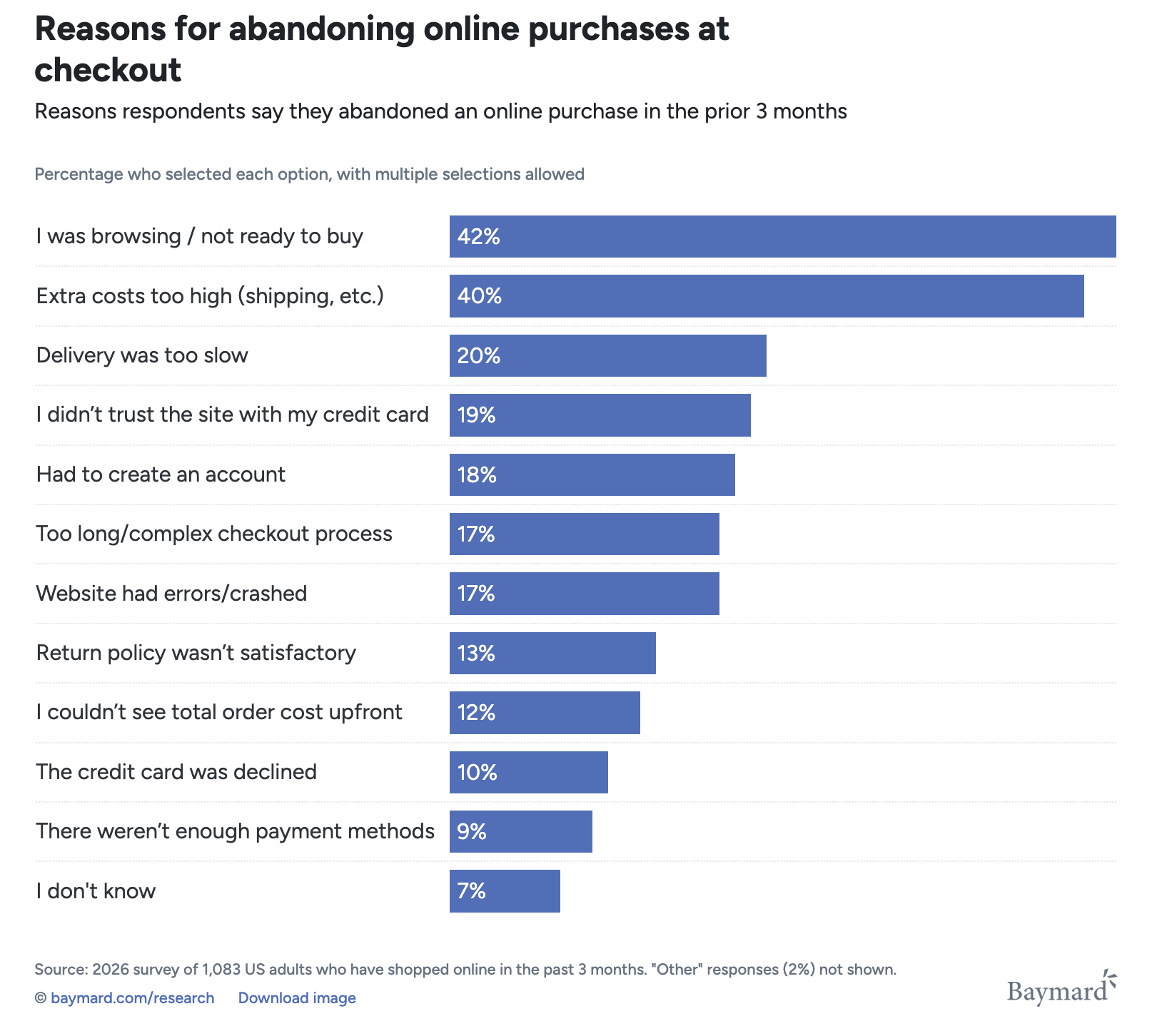
Here are some of the key benefits of e-commerce website testing:
- It protects revenue. A functional bug in search, cart, checkout, or payment stops sales immediately, and the cost of fixing it only increases the longer it stays live.
- It improves conversion rates. Usability testing catches confusing checkout steps and unclear error messages – the kind of friction that can cause cart abandonment without ever showing up as a hard error.
- It builds customer trust. Security testing finds the vulnerabilities that could expose payment details or sensitive customer information before an attacker does.
- It keeps the site stable under pressure. Performance and load testing confirm the platform holds up during flash sales and holiday traffic spikes instead of buckling at the worst possible moment.
Without testing, you risk a bad customer experience, an outage, or a breach that's far more expensive to clean up than it would have been to test for in advance.
Beyond the immediate financial risk, testing that isn’t performed properly compounds over time. A platform that ships untested changes regularly accumulates small defects that each seem minor on their own – a slightly slower product page here, a confusing error message there – until customer satisfaction drops in ways that are hard to trace back to any single release.
Treating e-commerce testing as an ongoing discipline rather than a one-time gate keeps that erosion from happening in the first place.
Types of e-commerce website testing
If you want to run comprehensive testing on your e-commerce site, you should use several distinct testing types, each catching a different category of problem. Running only one, such as functional testing, leaves an online store exposed.
Functional testing
Functional testing verifies that each feature on the e-commerce website works exactly as specified. It's the most basic layer of testing and also the most important, since nothing else matters if core functionality is broken.
A test makes sure that:
- Search functionality returns relevant results
- Filters and sorting behave correctly
- Cart totals recalculate accurately after every change
- The checkout process accepts valid orders
- Payment processing completes without failing
Functional testing also extends to account features: registration, login, password reset, order history, and saved addresses all need their own test cases.
Usability testing
A usability test evaluates how easy and intuitive the site is to actually use, separate from whether its features technically work.
It includes user interface testing, which checks for confusing layouts that could create friction even on a technically flawless page. A checkout flow can pass every functional test and still lose customers if it's confusing, which is why it’s important to watch real user behavior during a session.
You need to check:
- Navigation clarity
- Whether calls to action stand out
- Whether forms ask for more information than they need
- If error messages actually help a shopper fix a mistake instead of just blocking them
A ten-step checkout can function perfectly from a technical standpoint and still cause mass cart abandonment because real users give up partway through.
Performance, load, and stress testing
Performance testing measures how fast the site responds under normal conditions. Load testing pushes further, simulating the concurrent traffic a sale event or holiday season brings, while stress testing goes past expected peak traffic to find the point where the platform actually breaks.
Scalability testing, meanwhile, confirms that the platform keeps performing as the product catalog, customer base, and order volume all grow over time.
You perform this group of tests to ensure that, before a big sale, the site will hold up when demand hits. Slow pages also chip away at search engine rankings over time, so performance testing pays off in organic traffic as well as conversions.
Security testing
Security testing identifies vulnerabilities that could expose customer data or let an attacker access the platform without authorization. For any e-commerce platform handling payment information, this isn't an option.
Priorities here include:
- PCI DSS compliance for payment data
- Secure payment gateway integration
- Protection against SQL injection and cross-site scripting
- Solid authentication with properly hashed passwords rather than anything stored in plain text
A shopper expects your online store to protect sensitive customer data, so security testing has to run continuously, not just once before launch.
Compatibility testing
A compatibility test confirms the e-commerce site works correctly across the different devices and browsers customers use. Shoppers arrive on phones, tablets, and desktops, running Chrome, Safari, Firefox, and Edge in every possible combination.
Cross-browser testing and cross-device testing are part of this exercise, and mobile responsiveness deserves particular attention given how much online shopping now happens on a phone, often through dedicated mobile apps alongside the website itself.
A checkout that works perfectly on desktop Chrome but breaks on mobile Safari is still turning away a meaningful share of potential customers.
Accessibility testing
An accessibility test checks whether people using screen readers, keyboard navigation, or other assistive technology can actually complete a purchase. For e-commerce specifically, this carries weight beyond the ethical case for inclusive design.
E-commerce sites face a disproportionate share of ADA compliance lawsuits, since a store that's inaccessible to a customer using a screen reader is, in practice, a store that customer can't buy from.
According to a mid-2026 report on ADA lawsuits, eight industries, all of which rely on e-commerce revenue, accounted for 92.76% of the total lawsuits.
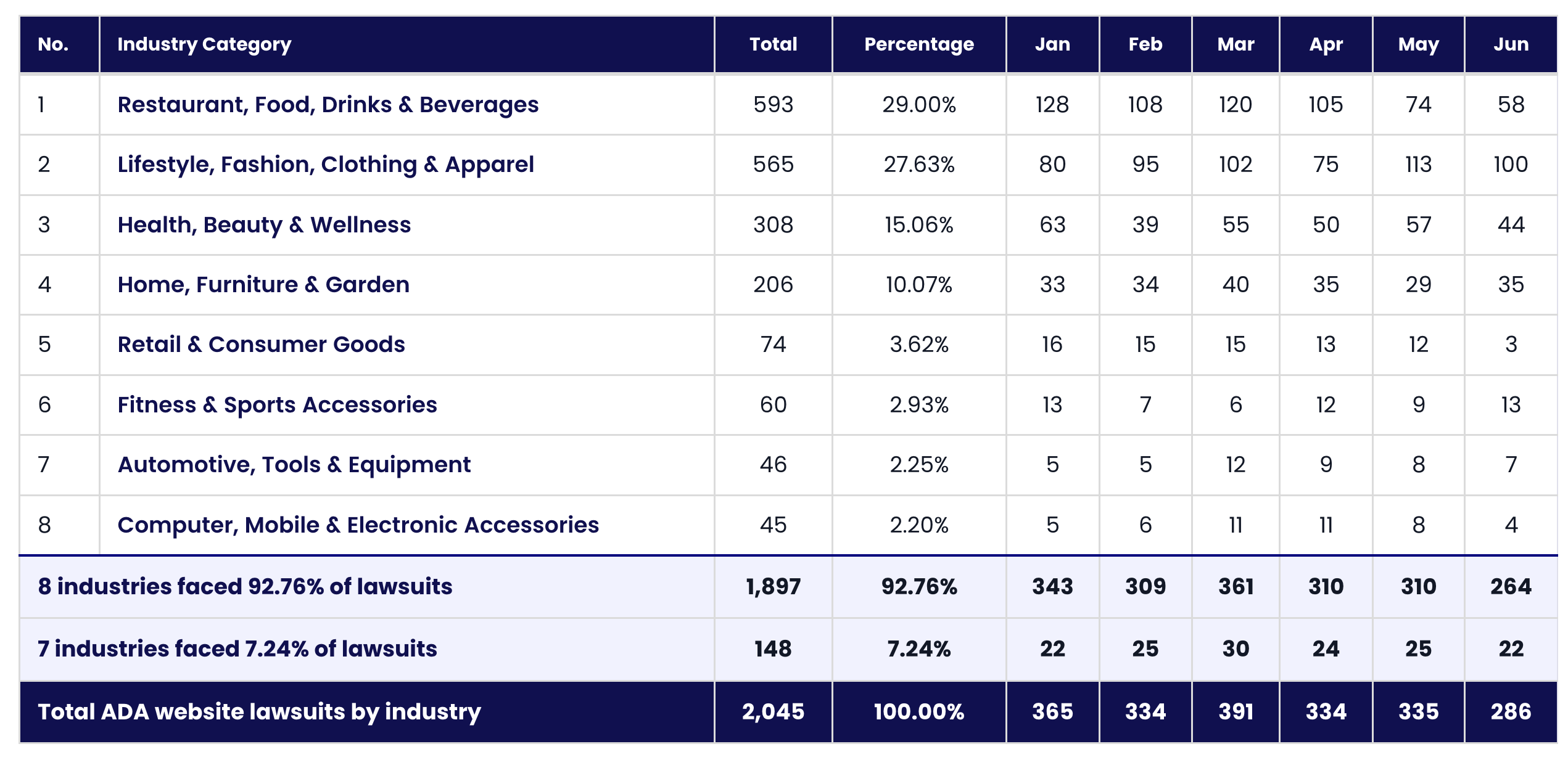
Accessibility issues also tend to double as usability issues for everyone else. Poor color contrast makes text harder to read for any shopper on a bright phone screen, and the same missing labels or unclear focus states that block a screen reader user also make a page feel confusing to everybody.
A step-by-step guide to testing an e-commerce website
Make sure your e-commerce website testing process is a repeatable one rather than an ad hoc scramble before each release. A solid e-commerce testing strategy breaks down into five steps:
1. Map the customer journey. Document every step a shopper takes, from landing on the site through browsing, adding to cart, checking out, and receiving an order confirmation. Each step in that journey needs its own test coverage.
2. Build a test plan and prioritize by business impact. Define what's in scope, which browsers and devices to cover, and which areas get the deepest testing first. The general QA checklist linked earlier is a useful starting point for the site-wide basics, layered underneath the e-commerce-specific priorities below. Payment and checkout should always sit above lower-stakes features like a wishlist.
3. Write test cases using realistic test data. Generic placeholder data will miss the edge cases that real shoppers create, e.g., international addresses, stacked discount codes, and unusual quantity values. Realistic test data surfaces problems that a tidy demo account won’t.
4. Run a mix of manual and automated tests. Cover critical test cases on real devices and browsers, not just emulators, and run them against a test environment that mirrors production as closely as possible.
5. Monitor after release. A test before launch only confirms the site worked at that moment. Every release afterward needs its own verification pass, plus ongoing monitoring to catch what creeps back in.
An e-commerce website testing checklist
Use this e-commerce website testing checklist as a quick, repeatable pass before any release, organized by the flows that matter most.
- Search and browse. Search returns relevant results, filters and sorting work, and product pages show the correct name, price, images, and stock status.
- Cart. Adding, updating, and removing items all work, totals recalculate correctly every time, and the cart persists across sessions instead of clearing itself.
- Checkout. Guest checkout works without forcing an account, address validation catches errors, and discount codes apply correctly while invalid ones show a clear message.
- Payment. Valid cards process successfully, invalid and expired cards get rejected with a clear reason, and alternative payment methods complete the full flow end to end.
- Accounts. Registration, login, password reset, order history, and saved addresses all function, and confirmation emails are sent.
- Performance. Pages stay fast under expected peak load, and the site degrades gracefully rather than crashing outright under a traffic spike.
- Security. HTTPS runs everywhere, payment data handling meets PCI DSS requirements, and sessions and passwords are stored securely.
- Compatibility. Checkout and layout hold up across every major browser, and mobile testing confirms the same on real devices, not just the one the developer running the test happened to be using.
- Accessibility. Core flows are usable with a keyboard alone and with a screen reader, not just with a mouse.
- Post-release. Monitoring is active, alerts are configured, and critical flows get a final spot-check on the live site after deploy.
Manual testing vs. automated testing for e-commerce
Most online stores need both manual testing and test automation.
Automated tests are the right call for regression testing, smoke tests that run on every build, and any test scenarios that need to run across many data combinations, like checking that a shipping calculator handles a dozen address formats correctly.
These scenarios repeat constantly, so automation testing pays for itself, and automated regression testing in particular can catch where a new feature accidentally breaks existing functionality.
Manual testing is the best option for anything that needs human judgment. Exploratory testing finds the issues nobody thought to write a test case for. Usability evaluation and accessibility testing with real assistive technology both depend on a person's actual experience, not a script's pass or fail.
Most popular testing tools for e-commerce software testing support multiple programming languages, integrate with a CI/CD pipeline, and handle integration testing against payment gateways and shipping APIs out of the box, which means you can run the same test suite on every commit.
Just be realistic about the trade-off: automated regression testing needs ongoing maintenance as the site changes, and a test suite nobody updates won’t catch anything useful.
Automate repetitive and complicated tasks that run the same way every time, and keep a human in the loop for anything that depends on judgment rather than a predictable pass or fail.
AI is increasingly part of that automation layer, from generating test cases to triaging failures faster, though it still needs a tester's judgment to confirm what actually matters.
If you're weighing which testing tools fit your stack, including where AI QA tools are actually worth adopting, start with the specific gap you're trying to close rather than picking a tool first and working backward. Checking that a discount code calculates the right total across fifty currency and tax combinations is a job for a script. Deciding whether a new checkout layout actually feels confusing to a first-time shopper is still a job for a person.
Here's how that split typically plays out across the release events a multi-brand store runs each year:
The automated column rarely changes from project to project. The sign-off column is where things get slow: the bigger the launch, the more people need to review it, and the harder it is to collect their feedback in one place.
How to turn test results into fixes your team can act on
Finding a bug is only half of e-commerce testing. The other half is getting that bug in front of a developer with enough detail that they can actually reproduce and fix it.
A typical bug report during a manual testing session looks something like this: take a screenshot, open a separate tool to annotate it, switch to a project management tool, write up what happened, try to remember the browser and screen size, and hope nothing important got lost between steps. Multiply that across dozens of test cases, and a tester will spend as much time documenting bugs as finding them.
A visual feedback tool can help.
A visual feedback tool, often accessed via a website feedback widget, can collapse that process into a single step. A tester reports directly on the live page, and the report arrives with a screenshot, the browser environment, console logs, and the source URL already attached, so a developer has everything needed to reproduce the issue without a single follow-up message.
Reports sync straight into whatever website bug tracker the team already uses – including Jira, Linear, or Asana – so testers don't have to learn a second tool just to log what they found.
You can also solve a separate problem with these tools: coordinating feedback from non-technical reviewers during UAT.
A QA tester and a merchandising manager, each of whom is running a user acceptance testing checklist, need different levels of detail in a bug report. Marker.io, the website feedback tool built for this exact workflow, enables a team to configure an advanced report form for QA and a simplified one for clients or internal stakeholders, so both groups can report issues without either one getting a form that doesn't fit their role.
You still need a test case management system or an automated test suite, but these tools help you make sure that what testing finds actually reaches a developer intact, instead of getting lost in a chat thread between the moment a bug gets spotted and the moment someone can fix it.
Why e-commerce testing doesn't stop at launch
A clean pre-launch testing pass only proves the site worked at that exact moment. Every release, content update, and third-party script change afterward can introduce a broken link, a layout shift, or an accessibility regression that nobody catches until a customer does.
E-commerce teams need to close that gap more than almost any other kind of site owner. A broken link on checkout day is lost revenue, and an accessibility regression carries real legal exposure given how often ADA lawsuits target online stores.
Waiting for the next scheduled testing cycle to catch either one means living with the problem, sometimes for weeks, in the meantime.
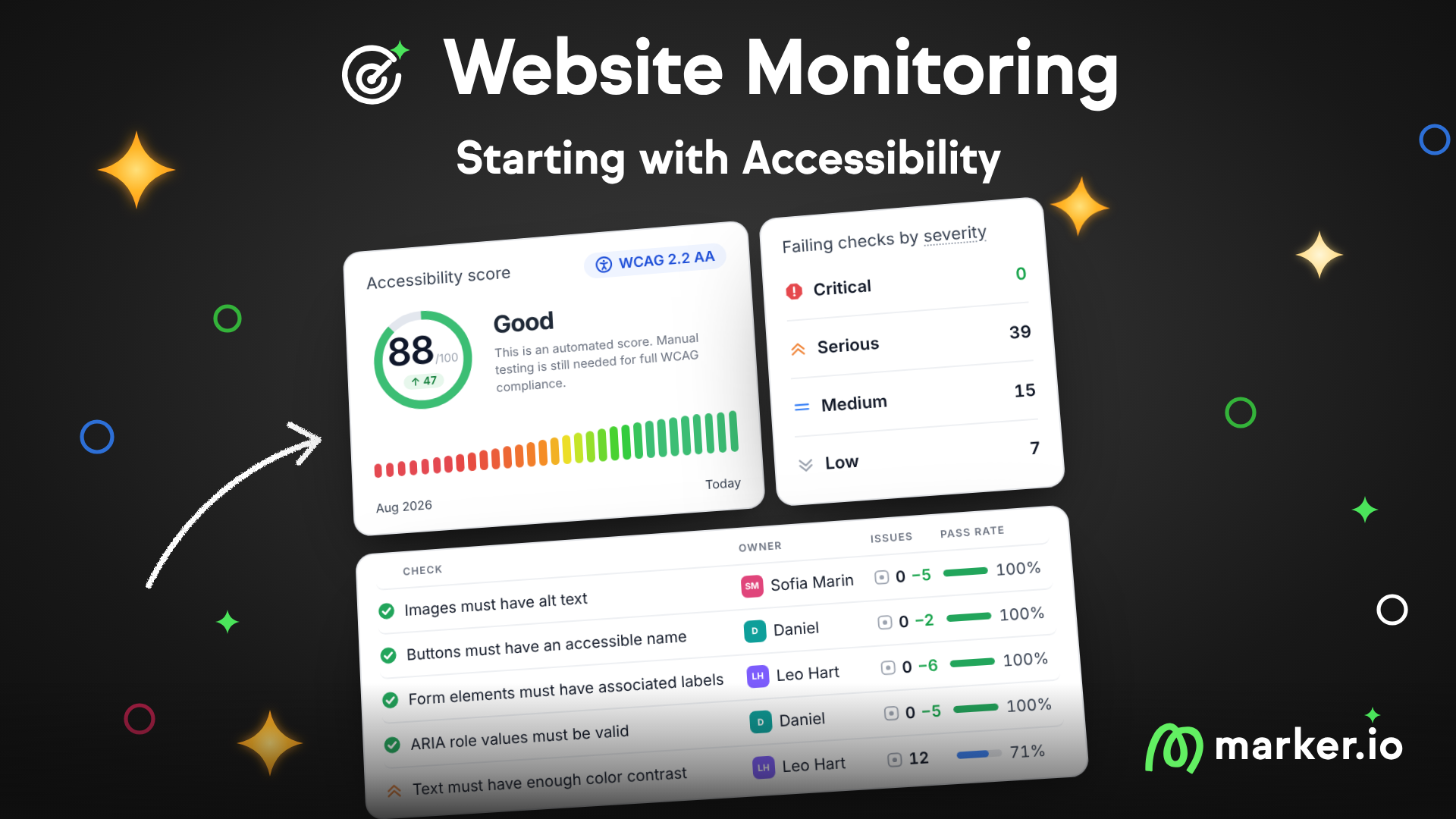
Website Monitoring closes that gap by scanning a live storefront on a schedule rather than waiting for the next manual pass. It flags the exact element that broke, with a screenshot and a plain-English fix, and routes each issue straight to its owner in the team's existing tracker instead of producing another report nobody opens.
It starts with accessibility monitoring against WCAG, which lines up directly with the legal and conversion stakes covered above, and every fix gets logged, so there's a record of what broke, when, and what fixed it.
The job of testing an e-commerce website is never really finished. It's an ongoing discipline that pre-launch testing kicks off and continuous monitoring keeps going.
How to find the best e-commerce website testing service
Not every team has the in-house capacity to cover every browser, device, and peak-load scenario alone, and that's when an outside ecommerce testing service comes in.
Bring one in when you need any of the following:
- Cross-browser and cross-device coverage faster than your team can staff alone.
- An independent security or PCI compliance review from outside your own blind spots.
- Extra testing capacity before a major sale or launch window.
- Load testing at a traffic scale your team genuinely can't simulate internally.
When evaluating a service, ask how they prioritize test cases, whether they test on real devices rather than emulators alone, how they report findings, and how quickly they can staff up before a known peak event like a holiday sale.
The best e-commerce testing services plug into a test plan you already own rather than replacing it. Keep ownership of your test cases and your testing strategy in-house, so an outside team's work strengthens your existing coverage instead of becoming a disconnected one-off report that goes stale the moment the engagement ends.
It's also worth asking how a prospective service hands off its findings. A vendor that delivers a static PDF of defects at the end of an engagement leaves your team to manually re-enter every issue into your own tracker, which wastes the time an outside service was supposed to save.
Look for a provider willing to report directly into the same workflow your in-house testers already use, so their findings land in context alongside everything else rather than in a separate silo you have to reconcile by hand.
Conclusion
Effective e-commerce website testing involves six overlapping disciplines – functional, usability, performance, security, compatibility, and accessibility testing – which run continuously across every release a successful online store ships.
Get the process right, and you catch problems before customers do. Get the follow-through right, route what testing finds to a fix, and monitor the live site afterward, and you keep catching them long after launch day.
Marker.io is a website feedback tool built for e-commerce teams, turning what QA testers and UAT reviewers find into bug reports developers can act on immediately, and extending that same coverage into production with Website Monitoring once the site is live.
Start a free trial and see how much faster testing turns into fixes when the whole workflow lives in one place.
E-commerce website testing FAQs
What e-commerce tests should I run before a launch?
At minimum, run functional, usability, performance, security, compatibility, and accessibility testing across the full customer journey: search, cart, checkout, payment, and account features.
Prioritize payment and checkout first, since failures there have the most direct revenue impact, then work outward to lower-stakes features like wishlists or product recommendations.
Does comprehensive e-commerce website testing actually improve checkout conversion?
Yes, indirectly but measurably. Usability testing during checkout catches the unclear steps, unnecessary form fields, and confusing error messages that drive cart abandonment, while performance testing prevents the slow page loads that cause shoppers to give up before completing a purchase. Fixing both tends to show up directly in conversion rate.
How is testing an e-commerce website different from testing a regular website?
The core testing types overlap, but e-commerce testing carries higher stakes on nearly every page because real transactions and sensitive customer data are involved throughout.
A marketing site can tolerate a minor bug on a secondary page. An e-commerce site can't afford the same bug if it sits anywhere near search, cart, checkout, or payment.
Who should own e-commerce website testing on a small team?
On a team without dedicated QA headcount, ownership usually falls to whoever is closest to the release, often a developer or product manager running through the checklist above before each deploy.
It's a workable solution as long as payment and checkout testing never get skipped under deadline pressure, and as long as findings get captured somewhere the whole team can see rather than staying in one person's head.
What should I do now?
Here are three ways you can continue your journey towards delivering bug-free websites:
Check out Marker.io and its features in action.
Read Next-Gen QA: How Companies Can Save Up To $125,000 A Year by adopting better bug reporting and resolution practices (no e-mail required).
Follow us on LinkedIn, YouTube, and X (Twitter) for bite-sized insights on all things QA testing, software development, bug resolution, and more.
Will Sigsworth
Will manages organic content at Marker.io. He also works as a marketing advisor and contributor to a number of other SaaS businesses.
Related blog posts


Get started now
Free 15-day trial • No credit card required • Cancel anytime