
How to Define Website Design Requirements Before You Brief a Designer
Learn what website design requirements to document before briefing designers and developers, with a template and checklist to keep every project on track.


Website projects are most likely to succeed when the project team agrees early on what the new site needs to do before the web design process begins.
That early agreement gives every decision a clear reference point, from layout and functionality to feedback and sign-off.
This guide walks through what to document before briefing a web designer, what responsive website design requirements to request from designers, how to make sure your website remains on-brand and accessible, and how to use a website requirements template and checklist to align everyone from day one.
What are website design requirements?
Website design requirements are the documented visual, functional, and technical specifications a website must meet. They cover everything from layout, typography, color, and brand identity to performance targets, browser support, accessibility, integrations, and how key pages should behave across different screen sizes.
Before you can decide what belongs in a requirements document, it helps to separate website design requirements from the broader project brief.
A brief explains what the business wants to achieve. It may describe business goals, target audience, key metrics, brand personality, traffic sources, or why the company needs a new website. Requirements go further. They specify what the website must do and look like to achieve those goals.
For example, a brief might say the site needs to generate more sales from potential customers. A requirement might say the homepage must include one primary call to action above the fold, product category pages must support filtering, and the e-commerce website checkout must work on a mobile device without horizontal scrolling.
Skipping this step is one of the most common reasons website projects go over budget. Without clear website requirements, every design choice becomes open to interpretation. The client may expect one thing, the website designer may create another, and the web developer may only discover missing technical requirements once the development process is already underway.
What to include in a website requirements document
A useful requirements document builds on the brief by giving the project team a shared reference point before design work begins.
Think of this section as a website requirements template you can adapt for almost any web design project, from small businesses creating a first site to in-house marketing teams managing a major redesign.
Project goals and success metrics
Start with the business goals behind the project. Is the website meant to drive leads, support more sales, improve search engine optimization, reduce support requests, or make the brand feel more credible?
Add the key metrics that will define success, such as conversion rates, demo requests, form completions, organic search results, or engagement in Google Analytics.
Target audience and user personas
Document who the website is for, what potential users need, and what user expectations must be met. Include audience segments, decision-makers, pain points, and the key tasks visitors need to complete. A site converts visitors more effectively when it’s designed around actual user behavior rather than internal assumptions.
Site structure and page inventory
Map the site architecture before visual design begins. List existing web pages, new pages, key pages, navigation levels, and any pages that will be removed or redirected. This step helps the team spot broken links, content gaps, and search engine optimization risks before they become expensive fixes.
Functionality and integrations
List the essential features the website needs. This might include forms, account areas, ecommerce functionality, booking tools, chat, search, personalization, Google Tag Manager, Google Analytics, CRM integrations, marketing automation tools, or a content management system. The more specific you are here, the easier it is for a web developer to assess effort and dependencies.
Brand and design standards
Reference the brand identity, style guide, design language, logo rules, color palette, typography, imagery, iconography, and any existing design system. If the company has a formal style guide, attach it; if not, the requirements should clarify what visual consistency means for this project.
Content requirements
Define what written content, images, video, downloads, testimonials, product information, and metadata will be needed. Include who owns each content item and whether keyword research has already been completed. Content delays are a major source of timeline drift, so this section should be practical and specific.
Technical constraints
Capture the platform, hosting environment, CMS, security needs, analytics setup, browser support, legal requirements, accessibility standards, and any known limitations. Some technical requirements depend on the chosen platform, so this section should be reviewed before sign-off.
A good requirements document is something the client, design team, and development team can approve before a pixel is moved. That shared sign-off reduces scope creep, saves time, and keeps the project commercially realistic.
With the structure in place, the next step is to define the visual rules that will shape the user’s first impression of the site.
Visual design requirements
Once the requirements document defines what the site must contain, visual design requirements define how the website should look and feel.
This section covers typography, color palette, imagery style, logo usage, whitespace, spacing conventions, page elements, visual hierarchy, and brand consistency rules. It gives the web designer enough direction to create a visually appealing site without guessing what the business means by good design.
Vague guidance, such as make it look modern, will just invite disagreement, so be specific. One stakeholder may associate modern web design with bold typography, large imagery, and minimal navigation. Another may expect restrained layouts, muted colors, and conservative design principles. Both can be valid, but they lead to different outcomes, so make sure your website design checklist is specific in its requirements.
A useful visual requirements section should specify:
- Primary and secondary typefaces
- Approved font weights and heading styles
- Core color palette with hex codes
- Button styles and hover states
- Logo placement, sizing, and clear space
- Imagery direction, such as real photography, illustration, product screenshots, or abstract visuals
- Rules for icons, backgrounds, cards, and repeated components
- Spacing conventions across desktop, tablet, and mobile layouts
- Examples of existing pages, campaigns, or assets that should guide the design
For example, instead of asking for a clean homepage, the requirements could state that the homepage should use a clear hero section, one primary call to action, a secondary product explanation, customer proof, and a visual hierarchy that draws attention to the most important content before introducing supporting links.
If existing brand guidelines, style guides, or design systems already exist, reference or attach them directly in the website requirements. If they don’t exist, the document should say where the designer has room to create new design rules and where the brand identity must remain fixed.
Starting with a website design questionnaire is a good place to start, especially if you’re designing a website for a third party. Understanding exactly what’s required from each stakeholder reduces the risk of delays and confusion later on.
UX and navigation requirements
Strong visual direction only works if users can find what they need, so UX and navigation requirements should translate the site structure into clear user journeys.
This section should define primary user journeys, navigation structure, call-to-action placement, form behavior, accessibility standards, how to recognize accessibility issues, and any audience-specific needs. It should explain how different visitors will move from arrival to action, whether that action is requesting a quote, buying a product, reading key information, booking a call, or finding support.
Start with the most important journeys:
- A B2B website may need separate paths for potential customers, partners, job applicants, and existing clients
- An e-commerce website may need users to move smoothly from category page to product page to checkout
- A service business may need the navigation to prioritize locations, case studies, pricing, and contact options.
The requirements should also define navigation expectations. That includes top-level menu items, footer links, breadcrumb behavior, internal search, sticky navigation, and whether primary calls to action appear in the header, hero section, page body, or all three.
Form behavior deserves its own detail. Requirements should cover required fields, validation messages, privacy notices, error states, confirmation pages, CRM routing, and any tracking needed in Google Analytics or Google Tag Manager. These details influence both design and development.
Web accessibility should be treated as a core requirement, not an optional enhancement. The WebAIM Million 2026 report found detectable WCAG failures on 95.9% of the one million home pages tested, noting that automated testing only catches some failures, meaning full conformance is likely lower.
That percentage has remained in the mid-90s for years.

Legal exposure for inaccessible sites is also growing, especially for public services, regulated industries, and federal websites. In fact, in 2025, there were more than 5,000 ADA-related digital accessibility lawsuits in the United States. If you want to avoid a web accessibility lawsuit, our ADA compliance checklist can help.
As a minimum, specify WCAG 2.1 AA compliance. Add any known audience-specific needs, such as large-type options, keyboard navigation, screen-reader compatibility, video captions, clear focus states, and accessible form labels.
Give the designer and developer a clear standard to work toward instead of relying on late-stage fixes.
Responsive design requirements
Because UX depends on device context, responsive website design requirements should be written into the project upfront rather than added after the desktop design is finished.
This section directly answers the question many project managers need to ask: What responsive website design requirements should I request from designers?
At a minimum, ask designers to define layouts for mobile, tablet, and desktop breakpoints. The exact breakpoints may depend on the design system or front-end framework, but the requirements should make clear which screen sizes will be designed, reviewed, and approved.
Responsive requirements should cover:
- Breakpoints for mobile, tablet, laptop, and large desktop screens
- How the navigation behaves at each breakpoint
- Whether menus collapse into a hamburger, bottom navigation, or simplified header
- Minimum touch target sizes for buttons, links, and form controls
- Font scaling between screen sizes
- Image cropping, compression, and art direction
- How cards, grids, tables, sliders, and forms stack on smaller screens
- Which content is prioritized, hidden, shortened, or reordered on mobile
- How sticky elements, banners, cookie notices, and chat widgets behave on mobile
- How key pages will be tested before sign-off
Mobile deserves its own section because it is no longer a secondary experience. Mobile devices accounted for approximately 52% of global web traffic in Q1 2026, according to Statista, so a mobile-friendly website is central to how users access the web.
Designers shouldn’t simply shrink the desktop layout.
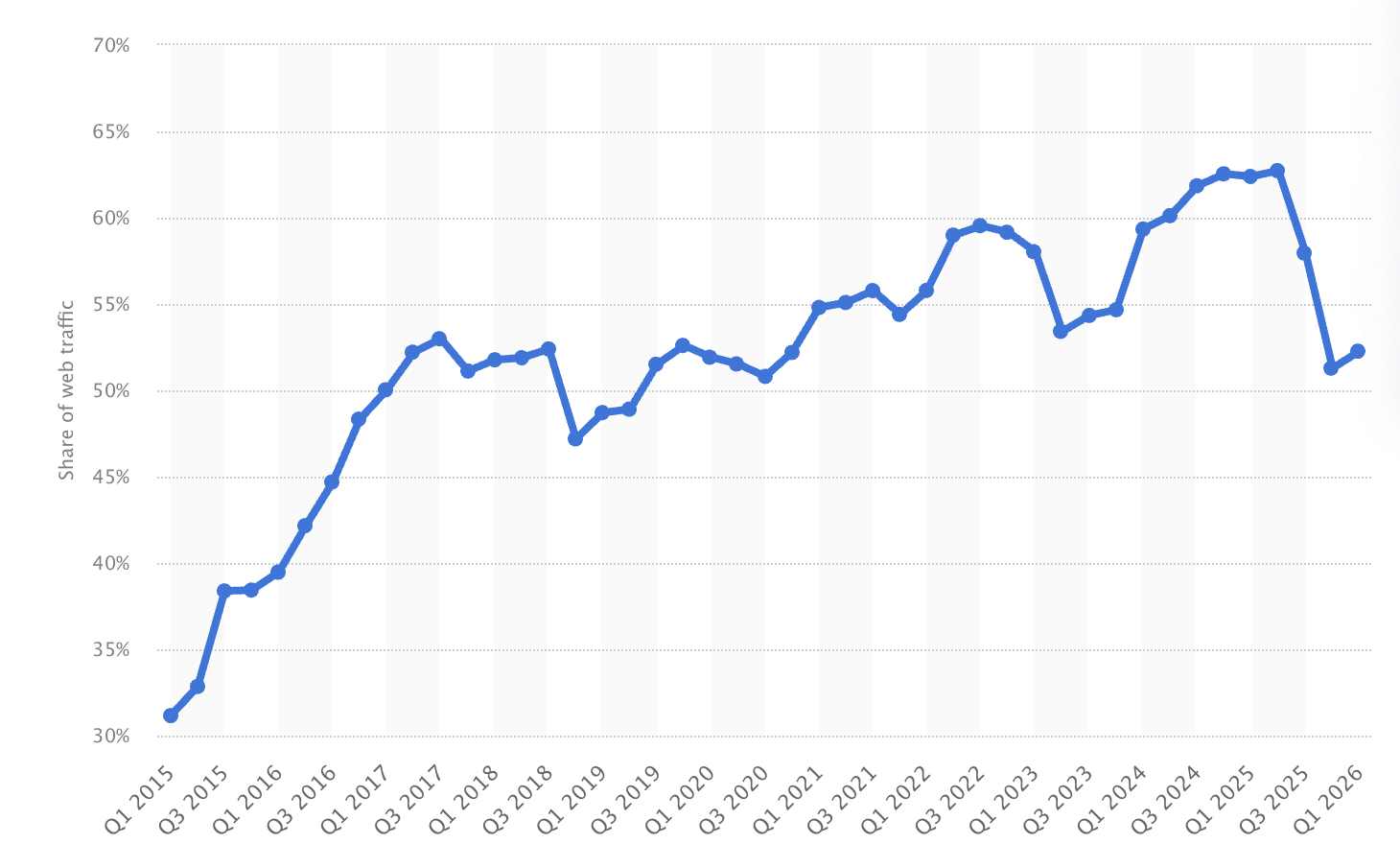
A mobile device changes what users can see, tap, read, and complete. Navigation may need fewer levels. Forms may need fewer fields. Images may need different crops. Tables may need to become cards. Primary calls to action may need to stay visible without blocking the page.
Responsive requirements should also state which components need different behavior on small screens. For example, a comparison table might become a swipeable card layout, a pricing grid might stack by plan priority, and a complex homepage hero might use a shorter message to keep the most important content visible.
This level of detail helps designers create layouts that work across screen sizes, and it gives developers the technical context they need to build them properly.
Performance and technical requirements
Responsive design defines how the website adapts visually, while performance and technical requirements define whether it loads, tracks, secures, and integrates properly.
A web developer should review this section before the requirements are finalized. Some specifications depend on the content management system, hosting environment, third-party tools, and development approach.
Performance
Requirements should define target page load times and Core Web Vitals thresholds, especially for key pages such as the homepage, service pages, product pages, checkout, and lead generation forms.
Performance affects user experience, search engines, conversion rates, and whether visitors stay long enough to act.
Technical performance requirements should also cover browser and device compatibility. List the browsers, operating systems, and screen sizes that must be supported. Include any requirements for older browsers only if there is a real business case, since legacy support can increase design and development effort.
Security and data
Security and data handling should be documented clearly. Include SSL, form data storage, spam protection, consent management, privacy notices, cookie behavior, role-based CMS access, and any legal requirements that apply to the business or audience.
Integrations
Integrations are another common source of late-stage issues.
The requirements should list analytics, CRM, email marketing, payment, booking, search, ecommerce, personalization, advertising, or support tools that need to connect to the website. For each one, state whether the integration is required at launch or can follow later.
You should also define who will manage content after launch. Requirements should cover page templates, reusable modules, editor permissions, media handling, redirect management, and whether the marketing team can create new pages without developer support.
These technical requirements may feel less visible than the design, but they are often what make an effective website sustainable after launch.
With the full requirements document now mapped out, we’ve compressed the same thinking into a checklist the team can use before handoff.
Your website requirements checklist
The checklist below is a summary of the full requirements document, not a replacement for it. Use it before the project kicks off, then again at handoff to sense-check that nothing important was missed before design work begins.
Project goals
Visual design
UX and navigation
Accessibility
Responsive behavior
Performance
Technical setup
Security and data requirements
A checklist makes the process more time-efficient, but it works best when it points back to a fuller document. Make sure the project team, client, designer, and developer are all working from the same definition of done.
That shared definition is what keeps the final stage of the project from turning into a messy feedback loop.
Conclusion
Documenting website design requirements upfront saves time, money, and revision cycles later in the project. It turns subjective preferences into agreed standards, connects the design process to business goals, and gives every member of the project team a clear reference point before work begins.
A strong requirements document explains:
- What the site must achieve
- Who it’s for
- How it should look
- How users should move through it
- How it should behave across screen sizes
- What technical requirements must be met before launch
A practical website requirements checklist then makes it easier to review those decisions before the actual design and development process begins.
Once the requirements are signed off and the build is underway, the next challenge is keeping feedback structured with a feedback, QA and UAT tool.
Marker.io helps web agencies and development teams collect feedback directly on the live site, annotate page elements, report bugs, and manage review cycles in one place – so nothing gets lost in email threads, screenshots, or spreadsheets before final sign-off.
Start your free trial of Marker.io today.
What should I do now?
Here are three ways you can continue your journey towards delivering bug-free websites:
Check out Marker.io and its features in action.
Read Next-Gen QA: How Companies Can Save Up To $125,000 A Year by adopting better bug reporting and resolution practices (no e-mail required).
Follow us on LinkedIn, YouTube, and X (Twitter) for bite-sized insights on all things QA testing, software development, bug resolution, and more.
Will Sigsworth
Will manages organic content at Marker.io. He also works as a marketing advisor and contributor to a number of other SaaS businesses.
Related blog posts


Get started now
Free 15-day trial • No credit card required • Cancel anytime