
Website Design Questionnaire: 11 Questions to Ask Your Web Design Clients
Download our free website design questionnaire template and the website design questions you need to ask clients before scoping any new website project.


We've put together the most useful and actionable website design questionnaire template possible.
TL;DR:
- Web design agencies need to know what a client wants before scoping and starting a project.
- A website design questionnaire brings together all of the information you need from a client to scope out and price a project, or refine the details once a new client has given you the go-ahead.
- We've made this easier by putting together a free detailed website design questionnaire: Download and use it as a free Google Docs.
Read on for details 👇
What is a website design questionnaire?
A website design questionnaire is a set of questions designed to gather information before starting a new website project.
Questionnaires help your team and the client understand the goals, preferences, and expectations for a new website.
A website design questionnaire, like this one, will cover important questions like:
- What's the main purpose of the website (e.g., lead generation, eCommerce sales, investor prospectus, or something else)?
- Who is the target audience, and what pain points are you solving?
- What functionalities and features do you need (e.g., contact forms, calculators, checkout, email capture, etc.)?
- And lots more, as we cover in more detail below!
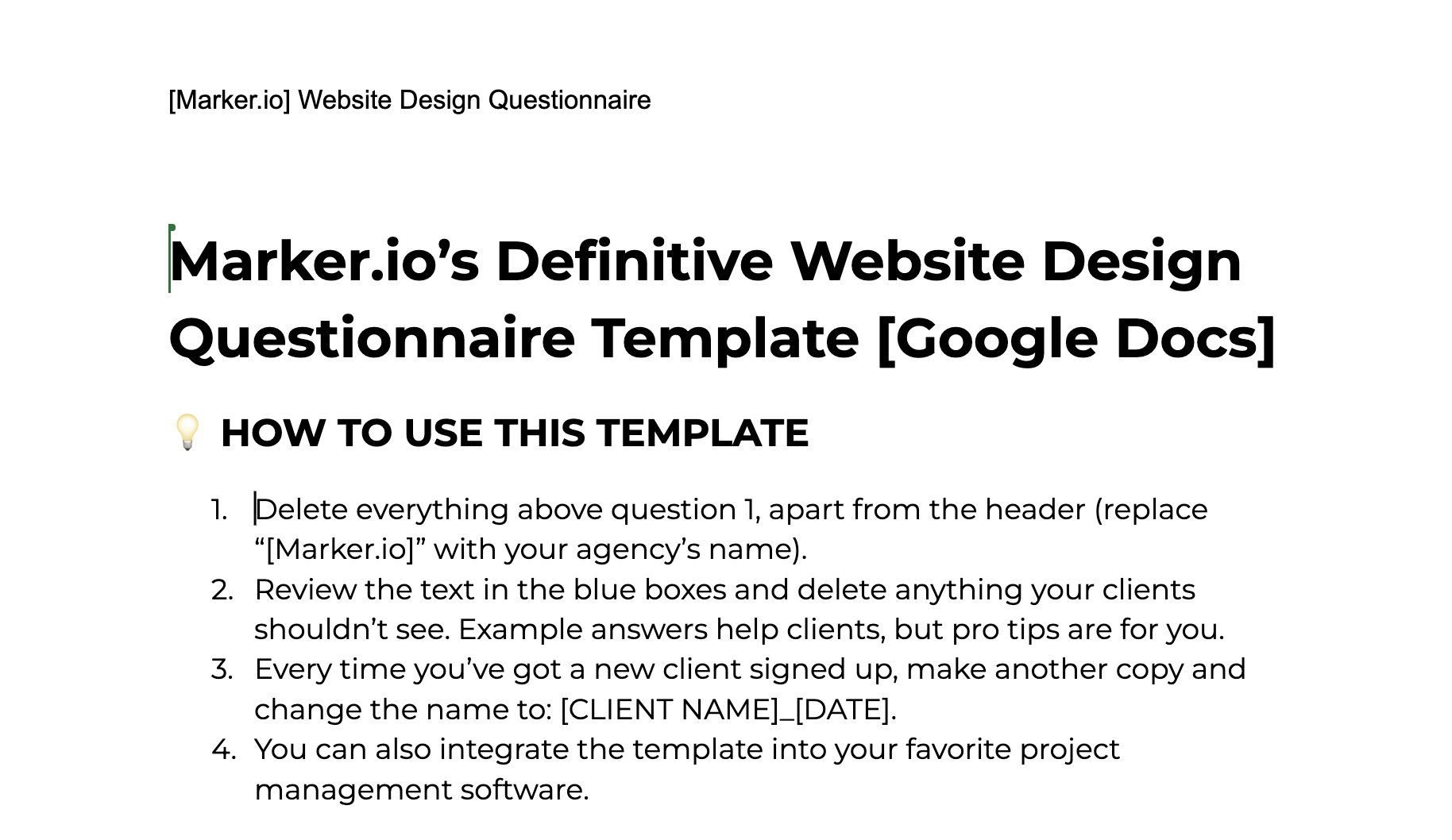
Here is a free downloadable website design questionnaire template to get started with.
Why use a website design questionnaire?
You don't want to show a client web design mockups only for them to say, "No, this is all wrong, we need…" followed by a long list of changes or a description of something completely different to what you believed was in the original scope.
Ensure everyone is on the same page before designing mockups to save time, money, and your team from unnecessary headaches.
Questionnaires give clients a chance to dump all of their ideas into one document.
Framing these around questions structures their ideas, so your team can turn them into design mockups and, finally, a fully-functioning website.
A website design questionnaire:
- Makes it easier to structure the development process
- Ensures client requirements are captured before project sign-off, avoiding scope issues
- Establishes clear expectations and starts the communication process between the client and design team
What questions should you ask when designing a website for a client?
The aim behind the questions is to reduce back-and-forth from the start.
It should eliminate the need for clarifying questions mid-project and get the basics on paper before any work begins (e.g., target audience or website purpose).
It also reduces the risk of any surprises, such as a client saying halfway through, "Oh, and we'll also need a blog."
Let's dive into the questions you should include!
How to structure your website design questionnaire
Asking the right questions is only half the job for a web designer. How you structure the questionnaire affects how much useful detail you actually get back, and it can make a significant difference to how smoothly the rest of the project runs.
A well-structured questionnaire also tends to surface the hidden elements of the project, like legal pages or third-party integrations, that are easy to miss in a shorter conversation.
A few things to keep in mind as you build your questionnaire:
- Respect your client's time. Ask enough to cover the essentials, but keep it short enough that nobody abandons it halfway through. Let clients add extra context afterward instead of trying to capture everything upfront.
- Group your questions by topic. Bundle budget, timeline, and administrative details together, and keep branding and design questions in their own section. It's easier for a client to describe what they want when they're only thinking about one topic at a time.
- Cut anything redundant. If two questions are really asking the same thing, like color preferences and overall style, combine them into one.
- Keep the tone positive. Asking "What design elements are you excited about?" invites clients to open up, instead of making them second-guess themselves the way a flat "What are your design preferences?" can. The friendlier phrasing usually gets you a more detailed answer.
Get these basics right, and the answers you get back will be useful enough to go straight into a project brief tied to the client's primary goals and broader business goals, instead of a vague list of likes and dislikes that invites scope creep later.
It also helps you identify early on whether a prospective client is a good fit for your agency, before both sides get involved in what’s planned.
11 website design questions for better client onboarding
Here are the 11 most important website design questions at the start of a client project.
1. What is the purpose of your website?
This is the first and most important way of scoping out a website project.
Why is this an important question?
Understanding a client's goals is step one to building a solid website.
Different websites have different goals, impacting design, user experience (UX), and functionality decisions.
For example, an e-commerce site focuses on UX/UI, generating conversions, and search functionality.
The aims and objectives also impact the size of a website. A simple service-based B2B website might need a few pages, whereas an e-commerce store will need hundreds or thousands of product pages.
How to answer this question?
A clear and concise statement.
The primary objective needs to be clear: what outcome are they aiming for (e.g., brand visibility or lead generation)?
Example answer:
"Our goal is to improve our current e-commerce site, re-platform it, overhaul the UX/UI, and search functionality to increase sales and reduce basket abandonment."
Pro tip: Follow up on this answer if you need more information.
Being vague at this stage could cause expensive and time-consuming mistakes later on.
2. Do you want to overhaul an existing website or create a website from scratch?
Before any project starts, you need to know the basic scope: start from scratch or overhaul an existing website.
Why is this an important question?
This question is crucial. It's about the scope of the project. It helps provide a price and prepare the resources needed.
This way, you can be clear on preferences and issues if the aim is to overhaul an existing website.
Find out what the client likes about their current website and what they dislike or want to change.
How to answer this question?
Knowing what a client wants and why is valuable information.
You need to know things like:
- What are the shortcomings of the current site?
- What don't you like about it?
- Why isn't it doing what you originally wanted it to?
Understanding the answers helps design and development teams avoid past mistakes and ensure the client gets what they want.
Example answer:
"We need to revamp our e-commerce site search function, as it returns irrelevant results at the moment."
3. Who is your target audience/who are your ideal customers?
Next, you need a clear idea of the target audience and customer profiles.
Why is this an important question?
A client's audience and their target customers will influence the look, feel, UX/UI, web copy, SEO, and images on a site.
A high-impact website that generates ROI for a client should solve problems for users.
It should show that the client understands their customer's pain points and can provide a solution.
How to answer this question?
Ideally, the client should have extensive customer research available for the design team.
We know that's not always the case. But aim to get as much from them as possible so you can understand their audience/customers.
You need information such as demographics (e.g., age, gender, and location), interests, and online behaviors.
If your clients are in B2B, you also need to know about job roles, their market, the types of businesses they work with, and as much ideal customer profile (ICP) information as possible.
Example answer:
"We want to attract young professionals, 25-35, with high disposable income, interested in fitness and wellness products across the US, Canada, and the UK.
Please see attached our ICP and market research data."
If all they've got is a few lines, then you might need to dig deeper and ask for more information.
4. What is your budget?
Before pricing a project and assigning team members, you've got to be clear on the client having a budget.
Why is this an important question?
You've got to determine feasibility early-on.
Clients with low budgets but wanting 50-page websites with lots of functionality need to know what's possible and what isn't.
Align on the budget, expectations, goals, and payment terms before a project starts. The last thing you want is to deliver a website that a client feels is "half done" and have them dispute the final invoice.
How to answer this question?
Websites are an investment. Clients need a realistic idea of their budget before committing to a website project. Agencies can charge from $3000 for something simple up to $50k or more for larger websites with advanced functionalities.
Pro tip: Lots of clients either don't know what to spend on websites. Or they only invested a small amount in their first site, so they expect it to be cheap.
There are many drag-and-drop website builders, cheaper providers, and freelancers who can create a template site for a low price. Your competition includes cheaper providers and misperceptions about pricing, value, and the impact a high-quality website can have on a business.
E-commerce brands are more willing to invest. Whereas smaller, traditional mom-and-pop shops are either more hesitant or have lower budgets.
One way around this is to present clients with a range of packages so you can see how your packaged options fit with your clients’ budgets.
5. What is the desired timeline for the completion of the website?
Timescale and budgets are two questions that go hand-in-hand.
Why is this an important question?
Both sides need to set realistic expectations of when the project will be finished.
A client wanting a 20-page, custom design site with new web copy, branding, SEO, and images in 2 weeks isn't realistic, or they should expect to pay a premium fee.
Setting a timescale makes it easier to manage a project, set milestones, and use this information to impact the project management roadmap.
With a realistic timeline, you can agree on payment terms based on those milestones, as well as expectations from the client side, so they're clear on when they need to provide assets and feedback throughout the project.
How to answer this question?
Clients don't always know how to answer this question and will likely say something like "As fast as possible" or "We'd like to start this project by the end of XYZ". One of the most common reasons is that projects are complex and have multiple stages.
In most cases, feedback from clients is needed at these stages/milestones (e.g., design mockup feedback).
Pro tip: Make it easier for both parties by explaining the various stages of the process to the client:
- Design
- Development
- Testing (QA, UAT, etc.)
- Launch (including testing and implementing pre-launch fixes)
Explaining each stage will help manage their expectations of how long the project will take.
6. What specific functionality do you need on your website?
Functionality is equally essential as the answer to this impacts budgets and timescales.
Why is this an important question?
It's important to know because you don't want to be six weeks into a project when a client suddenly says, "Oh, and we'll need a blog too!"
Knowing all of the functionality in advance means you can plan for this in the development stages.
If a blog is needed, then the website can be built on a basic content management system (CMS), like WordPress or Webflow, which has that functionality built in. Alternatively, you can use Next.js to manage content, if your client has enough technical know-how in the team. Using Next.js can also make it easier to connect a LLM to your website, and create AI-enabled workflows.
How much functionality is required and how complex it is could increase the overall cost.
How to answer this question?
Provide a comprehensive list of the functionality the website needs.
These should align with the goals (e.g., if you're going to sell products on your site, you'll need a cart/checkout process linked with payment processors/platforms).
Pro tip: Make it easy for clients in the questionnaire by giving them a list of the most requested functionalities. The client can then pick and choose.
Also, leave a field blank where they can input a request for anything more specialized or custom.
7. Does your company have branding guidelines/a style guide we can use?
A company's brand image and identity are vital in helping designers produce mockups – not having to start from scratch makes a big difference
Why is this an important question?
Websites act as digital showrooms or shops.
Businesses need to make a good impression on their target audience/customers.
Style guide and branding assets (e.g., logos, fonts, color palettes, spacing) ensure consistency between the website and the client's brand identity, while brand guidelines save a lot of time for an agency.
Otherwise, this might be a service you need to offer a client in the early stages of a website design and development project.
How to answer this question?
The easiest way for a client to answer this is to provide any available assets, branding guidelines, and other materials to an agency.
However, it's useful to add some context. Make sure the client is clear on the design elements that need to be included on the website. A little background on how the brand name came about is also useful, especially from a design perspective.
Pro tip: When a client doesn't have branding guidelines, make it easy for them to explain how they want their website to look.
Give them a space to share websites they admire and want you to take inspiration from.
Also, give them a short "brand image" sub questionnaire that includes questions like:
- Do you want a more serious or fun website?
- Should it appear minimalistic or more complex?
- Do you prefer a professional or a more colorful design?
8. What are your primary competitors' websites?
Next, you need to know who your client considers to be a competitor.
Why is this an important question?
Whether you're implementing SEO or focusing on design and build, the answer to this question will give you a deeper understanding of the target audience through competitive analysis.
Competitor analysis provides valuable insights to set design benchmarks and differentiate this website from the competition.
How to answer this question?
Ask for a list of competitors. Do any extra research needed to find others, including examples of services that steal budget from companies in that sector, even if they aren't direct competitors.
Pro tip: The main goal with this question is to find out what aspects of the competitor's websites your client likes or dislikes.
Use this to determine:
- Where can they improve?
- What specific functionalities are they lacking that you can develop for your client?
Get the client's perspective, as they know their customer and market best.
Even if there are larger, better-funded competitors, there are good reasons why they've got market share and customers.
9. What are the business’s and the key stakeholders’ contact details?
Before anything else on a new site project, you need the basics on record, separate from the client's primary goals or design preferences: who you're working with, and how to reach them.
Why is this an important question?
It sounds obvious, but plenty of projects start without this locked down. You need a point of contact, a preferred way to reach them, and the business details, like the registered name and address, that need to show up on the finished site, not just in your project files.
How to answer this question?
A short list covers it: business name, the registered business name for any copyright or legal footer text, key stakeholders, their job roles, a preferred contact method, and links to the social media profiles they've created.
Example answer:
"Our business name is Bright & Co, registered as Bright and Company LLC. Jane Smith is the key stakeholder. Email is best for most things and here is the best address, but call us for anything urgent. Here are our Instagram and LinkedIn pages."
Pro tip: Ask how they want business information displayed on the site too – written out, through a contact form, or both – so you're not guessing at launch.
10. Is your content ready, or do you need copywriting support?
Content and design move together, so it's worth asking this before you start on layouts.
Why is this an important question?
If a client's copy isn't ready, your layouts need to account for placeholder text, and your timeline needs to account for a content creation phase before launch. It's also worth planning for future content, like blog posts or product videos, not just what's ready today.
How to answer this question?
Find out exactly what's expected from the client: finished copy, a content outline, or a request for copywriting as part of the project. If they're managing the content themselves, also ask what content management system (CMS) they expect to use, and whether they want the ability to update pages without any coding or HTML knowledge. If a blog is part of the plan, ask who their readers are and whether video content, including YouTube embeds, will be part of the mix.
Example answer:
"We have most of our product descriptions ready, but we'll need help writing the homepage and about page. We'd like to have the ability to edit blog posts ourselves after launch, and we'll probably embed a few YouTube videos too."
Pro tip: If a client says their content is "basically done," ask to see it. Expectations vary a lot, and who has access to make updates later is worth confirming now.
11. What ongoing maintenance and support will you need after launch?
A website's launch date isn't the finish line, so it helps to agree on what comes next before the project starts.
Why is this an important question?
Knowing upfront whether a client wants an ongoing retainer, occasional updates, or nothing at all affects how you scope the project, price it, and determine how visible the business plans to be in search engines going forward.
How to answer this question?
Ask directly what they expect once the site is live:
- Regular content updates
- Security and plugin maintenance
- Ongoing SEO and GEO support, so the site stays optimized for search engines and keeps generating traffic
- Content marketing or blog management
It's also worth asking how much traffic growth they expect over the next year, since that affects whether ongoing SEO and GEO work is worth budgeting for.
Example answer:
"We'll handle small content updates ourselves, but we'd like you to manage hosting, backups, and a monthly check-in on site performance."
Pro tip: Put maintenance expectations in writing before launch. If a client doesn't have in-house developers or marketing expertise, following up with a clear maintenance plan sets them up for long-term success, and it's a common source of disputes when that plan is left unwritten.
Website Design Questionnaire Template
To make this easier for you, we've included all of the questions above (and several others) in our free downloadable website design questionnaire template.
From client answers to a finished website
A completed questionnaire gives you a clear brief, but the real test comes once you start developing mockups into a working site, whether that's a new site or a full redesign. That's when client feedback, dev handoff, and QA all start happening at once, often scattered across emails, screenshots, Slack messages, and long comment threads.
This is where a dedicated website feedback tool earns its keep, keeping the collaboration between clients, designers, testers, and developers moving instead of stalling in an inbox. Instead of visitors or clients describing issues in a message, like "the button in the top right is too small," they can leave visual comments directly on the staging or live site, with screen size, browser, and page URL captured automatically.
For web design agencies managing multiple clients at once, this cuts down the back-and-forth that happens after the client answers your questions, during mockup review and QA specifically, and it's part of what keeps a project from dragging on past its original time frame.
Wrapping up…
We hope you've found this web design questionnaire template article helpful!
Start using Marker.io's template today to speed up the pricing and onboarding process of web design projects and gather all the information you need to design amazing websites for clients.
Website Design Questionnaire FAQs
What questions should I ask a website designer?
As the client, flip the questionnaire around and ask your designer about their process and timeline, and ask them to identify what they'll need from you at each stage. At minimum, find out how many rounds of revisions are included, how feedback gets collected and actioned, and what happens following project completion if the site needs further changes.
What are the 5 elements of a good website design?
Most designers agree a strong website needs:
- Clear navigation
- Fast load times
- Responsive layouts that work on any device
- A consistent visual brand
- Content that's easy to scan
A thorough website design questionnaire gathers the information you need to get all five right from the start, instead of fixing them after launch.
What are the 7 C's of website design?
The "7 C's" are a common shorthand for the things a website needs to get right:
- Clarity
- Consistency
- Content
- Credibility
- Conversion
- Compatibility across devices
- Communication
Your questionnaire answers feed directly into most of these, especially content, consistency, and conversion goals.
What should a website design questionnaire include?
There's no fixed number of questions. What is important is covering purpose, audience, budget, timeline, functionality, branding, competitors, business basics, content readiness, and post-launch support in enough detail that nothing gets discovered halfway through the project.
What should I do now?
Here are three ways you can continue your journey towards delivering bug-free websites:
Check out Marker.io and its features in action.
Read Next-Gen QA: How Companies Can Save Up To $125,000 A Year by adopting better bug reporting and resolution practices (no e-mail required).
Follow us on LinkedIn, YouTube, and X (Twitter) for bite-sized insights on all things QA testing, software development, bug resolution, and more.
Nathan Vander Heyden
Nathan is Head of Marketing at Marker.io. He used to work as a SEO consultant for various SaaS companies—today, he's all about helping Web Ops teams find more efficient ways to deliver bug-free websites.
Related blog posts

Get started now
Free 15-day trial • No credit card required • Cancel anytime