
ADA Compliance Checklist for Websites and Teams
Make sure you have an ADA compliant website which offers a good user experience, or download the free ADA compliance PDF to use and share the checklist offline.


Ensuring that your company website is accessible to all users is a vital part of web development. Providing all visitors with a user-friendly experience not only increases page engagement and pushes people to conversion pages, it also helps you stay compliant with regulations like those introduced by Section 508 of the Americans with Disabilities Act (ADA) and the Rehabilitation Act.
Use this checklist to make sure your website is compliant with the ADA and offers a good user experience, or download the free ADA compliance PDF to use and share the checklist offline.
TL;DR:
- The ADA is a civil rights law designed to ensure equal access for people with disabilities – and it's increasingly applied to online accessibility and digital content.
- Most organizations use the Web Content Accessibility Guidelines (WCAG) as the practical benchmark for ADA website compliance, typically aiming for Level AA.
- The fastest path to achieve ADA compliance is: run an accessibility audit, fix high-impact accessibility issues and barriers first, and run regular scans to prevent regressions.
- Use the complete ADA compliance checklist below to catch the common accessibility issues that lead to accessibility violations (especially in navigation, forms, and interactive elements).
What is the ADA?
The Americans with Disabilities Act (ADA) is a civil rights law that prohibits discrimination against people with disabilities and aims to provide equal opportunity and equal access in everyday life.
For website owners, the important part is how ADA requirements apply to information and communication technology – including websites, web pages, mobile devices, and other digital experiences.
A quick practical breakdown:
- Title II covers state and local governments (and many public institutions). If you're publishing digital content or online forms for public services, accessibility standards matter – because the goal is accessible communication for everyone.
- Title III covers many public accommodation businesses (think: hotels, banks, healthcare providers, and retail stores). If your website is part of how customers learn, browse, book, or buy, online accessibility becomes part of the "equal access" expectation.
The ADA is often discussed alongside the Rehabilitation Act (including Section 508, which requires its own checklist), which is especially relevant for governments and organizations that work with governmental departments.
ADA compliance is not the same thing as "checking a single box." Most websites change constantly, so compliance is a process – not a one-time launch task.
What could happen if my website isn't ADA-compliant?
Failure to comply with the ADA regulations could lead to a fine from the U.S. Department of Justice (DOJ), with the cost rising if you're found to repeatedly contravene the ADA:
- A fine of up to a $75,000 penalty for the first violation
- Fines of up to $150,000 for each subsequent instance of violation.
If you're a governmental or public institution, you should be aware of two key deadlines published by the DOJ:
- If you're serving a population of up to 50,000, you must be ADA compliant by April 26, 2027.
- If you're serving a population over 50,000, you must be ADA compliant by April 24, 2026.
All businesses – particularly e-commerce websites with accessibility issues – could also be hit with litigation from individuals. In fact, there has been a surge in ADA-related lawsuits brought against businesses due to website accessibility issues: The first half of 2025 was up 37% on the same period in 2024.
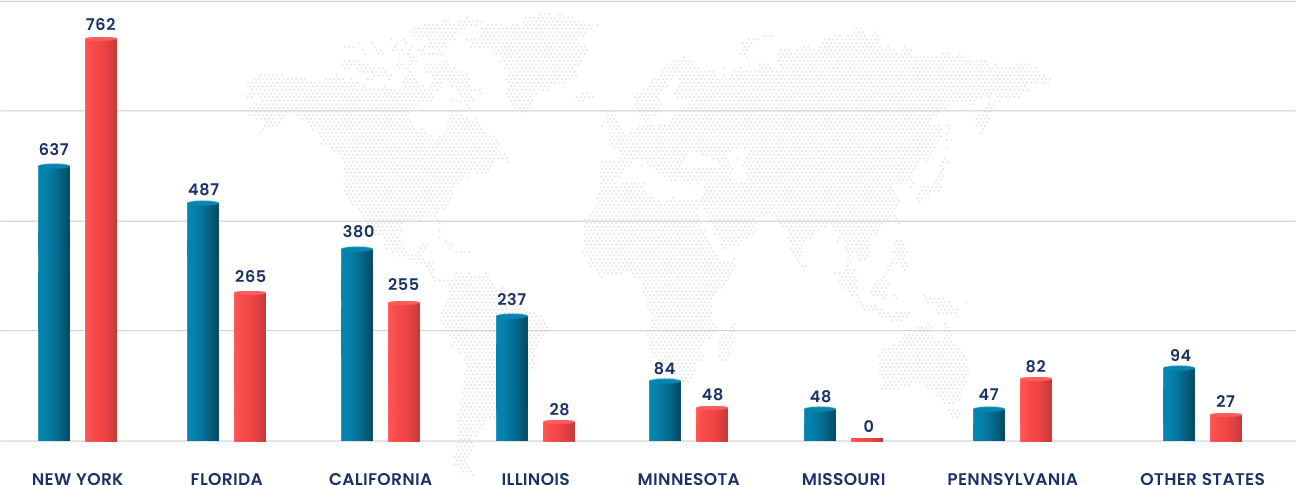
The financial impact is, of course, the main reason to stay ADA compliant, but it's not to only reason why it's important for businesses. If you manage an e-commerce website, here is our guide to ADA compliance for e-commerce businesses.
Why is ADA compliance important for businesses?
A lot of teams start the compliance journey for risk mitigation, which is valid. However, they quickly discover the benefits beyond that instigating factor
Here's why ADA compliance matters in practice:
- You reduce the risk of litigation – first and foremost, ADA compliance ensures that you avoid lawsuits from (or settlements with) individuals and fines from the DOJ, which can cost businesses thousands of dollars.
- Better web accessibility means better UX for everyone – Clear navigation, consistent headings, good color contrast ratio, helpful error messages, and keyboard navigation make your site easier to use even if someone isn't using assistive technology.
- You expand reach – People with disabilities browse, research, and buy online every day. If disabilities navigate your site with screen readers, just a keyboard, or voice input, your web content needs to cooperate. Currently, 16% of the world’s population live with a “significant disability,” according to the World Health Organization.
- You reduce friction in high-value flows – Accessibility issues are conversion killers: an inaccessible checkout, broken skip navigation links, or confusing input errors can block users from completing tasks.
- You future-proof your content – Accessibility standards increasingly show up in procurement, enterprise governance, and global web programs – especially if you operate across multiple brands and local governments/regions.
- You build a more resilient QA process – Treat accessibility barriers like any other class of bug: track, prioritize, fix, and prevent regressions.
If you're a WebOps, Digital Excellence, or Brand Ops team managing dozens of sites and thousands of pages, the stakes are higher. You're not just trying to ship one accessible website – you're trying to keep many compliant website experiences consistent across markets.
Key steps to make sure your website is ADA compliant
If you want a reliable way to ensure accessibility without amping up the stress during every release, use these steps to make sure you hit compliance requirements.
1. Pick your benchmark: WCAG and Level AA
Most organizations use the Web Content Accessibility Guidelines (WCAG) 2.1/2.2 as a practical standard, and aim for Levels A and AA (often shortened to "Level AA").
A, AA and AAA are the three levels of WCAG conformity, with A being the minimum requirements and AAA being the most comprehensive.
ADA compliance usually gets interpreted through WCAG-style accessibility requirements: text alternatives, keyboard support, contrast ratio targets, accessible names/labels, captions, and predictable interactions.
2. Know the common ADA website compliance failure points
When teams run into ADA violations, the cause is usually boring. It's not "we didn't care." It's "we didn't notice."
These are the usual suspects:
- Keyboard navigation breaks – Interactive elements that can't be reached or activated without a mouse (e.g., menus, modals, and custom dropdowns).
- Missing or weak alt text – key images, icons, and buttons without usable text alternatives.
- Color contrast issues – Low color contrast ratio between text and background, or important info conveyed by color alone.
- Form failures – Unlabeled fields, unclear input errors, time limits with no way to extend, or error messages that aren't announced to screen readers.
- Video and audio gaps – Missing video captions, missing audio descriptions, or audio-only content with no transcript or text captions.
- Navigation friction – No skip navigation links, inconsistent menus, unclear focus states, or confusing heading structure.
3. Run an accessibility audit (then prioritize key tasks)
A solid accessibility audit combines:
- Automated checks – Fast coverage across many web elements.
- Manual reviews to catch real-world problems that automated tools miss)
- Assistive technology spot checks – Screen readers and keyboard-only flows at minimum)
In practice, prioritization is the difference between "we tried" and "we achieved ADA compliance."
Start here:
- Blockers in core flows – Navigation, search, login, cart, checkout, lead-gen forms.
- High-frequency templates – Header/footer, product listing, article pages, location pages.
- High-traffic entry points – Top landing pages and campaign pages.
Conducting an accessibility audit with Marker.io (coming soon)
Marker.io is building an Accessibility Module designed to make accessibility audits easier to run and operationalize. With our upcoming accessibility features, you'll be able to:
- Run on-demand or scheduled accessibility audits across your website.
- Detect accessibility violations like missing alt text, low contrast, broken keyboard navigation, and unlabeled form fields.
- Get a prioritized list of issues, then automatically create tickets in your project management tool (ranked by severity, frequency, and how often they occur).
- Use an "accessibility checker" approach: scan against WCAG 2.1/2.2 and turn findings into actionable fixes.
You'll be able to access the Accessibility Module in beta in early 2026.
4. Run regular audits every time your site changes
Accessibility regressions can happen after:
- A redesign
- A component library update
- CMS template edits
- Localization waves
- New marketing scripts/widgets
- "Small" content changes (especially in headings, links, and site elements)
That's why teams move from "one accessibility audit" to continuous monitoring.
If you want continuous monitoring, why not sign up for early access of our upcoming Website monitoring feature, which automates the accessibility audit for you.
5. Stay up to date on legal and regional requirements
If you operate across regions (or you sell into government, healthcare, education, or finance), your "ADA compliance" program often overlaps with Title II obligations (especially for state and local governments), Section 508 expectations, WCAG updates (e.g., 2.1 → 2.2), and other regional rules (e.g., the European Accessibility Act).
For global teams, the key is governance: one standard, one checklist, and one way to track accessibility issues across all sites.
Your ADA compliance website checklist
This is the "print it, share it, use it in every release" section – your ADA compliance checklist for websites.
If you want the complete ADA compliance checklist experience, use it in three passes:
- Before you audit – Prep and process
- On-page checks – What you can see
- Sitewide and technical checks – What breaks across templates and behind the scenes
Steps to take before auditing your website
Before you touch a single web page, get the workflow right:
Coming soon: Marker.io's planned Accessibility Module is positioned to plug into existing QA testing workflows and project management tools, then create prioritized issues automatically.
On-page checks
These are quick, high-impact checks you can do while looking at the page.
Color, text, and layout
Media: video and audio
Interaction cues
Sitewide checks
These checks tend to fail across templates – and they're the ones that frustrate website visitors the most.
Technical checks
This is where most ADA website compliance checklist wins happen – because technical issues scale across your whole site.
Text alternatives and semantics
Keyboard and focus behavior
Forms: labels, input errors, and time limits
Compatibility with assistive technology
Download your ADA compliance checklist PDF
Get your free ADA compliance checklist PDF to share with colleagues and manage accessibility offline. Simply save this page as a PDF with these easy steps:
- Open this checklist in your browser.
- Open Print
- Windows:
Ctrl + P - Mac:
⌘ + P
- Windows:
- In the printer/destination options, select Save as PDF (or PDF).
- Tap/click Save (or Download) and choose where to store it.
- Share the saved PDF with your colleagues across email, Slack, WhatsApp, AirDrop, and more.
Best practices to stay ADA compliant
The best accessibility program is boring. That's a compliment. Here's what works long-term.
Bake accessibility into design
The fastest way to improve web accessibility is to stop treating it like a QA cleanup task. If accessibility requirements show up only at the end, you'll keep shipping the same accessibility barriers: low color contrast ratio, missing focus states, confusing error messages, and interactive elements that don't work with keyboard navigation.
Instead, bake accessible design patterns into your process from day one. Make color contrast, predictable components, clear headings, and usable states (e.g., hover, focus, disabled, error) part of your definition of "done."
When you design with screen readers and "just a keyboard" in mind, you reduce rework and get closer to an ADA-compliant website without turning every release into a scramble.
Treat accessibility like security
ADA compliance works best when it's operationalized, not "owned" by one passionate person. The teams that achieve ADA compliance reliably treat accessibility like security: routine checks, clear accountability, documented standards, and release gates for high-risk changes.
That means you don't wait for a complaint or an accessibility audit report to act. You build a process where accessibility issues are logged, prioritized, fixed, and verified like any other production bug – especially when the issue blocks disabled users from completing tasks on key flows like navigation, checkout, or online forms.
Create an accessibility-ready component library
Most accessibility violations don't come from your CMS content. They come from inconsistent UI patterns. One-off dropdowns, custom tabs, "clever" modals, and bespoke form fields are where ADA website compliance breaks, because those web elements often miss proper labels, keyboard support, or predictable behavior for assistive technology.
An accessibility-ready component library solves that at the source.
Build (or adopt) components that ship with the basics already handled: semantic structure, accessible names, focus management, error handling, and sensible defaults for text alternatives and alt text. When those building blocks are solid, every new page inherits better website accessibility automatically.
Run audits regularly
A quarterly accessibility audit is a good start. But if your site changes weekly – new campaigns, new templates, new website sections, new content blocks – you'll need a cadence that matches reality. Regular scans catch regressions early, before accessibility issues spread across the site and turn into repeated accessibility barriers for website visitors.
Think in terms of "always-on hygiene." Run checks after major releases, when you introduce new interactive elements, and anytime you change navigation, forms, or media components (e.g., captions, audio descriptions, video captions, and image alt text). And keep validating with real-world flows using screen readers and keyboard-only testing, because automated tooling won't catch everything.
Don't ignore global rules
If you operate internationally, you need one shared standard that scales. WCAG (typically Level AA) is the practical baseline most teams align on, because it maps well to ADA guidelines and broader accessibility standards – even when local laws and enforcement vary.
The key is governance: one set of rules, one way to test, one way to document fixes. Then you can map regional requirements on top without fragmenting your approach. For global web teams managing dozens of sites, this is how you keep a compliant website experience consistent across markets, without re-litigating accessibility requirements every time a local team publishes new digital content.
With Marker.io's Accessibility Module, which is coming in 2026, you can schedule WCAG scans, detect issues, prioritize them, and create tickets in your PM tool – exactly what enterprise teams need when they're managing multiple sites and releases.
Conclusion
ADA compliance is bigger than a checklist – but you still need a checklist.
If you're trying to keep an ADA-compliant website (or multiple websites) healthy across redesigns, releases, and localization waves, the winning formula is following WCAG (aim for Level AA), running an accessibility audit on what matters most, fixing accessibility barriers that block users from completing tasks, and re-checking continuously. Checking out websites that are performing well across compliance indicators also helps – here are some web accessibility examples to take inspiration from.
Use the ADA compliance checklist above as your baseline, adapt it to your organization, and treat accessibility issues with the same seriousness as any other production bug.
What should I do now?
Here are three ways you can continue your journey towards delivering bug-free websites:
Check out Marker.io and its features in action.
Read Next-Gen QA: How Companies Can Save Up To $125,000 A Year by adopting better bug reporting and resolution practices (no e-mail required).
Follow us on LinkedIn, YouTube, and X (Twitter) for bite-sized insights on all things QA testing, software development, bug resolution, and more.
Nathan Vander Heyden
Nathan is Head of Marketing at Marker.io. He used to work as a SEO consultant for various SaaS companies—today, he's all about helping Web Ops teams find more efficient ways to deliver bug-free websites.
Related blog posts

Get started now
Free 15-day trial • No credit card required • Cancel anytime