
How to Prioritize Bugs: A Practical Framework for Web and Software Developers
Learn how to prioritize bugs using clear criteria, a repeatable process, and automated tools that speed up accurate triage for busy teams.


Learning how to prioritize bugs is really learning how to make a judgment call, over and over, with incomplete information and limited time. Every development team has more reported defects than it has hours in a sprint, and deciding which ones deserve immediate attention and which ones can wait is one of the least glamorous but most consequential parts of managing a website or product.
In web development, bug tracking is often secondary to publishing new pages. In software development, defect management rarely gets the attention that shipping new features does, even though how you fix bugs shapes user trust just as much.
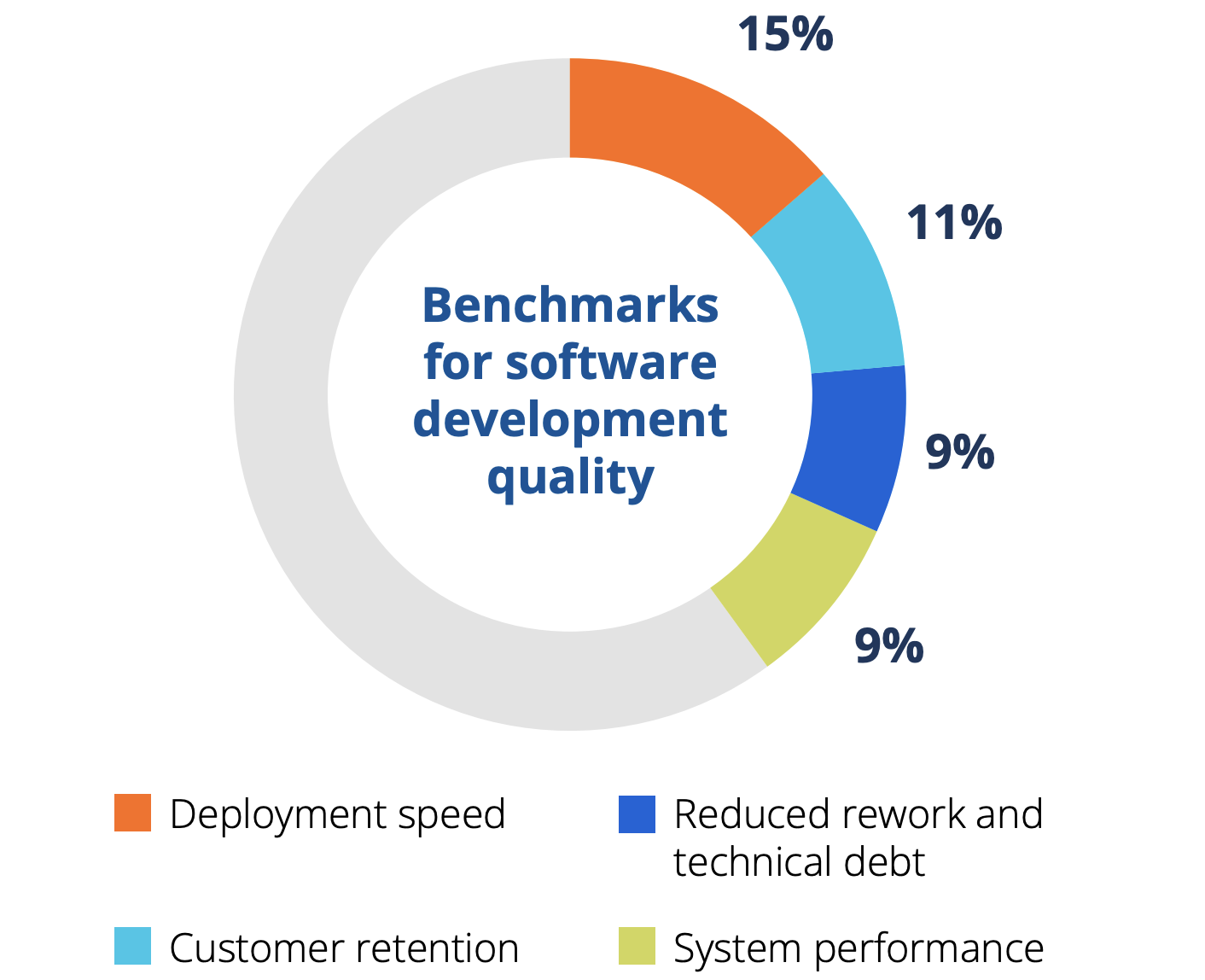
According to the Tricentis Quality Transformation Report, 45% of teams prioritized improving delivery speed, compared with only 13% prioritizing software quality. Additionally, respondents were most likely to say improved development and deployment speed as the most important indicator of quality.
A framework only works if you actually understand the bug you're scoring, and bug fix prioritization often goes wrong because the report itself doesn't have enough detail for the recipient to judge what needs to happen and take action.
Our guide will provide you with the criteria, a process product managers can run day-to-day, and a look at how automated tools now help teams triage and prioritize bugs without losing the human judgment call at the end.
What is bug prioritization?
Bug prioritization is the process of deciding the order in which reported defects and issues get fixed, based on how severe they are, how many users they affect, and how much effort a fix requires
It's a different job from bug tracking. Bug tracking is just keeping a record of what's broken. Prioritization is the decision layer sitting on top of that record, the part that tells a development team what to work on today versus next sprint versus never.
Every team ends up doing some version of this, whether they call it defect management or just "triage." The difference between teams that do it well and teams that don't usually is whether the criteria are consistent enough that two different people, looking at the same bug, would score it the same way.
That consistency is also what a bug fix needs to distinguish from a new content or feature request: a fix restores something that was supposed to work, have a particular appearance, or behave in a certain way; a new content, web page, or feature request adds something new – mixing the two into one queue makes prioritization harder than it needs to be.
The importance of bug prioritization
Without a working process, a bug backlog actively costs you time and effort, as critical bugs end up sitting next to cosmetic ones with no clear signal about which needs to be addressed first. The loudest bug reporter in the room often wins by default, rather than the bug with the biggest business impact.
Consequences can show up quickly. A severe issue affecting checkout or account access left unresolved for a week can mean lost revenue and eroded customer expectations, while a team can burn an entire sprint fixing low-priority issues simply because they were easy or because someone complained loudly enough.
Over time, this pattern damages code quality: quick, unprioritized fixes tend to get patched in under pressure rather than solved properly, creating the conditions for new bugs down the line and pulling focus away from the business goals a roadmap was set up to support.
Consistent prioritization won't eliminate that risk entirely, but it gives you a defensible, repeatable reason for every call you make – vital for not just your own team's focus, but also giving you the insights to explain decisions to stakeholders who want to know why their pet issue didn't make the cut, and protecting morale in a way ad hoc decisions never do.
Developers who watch the same low-value bug get bumped to the top of the list every time someone senior complains tend to lose faith in the process, while a visible, consistent bug prioritization process keeps the reasoning behind each decision something anyone on the team can check for themselves.
Separating genuinely critical issues from user feedback that's simply louder is what lets a team make informed decisions instead of reactive ones.
The bug prioritization criteria you should use
Before you can rank bugs against each other, you need consistent criteria. Most bug prioritization processes lean on a handful of factors that, together, tell you both how bad a bug is and how urgently it needs attention.
What's the difference between bug severity and bug priority?
Bug severity and priority get used interchangeably, but they measure two dimensions of a bug, not one.
- Severity is about technical impact: does the bug cause total system failure, data loss, or a security hole, or is it a minor visual glitch that nobody outside your team would notice?
- Priority is about urgency: how soon does this need fixing, regardless of how severe it is? Assigning clear severity levels first, then layering urgency on top, keeps the two from getting tangled together.
A bug can be high severity and low priority. A rare loading issue that only affects an old browser – one most of your visitors abandoned years ago – might do real damage when it happens, but it's rare enough to sit in the backlog. The reverse is also true: a low-severity typo on your homepage might carry high priority simply because it's visible to every visitor and every executive who opens the site.
Reach: how many users a bug affects
Reach is one of the simplest and most reliable signals you have. A bug affecting a handful of users on an edge-case workflow rarely justifies the same level of urgency as one hitting your main sign-up flow.
Where you can, pull actual usage data instead of guessing. Knowing that a broken feature touches 40% of active users, rather than assuming it's "probably a lot of people," turns a debate into a decision.
It’s also important to consider who the bug affects. If a broken link is blocking the onboarding process for a small segment of new users, it may take higher priority than a broken link on a top-of-funnel page that gets a lot of traffic from non-users.
Business impact and risk
Some bugs threaten the business directly: a failed payment flow, a compliance gap, a security vulnerability that exposes customer data. These issues deserve to jump the queue almost automatically, since the downside of waiting isn't just annoyed users; it's risk to revenue and legal standing.
Weigh this alongside severity rather than instead of it. A bug can carry serious business risk, even when the underlying defect looks technically simple.
Effort required to fix
The counterweight to impact is the resources required to fix it.
A high-impact bug that takes an afternoon to fix should almost always jump ahead of a similar bug that needs a full sprint – an idea sometimes called shortest job first thinking.
This decision is also where a lot of prioritization goes wrong: teams estimate effort optimistically, then get surprised when a "quick fix" drags into next week. Treat effort estimates as a factor to weigh, not a guarantee.
Frameworks like RICE scoring formalize this by combining reach, impact, and confidence, then dividing by effort, so a bug's RICE score reflects both how much it matters and how cheap it is to resolve.
- Reach – How many people are affected
- Impact – The impact of the issue on your most important metrics
- Confidence – How confident you are in your estimates of your scores
- Effort – How long a fix will take, and how many people are required to fix it
You don't need to adopt RICE wholesale to benefit from the underlying logic: impact and effort are two factors that always deserve to be weighed against each other, not considered in isolation.
How to prioritize bugs in product management
For a product owner or product manager, prioritizing bug fixes isn't a one-time exercise. It's a habit that has to run alongside planning new features, and it works best as a short, repeatable process rather than a fresh debate every time a report lands. Agile teams that already run regular sprint planning have a natural place to slot this in, rather than treating it as a separate meeting.
For example, imagine four reports land on the same afternoon: a checkout error, a slow-loading image gallery, a typo in a footer link, and a request to add a dark mode toggle.
Running each through the same process, rather than reacting to whichever one arrived first, is what keeps the team focused on the checkout error without ignoring the rest.
- Collect every report in one place. Support tickets, QA findings, bug reports, and customer feedback about the same issue tend to scatter across tools if you let them. Funnel everything into a single bug tracking system so nothing gets triaged from memory.
- Check for duplicate bugs before scoring. Ten reports about the same issue can look like ten separate problems and inflate perceived urgency. Merge duplicate bugs into one ticket so you're scoring the real underlying defect, not the volume of complaints about it.
- Score against your criteria. Apply severity, how many users are affected, business impact, and effort required consistently, the same way every time, rather than case by case based on gut feeling.
- Assign a priority level. Translate the score into a decision: highest priority goes into the current sprint, high priority gets estimated for next sprint, and low priority sits in the backlog until conditions change.
- Revisit the backlog regularly. A low-priority bug today might become urgent next quarter if the affected feature suddenly becomes a major feature in your product, or if it's still open by the next release and starts affecting customer impact metrics. Don't treat priority levels as permanent.
This process only works as well as the information feeding it. If a bug report doesn't say how many users are affected or what actually broke, no amount of scoring discipline fixes that gap, and that's exactly where most prioritizing goes wrong in practice.
Why report quality decides prioritization accuracy
You can have the best bug prioritization process on paper and still make the wrong call, because you can't accurately score a bug you don't fully understand yet – which is where knowing how to write a bug report comes in.
Think about how a typical bug reporter describes a problem: "the checkout button doesn't work," or "the page looks broken on my phone."
That's a completely valid bug report from someone who isn't technical, and it's nearly useless for prioritization on its own. You don't know yet whether it's a total failure affecting every visitor or a rendering quirk on one outdated device.
Someone has to reproduce the bug and write out clear reproduction steps before anyone can judge its severity or user impact accurately, a reproduction step that alone can eat hours a team doesn't have.
This gap shows up constantly on websites specifically, because reports come from so many different kinds of bug reporters at once: internal QA testers who know exactly what to log, marketers and clients who can spot that something's wrong but not why, and customers who just want the thing fixed.
Each group reports bugs differently, with a different sense of what counts as urgent, and reconciling that into one honest priority level is its own skill.
How to prioritize bugs with automated tools
This is exactly the gap tools built for reporting and prioritizing bugs are designed to close. With Marker.io's bug tracker, a bug reporter clicks directly on the live page, annotates what's wrong, and submits it without writing a paragraph of description first.
Every report submitted arrives with the technical context a team would otherwise have to go dig up: browser and operating system details, console logs and network requests, and an annotated screenshot, all captured automatically.
That context changes how fast and how accurately you can prioritize. Instead of guessing at severity from a vague sentence, a developer or product manager can see exactly what broke and for whom, turning a scoring debate into a five-minute decision.
For bugs that are hard to describe in words at all, a reviewer can turn to session replay and watch exactly what the reporter did right before the issue happened, instead of trying to reconstruct steps to reproduce from memory.
Alternatively, they can use Marker.io's AI features to write concise bug reports in the recipient's own language.
Marker.io integrates directly with Jira, GitHub, Linear, and several other issue trackers, so a report becomes a properly tagged ticket where severity and priority fields already get filled in with real information, rather than another inbox to check separately.
Automation is also possible during the triage step. The Marker.io MCP is built on the Model Context Protocol, an open standard that AI agents like Claude or Cursor can use to pull the full context of a bug report in one pass – screenshot, logs, technical details, and browser details included – then use it to help assess how severe or urgent an issue actually is.
You could even take this further, using an AI agent to draft a proposed fix or open a pull request directly.
An AI agent can surface context and flag likely duplicate bugs faster than a person scanning tickets one by one, but weighing business impact or resourcing constraints still comes down to a person. Most teams keep someone making the final call on priority, while the tool handles the time-consuming groundwork underneath it.
Zooming out from any single bug, workspace analytics show how quickly your team resolves issues over time and surface patterns in where new bugs keep showing up, so a strategic approach to prioritization can rest on actual resolution data instead of memory or assumption.
Bug prioritization best practices
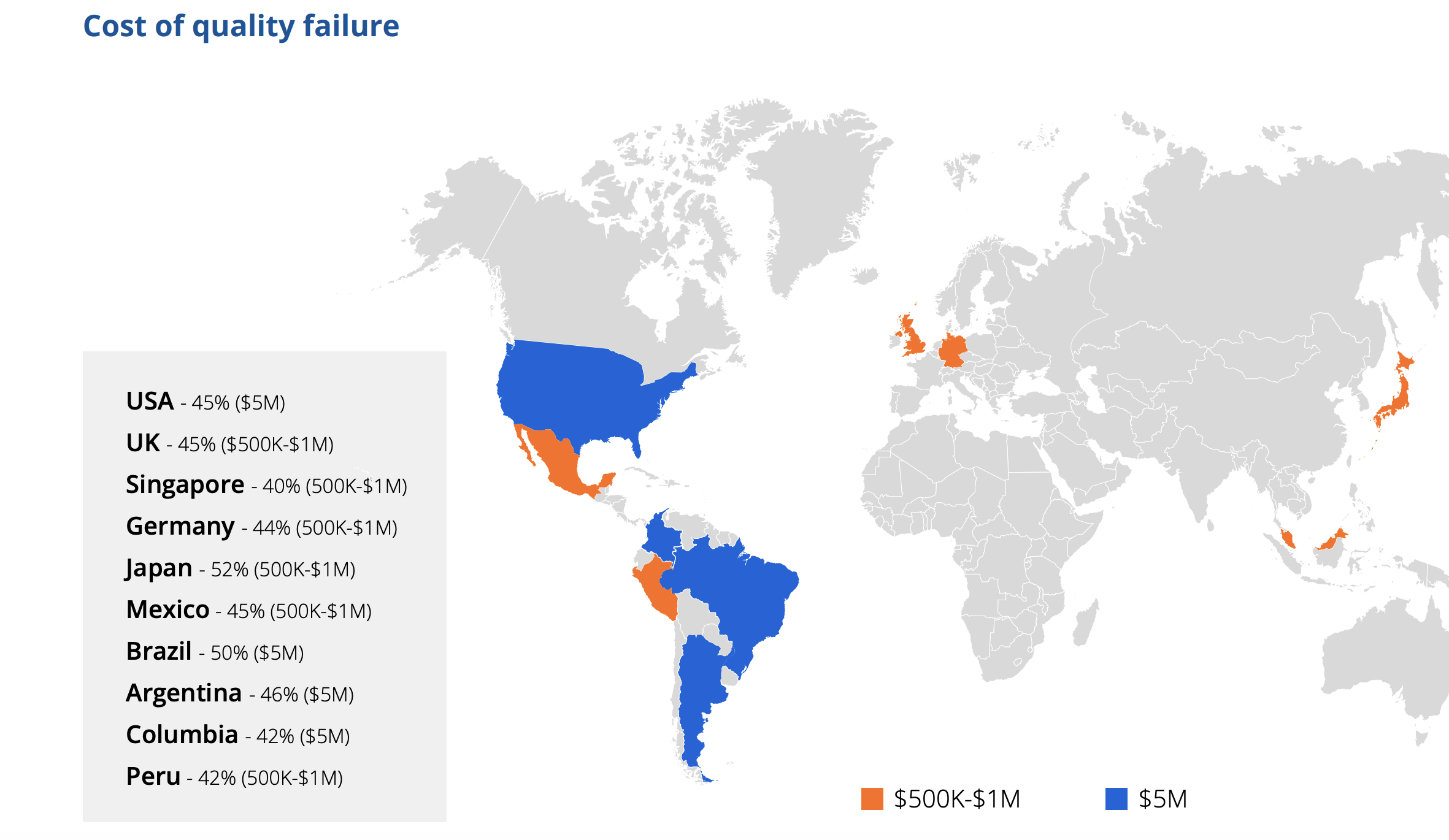
Nearly half of global organizations say poor software quality costs them $1 million or more a year, according to Tricentis's 2025 Quality Transformation Report, with financial services firms reporting costs upwards of $5 million annually.
A handful of habits separate teams that prioritize bugs consistently from teams that argue about the same issue every sprint:
- Score every bug the same way. Consistency matters more than any single framework you pick.
- Separate severity from priority explicitly. Don't let a scary-looking bug jump the queue just because it sounds dramatic if the actual user impact is small.
- Reserve sprint capacity for bugs. Teams that treat bug fixes as something to squeeze in "if there's time" end up with a backlog that never shrinks.
- Revisit old low-priority bugs. Conditions change, and yesterday's edge case can become tomorrow's critical issue as usage shifts.
- Keep the criteria visible to the whole team. When everyone, not just the product owner, understands how a priority level gets assigned, fewer decisions need re-litigating later.
Conclusion
Prioritizing bugs well comes down to two things working together: consistent criteria, and reports detailed enough to actually apply them to.
Get the second part wrong, and even the best scoring framework is just guessing with extra steps.
If your team is buried in reports coming from clients, customers, and internal QA testers all at once, and no two of them describe a bug the same way, why not try Marker.io, which simplifies the process from the first click on a broken page through to a properly triaged ticket in your existing bug tracking system.
Start a free trial to see how much faster accurate prioritization gets when every report already has the context your team needs.
How to prioritize bugs FAQs
How do you prioritize bugs in Jira?
Most teams use Jira's built-in priority and severity fields, sometimes alongside a custom field or label for a numeric score, then sort the backlog accordingly.
The accuracy of that sorting depends entirely on what's in the ticket. Tools that create Jira tickets directly from a bug report, with browser details and console logs already attached, make it far easier to set those fields correctly the first time instead of guessing.
Should critical bugs always be fixed first?
Usually, but not automatically. A critical bug affecting a tiny fraction of users with an easy workaround available might reasonably wait behind a moderate bug blocking a core workflow for everyone. Treat "critical" as one strong input into the priority level, not an automatic override of every other factor.
How do you handle a constant stream of new bugs without falling behind?
Batch the low-effort decisions and protect focus time for the rest. Duplicate bugs and clearly low-priority reports can be triaged in bulk, often in minutes, while anything touching business impact or high severity deserves a proper look before it gets a priority level.
Reserving a fixed share of each sprint for bug fixes, rather than treating them as leftover time, keeps the backlog from growing faster than the team can clear it.
What should I do now?
Here are three ways you can continue your journey towards delivering bug-free websites:
Check out Marker.io and its features in action.
Read Next-Gen QA: How Companies Can Save Up To $125,000 A Year by adopting better bug reporting and resolution practices (no e-mail required).
Follow us on LinkedIn, YouTube, and X (Twitter) for bite-sized insights on all things QA testing, software development, bug resolution, and more.
Related blog posts


Get started now
Free 15-day trial • No credit card required • Cancel anytime