
Bug Severity vs. Priority: A Complete Guide for QA Teams
Confused about bug severity vs. priority? Here's how they differ, who should decide each one, and how to explain it to stakeholders.


If you've sat through a bug triage meeting where someone insists a typo is "critical" while someone else wants to bump a rare crash down the list, you've run into the question of bug severity vs. priority.
The two terms often get used interchangeably, but severity and priority answer two completely different questions:
- A bug's severity tells you how badly a bug breaks your site or app.
- A bug's priority tells you when it needs to get fixed.
Mixing them up not only causes confusion, it also leads to real bugs slipping through while cosmetic ones jump the queue.
This guide breaks down what each term actually means, how to tell them apart with real examples, and how to explain the difference to a stakeholder who just wants their bug fixed yesterday.
What is bug severity?
In website or software testing, bug severity refers to the degree of impact a defect has on your site or system's functionality. It's usually assigned by the QA team or testers, based purely on technical impact, not on deadlines or business pressure.
Severity should stay consistent regardless of when the bug is found or who's asking about it. A bug that causes data loss or threatens system stability is severe whether it's discovered on launch day or six months into the release cycle.
Many teams use five severity levels, from trivial severity up to critical severity:
The key question for severity is always the same: how badly does this affect core functionality and overall system stability, and is there an alternate path around it?
What is bug priority?
Bug priority refers to how urgently a defect needs to be fixed, based on business needs, user impact, and release timelines. It's usually set by a product manager, project manager, or business team, since it depends on context severity alone can't capture.
Unlike severity, priority can shift. A bug that was low priority last week can become high priority overnight if a big campaign launches or a client is about to see it live.
Common priority levels look like this:
Priority answers a different question than severity, taking in the current context: given business needs and deadlines, where does this land in the queue? A high-priority bug jumps to the top of the queue, whether or not it's technically severe.
Teams need both because they're answering different questions. Severity alone tells you nothing about deadlines or business risk. Priority alone tells you nothing about how much damage a bug is actually doing.
You need to assess them separately, then combine them to decide what to fix first.
Bug severity vs. priority: key differences
Here's the bug priority vs. severity comparison side by side:
The simplest way to remember it: severity is set by the nature of the bug. Priority is set by everything happening around it.
A severity vs. priority matrix for bug tracking
Since severity and priority move independently, you end up with four combinations. A severity vs. priority bug matrix can help you work out when an issue sits.
Two of those combinations are especially challenging to get right:
- The high-severity bug nobody's in a rush to fix.
- The low-severity bug that suddenly needs fixing today because of timing.
Both are correct classifications. The mistake is assuming severity and priority should always match.
How should QA teams define bug severity vs. priority?
QA teams should assess severity first, independently of any deadline pressure, then let priority get layered on afterward by whoever owns the business context.
Here is a practical checklist for assessing severity:
- Functional impact – Does the bug affect core functionality, or just cause minor friction?
- Alternate path – Can the user complete their task another way?
- Scope – Does it affect one page, one browser, one recurring component, or the entire site?
- Reproducibility – Does it happen every time, or only under rare conditions?
The hardest part of this checklist is that you’re usually missing information.
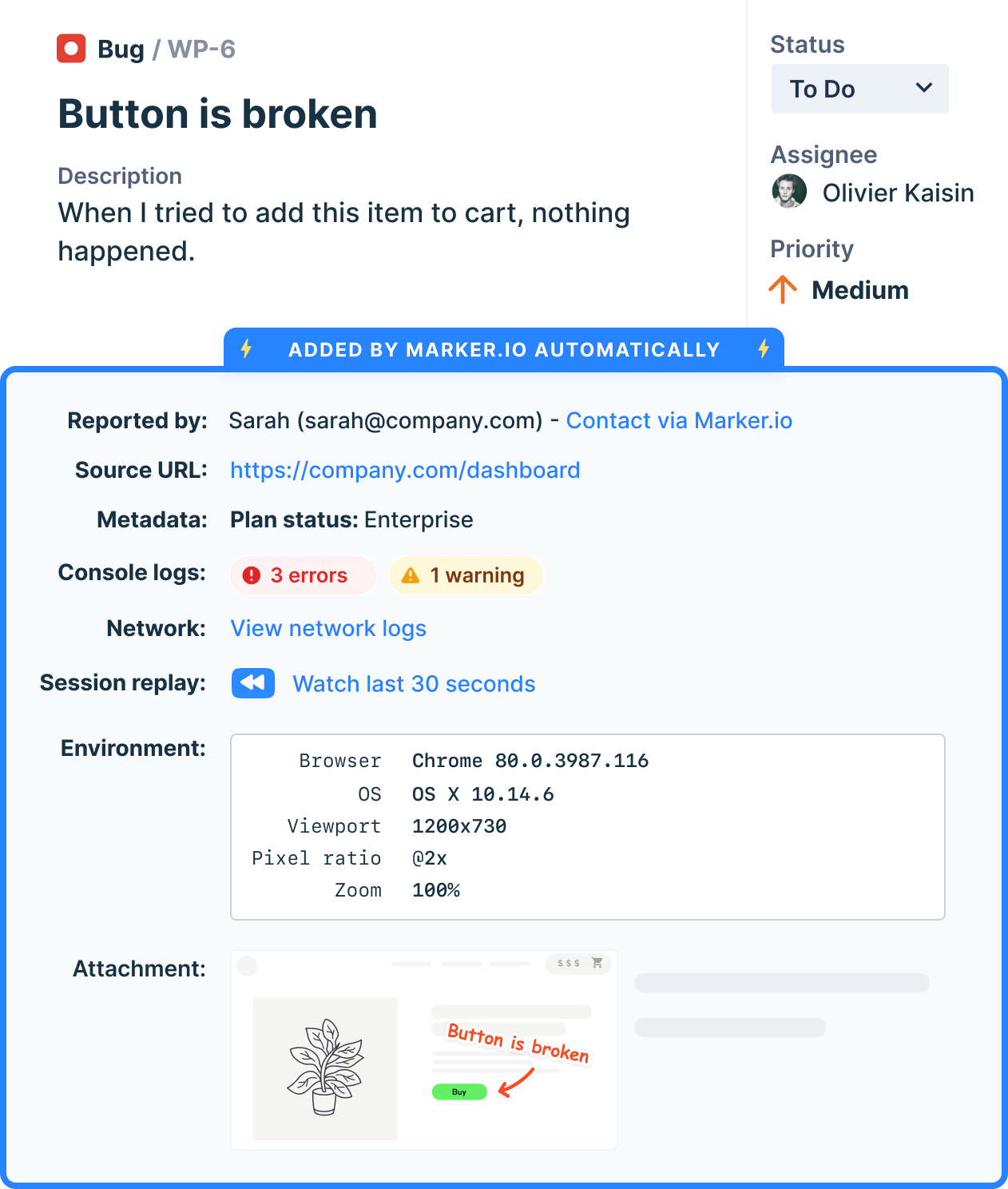
If you don't know which browser or device triggered a bug, or can't see the console errors behind it, you might end up guessing at severity instead of measuring it.
Capturing full technical context with every bug report is as important as understanding the definitions. When a report already includes the browser, OS, viewport, and console logs automatically, there's nothing left to guess.
When should a tester prioritize severity over bug priority?
A tester shouldn't inflate or deflate severity just to force a priority change. If a bug is minor, it stays minor, even if someone wants it fixed today.
That said, testers do have a role in flagging when a high-severity, low-priority bug deserves a second look. Priority depends on where you are in the software development life cycle, not just on the bug itself.
Before a major release, a big marketing push, or a compliance deadline, it's worth surfacing bugs that were previously deprioritized. Business context shifts fast, and a bug that made sense to leave alone in March might carry real risk by the time a product launch rolls around in June.
As a rule of thumb, testers own the severity call and should defend it, but they're also often the first to notice when priority needs revisiting, so raising that flag is part of the job, even if the final priority decision belongs to someone else.
This flagging responsibility fits naturally into the broader bug life cycle, where a resolved issue can still get reopened if the business context around it changes.
Who should decide severity and priority on a website team?
On most teams, QA or testers own severity, since it depends on technical understanding of how the system behaves. Product managers, account managers, or business stakeholders own priority, since it depends on release timelines, client relationships, and business risk.
However, it gets more complicated on larger website teams.
Agencies juggling multiple client sites, or enterprise teams running dozens of brands and markets, often have far more people weighing in: developers, QA, brand teams, WebOps, and the client or stakeholder who reported the bug in the first place.
The more stakeholders involved, the more it helps to have one shared source of truth for every bug report, so severity and priority conversations happen against the same facts instead of a screenshot forwarded five times over email.
How to explain bug severity vs. bug priority to stakeholders
Non-technical stakeholders, especially clients and marketers, run into this distinction constantly without knowing the terminology. They'll see a visually jarring bug and assume it must be severe, when really what they're describing is priority: i.e., something that needs fixing before anyone else sees it.
A few things help when you're explaining bug severity versus priority to someone outside the technical team:
- Validate the concern without changing the rating – A typo on a live campaign page might be low severity, but that doesn't mean it's not urgent. Acknowledging both at once avoids the stakeholder feeling dismissed.
- Use their language, not yours – Instead of leading with "severity" and "priority," ask two questions: how badly is this broken, and how soon does it need to be fixed?
- Show them what you're looking at, not just a description – A screenshot with an annotation pointing at the exact issue, along with the browser and page it appears on, removes a lot of the back-and-forth where a stakeholder insists something is broken everywhere when it's actually one browser on one page.
- Keep the fields visible – If your bug tracker shows severity and priority as separate fields on every ticket, stakeholders start to internalize the difference themselves over time, instead of relearning it every time a bug comes up.
It also helps to sync bug reports into the tools your development team already uses. When an annotated report moves straight into Jira, Asana, or Linear with severity and priority already attached, nobody has to retype the same conversation into a different system.
Best practices for managing bug severity and bug priority
A few habits maintain good severity and priority standards instead of them becoming fields in your bug report that nobody trusts, keeping critical issues moving ahead of trivial ones.
For a deeper framework on ranking the resulting backlog, see how to prioritize bugs:
- Assess severity independently of deadlines – Don't inflate the severity of a bug due to a looming release.
- Reassess priority as timelines shift – A bug's priority isn't set in stone the day it's logged; revisit it as launches, campaigns, or deadlines change.
- Run short, regular triage meetings – Bring QA and the business side together so severity and priority get decided with both perspectives in the room, not in isolation.
- Make the matrix visible – A simple shared severity-priority matrix, pinned somewhere the whole team can see, keeps everyone applying the same logic instead of them guessing case by case.
- Capture full technical context in every report – Screenshots, console logs, network requests, and environment details take the guesswork out of severity, so triage conversations focus on judgment calls instead of missing facts.
Even if you follow these steps, it’s important to maintain communication between the QA team and the rest of the business, particularly stakeholders and technical team members. No field or workflow removes the need for a quick check-in when a bug genuinely doesn't fit the usual pattern.
Conclusion
Severity tells you how broken something is. Priority tells you when to fix it. Considering them first separately and then together, and giving each one to the person best placed to judge it, is what keeps a bug backlog accurate and manageable.
If you're tired of chasing down browser details, screenshots, and stakeholder context just to figure out how severe a bug actually is, Marker.io captures all of it automatically the moment someone reports an issue on your site.
Start a free trial and see how much faster triage gets when severity and priority decisions come with the full picture attached.
Bug Severity vs. Priority FAQs
Can a bug have high severity and low priority?
Yes. A bug that crashes a rarely used feature or an old browser version can be technically severe while carrying low priority, since almost no one is affected right now.
Does bug severity ever change?
Rarely, and only when new information changes the technical picture, such as discovering a bug affects more browsers or pages than first thought. Priority changes far more often, since it depends on shifting deadlines and business context.
What's the difference between severity and priority in Jira?
Jira doesn't include a severity field by default; it ships with priority only. Many teams add a custom severity field to track technical impact separately from the urgency Jira's priority field already covers.
Who assigns severity and priority when a client reports a bug directly?
QA is the best-placed team to assess severity based on the technical details in the report. Whoever owns the client relationship, usually a project manager or account manager, sets priority based on the client's context and deadlines.
What should I do now?
Here are three ways you can continue your journey towards delivering bug-free websites:
Check out Marker.io and its features in action.
Read Next-Gen QA: How Companies Can Save Up To $125,000 A Year by adopting better bug reporting and resolution practices (no e-mail required).
Follow us on LinkedIn, YouTube, and X (Twitter) for bite-sized insights on all things QA testing, software development, bug resolution, and more.
Related blog posts

Get started now
Free 15-day trial • No credit card required • Cancel anytime