
Bug vs. Defect: What's the Real Difference?
Bug vs. defect, explained: what separates the two terms in software and website testing, plus how error and incident fit into the picture.


Introduction
Ask five people on a software team to explain the difference between a bug and a defect, and you'll likely get five different answers. Some will tell you the two words mean the same thing, while others will insist a defect only counts once it reaches production.
Both answers carry some truth, but neither tells the whole story.
This guide gives you a clear, standards-based breakdown of a bug vs. a defect that holds up across software development in general, shows you where error and incident fit into the same picture, and gets into why the label matters far less than what you do with a report once it lands in your bug tracking system.
You'll also see how this plays out in website testing specifically, since a large share of the bugs and defects a web team logs never touch a line of backend code at all.
Bug vs. defect: A quick definition of both
What is a Bug?
A bug is an error in a computer program that causes it to produce an incorrect or unexpected result.
What is a Defect?
A defect is a flaw in a software system that causes it to behave in a way that doesn't match its intended or expected functionality.
Those two definitions sound pretty similar, right?
Depending on who you ask, "bug" refers to anything from a one-line typo to a wider software behavior problem, while defect means the same software product falling short of what was expected.
Both terms cover the same range of problems across the software development life cycle, from small coding errors to documentation issues that only surface after release.
In practice, most teams in the software industry do draw a line, even an informal one. You'll more often hear "bug" from developers checking their own work during the coding phase. You'll more often hear "defect" from a testing team validating a finished build against a written requirement or expected functionality.
That defect vs. bug split comes down to timing far more than any real difference in substance.
You can use both terms interchangeably in most cases. They're two terms describing the same underlying problem: your software isn't doing what it's supposed to do.
Whichever word your quality assurance process favors, the goal stays identical: protect software quality without slowing the team down.
Bug vs. defect: The core differences
Here's how the differences between the two usually break down:
None of these rows is a universal rule. What actually matters is that your team agrees on what each label means before a defect gets triaged, not which word wins the debate.
Error vs. defect vs. bug vs. incident
Bug and defect aren’t the only two terms you’ll hear.
Every defect starts with an ordinary human error – a missed line in a spec, a skipped review step. Understanding how the terms failure, error, incident, bug, and defect all connect gives you the full chain of cause and effect behind almost any software problem:
"Incident" refers to an unplanned interruption to a service, not just a security breach. A defect sitting quietly in your backlog is routine; the same defect causing a checkout outage on your highest-traffic day is an incident.
Once an error occurs, most resulting defects never make that jump to incident status – they get caught and fixed quietly, long before anyone outside the team notices.
That's what a healthy bug tracking process looks like: plenty of defects, very few incidents.
Bugs vs. defects in software testing
Software testing is where it can help to differentiate between a bug and a defect. Different testing phases tend to surface different kinds of problems.
Unit testing, run against small, isolated pieces of code, tends to catch what most developers call bugs: coding mistakes, logical errors, and syntax issues caught close to where they were written.
Integration testing catches a different category, sometimes called integration defects, where two individually correct components produce an incorrect result once they interact.
Manual testing still catches plenty that automated tests miss, especially compatibility bugs across browsers and devices, along with logic errors that only surface when a human engages with them.
Test automation earns its place elsewhere: running the same test cases over and over, confirming actual and expected results still match after every change, so a bug fixed last month doesn't reappear during regression testing.
A testing team's real job, regardless of which label ends up in the ticket, is comparing actual results against expected results and documenting the gap clearly enough that someone else knows how to reproduce it.
Skip that step, and communication gaps between the person who found the issue and the person fixing it turn a five-minute fix into a days-long back-and-forth.
A bug detected early in the development phase costs far less to fix than the same defect caught later in integration testing or production. Teams that detect issues early ship high-quality software with fewer surprises.
Bugs vs. defects in website testing
Website testing puts its own spin on the bug-vs-defect comparison. A website introduces failure modes that a lot of general software testing advice never quite covers.
A compatibility bug might mean a layout that renders fine in one browser and breaks in another, or a component that behaves differently on phone versus desktop.
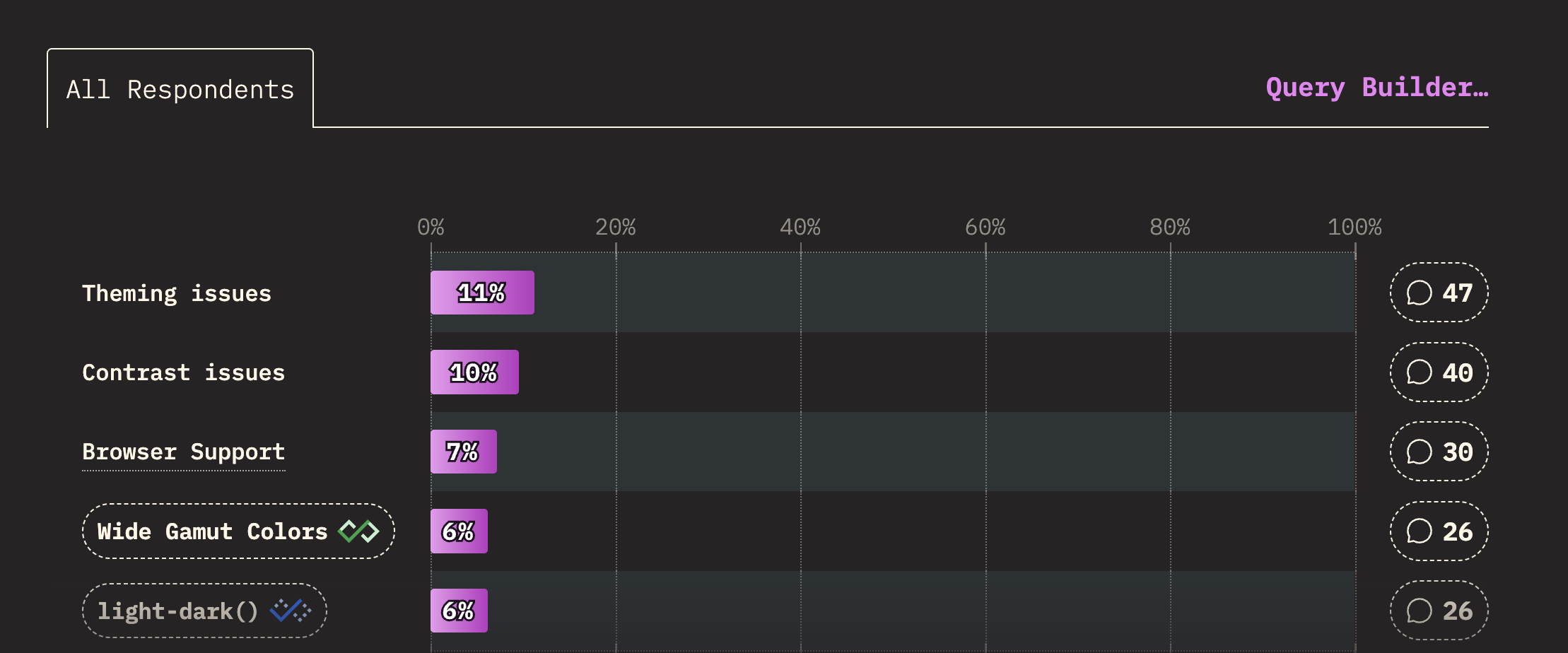
Browser support remains among the biggest headaches developers face across nearly every category of CSS, from layout to typography, according to Devographics' 2025 State of CSS survey – exactly the kind of gap that turns a small compatibility bug into a defect nobody catches until a real visitor hits it.
A visual bug is a styling or layout issue: text overlapping an image, a button sitting a few pixels out of place. A functional defect is more serious: a checkout flow that won't complete, or a form that silently fails to submit.
The line between the two matters for triage. A visual bug on a rarely visited page can usually wait, whereas a functional defect on your checkout page cannot.
Website testing also turns up performance bugs, like a page that loads too slowly, and security bugs, like a form that fails to sanitize input properly. Functional defects, sometimes grouped with these as functional bugs, deserve the same attention.
This kind of testing also brings in reporters beyond the usual developer/QA flow. Marketers reviewing a landing page, designers checking a build against a mockup, and clients doing user acceptance testing before launch all spot real problems.
They think in terms of "this looks wrong," not severity or priority, and a good bug tracking system needs to help reporters give clear instructions to those fixing issues.
The evidence is more important than the term used
Whether something gets logged as a bug, a defect, or an incident is far less important than whether the report actually explains what happened.
A report that resolves ambiguity, regardless of what it's called, needs a few consistent pieces:
- A clear description of what went wrong, in plain language.
- Steps to reproduce, specific enough that someone else can trigger the same result.
- Expected vs. actual result, so there's no debate about whether it's really a problem.
- Environment details, like browser, operating system, and screen size.
- Visual proof, usually a screenshot or short recording of the issue in context.
Not all defects need equal scrutiny, but every one of them deserves proper documentation across your testing environments, not just a mention in passing.
Miss any of these, and whoever's assigned to fix it has to go hunting for context first. Most of the friction in a bug tracking system or defect tracking system comes from exactly that – not the terminology, but the communication gaps between what got reported and what the fix requires.
How to track bugs and defects efficiently
A good bug tracking system closes that gap by making the report complete from the start, rather than relying on whoever filed it to remember every detail by hand.
A defect that lingers unfixed doesn't just cost engineering time; it quietly erodes user expectations and, over enough repeat incidents, your company's reputation with the people using your website every day.
The right management tool won't rectify bugs on its own, but paired with good debugging tools and a process everyone actually follows, it noticeably improves testing efficiency.
Look for a defect management tool that captures technical context automatically, is intuitive for non-technical reporters as well as a dedicated testing team, and connects to the project management tools your development team already uses.
Marker.io is a good example of what that looks like on the web.
A reporter clicks a widget on the live page, annotates a screenshot, and submits it. Behind the scenes, Marker.io automatically captures console logs, network requests, and environment details – browser, operating system, page URL, and screen size – so whoever picks it up gets full context without asking for it.
Reports then flow straight into tools like Jira, Linear, and Asana.
Marker.io is built for websites and web apps, not embedded firmware or a mobile-only codebase with no web surface. Plans and feature limits vary, so check the pricing page to see what fits your team.
For any web team, though, it removes most of the reason the bug-vs-defect debate started in the first place – once the report carries full context automatically, the word in the ticket no longer matters.
Conclusion
Under most standards, both bug and defect describe the same underlying problem, and the informal split most teams use – bug during coding, defect later on – is a convention, not a rule. What separates a smooth release from a chaotic one is whether every report carries enough detail to act on immediately.
Want reports that arrive with that detail already attached, on every website or web app you manage? Start a free trial of Marker.io and see how much time your team gets back.
Bug vs. defect FAQs
Is a bug a type of defect, or is it the other way around?
Neither, strictly speaking. Most formal glossaries treat bug and defect as synonyms rather than one being a subset of the other. The common industry convention that bug applies earlier and defect applies later is a practical habit, not a hierarchy.
How does severity differ from priority when triaging a bug or defect?
Severity measures how serious the problem is on its own – whether it crashes the software or just looks slightly off. Priority measures how urgently it needs fixing relative to everything else in the queue. A low-severity defect can still get high priority right before a big launch, while a high-severity bug can sit lower in priority if almost nobody uses the affected feature.
Does every defect turn into an incident?
No, and most don't. A defect only becomes an incident once its failure has real, active impact, like a service outage or a broken checkout page, that needs an urgent response rather than a routine fix on the next release cycle.
What should I do now?
Here are three ways you can continue your journey towards delivering bug-free websites:
Check out Marker.io and its features in action.
Read Next-Gen QA: How Companies Can Save Up To $125,000 A Year by adopting better bug reporting and resolution practices (no e-mail required).
Follow us on LinkedIn, YouTube, and X (Twitter) for bite-sized insights on all things QA testing, software development, bug resolution, and more.
Gary Gaspar
Gary is Marker.io's CEO. He's passionate about startups, growth and business. Before Marker.io, he ran a web design agency. Outside of work, he's the biggest basketball fan!
Related blog posts



Get started now
Free 15-day trial • No credit card required • Cancel anytime