
Bug Fixes: What They Are and How to Fix Bugs Faster
Learn what bug fixes are, why they happen, and the exact process to fix them faster – plus how to automate bug fixing on your website.


Introduction
Bug fixes are what keep software behaving the way it's supposed to, whether that's an app that keeps crashing on your computer or a checkout button that quietly stops working.
Even with processes like QA testing, beta testing, and UAT, every piece of software ships with bugs its creators don’t know about, and fixing them is a permanent part of building and maintaining any piece of technology.
This guide breaks down what a bug fix actually is, the types of bugs you'll run into, and the process developers follow to squash them.
It also takes a closer look at website bugs, since a bug on a live site behaves differently than one buried in a mobile app, and at how AI is starting to change what it means to fix a bug.
What are bug fixes?
A bug fix is a change to source code that corrects a software bug – an example of behavior that doesn't match what the program was intended to do. If a form fails to submit, a page crashes, or a calculation returns the wrong number, the fix is whatever code change makes the software work as intended again.
Developers often divide their time between bug fixes and new features.
A bug fix restores behavior that was already promised: the software is supposed to do X, and right now it doesn't. A new feature adds behavior that was never part of the original promise.
Teams that mix these don’t find the balance between the two could underprioritize real bugs in favor of shiny new features – or spend all their time tracking bugs and squashing them.
Think of a bug fix as a repair: it's putting broken functionality back the way it was meant to work, rather than building something new.
Common types of software bugs
Bugs show up in almost every part of a codebase, but most fall into a handful of recognizable categories:
- Coding errors. Simple mistakes in just a few lines of source code – e.g., a wrong variable, a missing condition – that cause software to behave incorrectly or crash outright.
- Security vulnerabilities. Flaws that let someone bypass access controls or extract data they shouldn't be able to get to. These are usually treated as a critical bug the moment they're confirmed.
- Memory leaks. Bugs where a program keeps allocating memory without releasing it, gradually slowing down or crashing after enough time running.
- Performance issues. Bugs that don't stop functionality outright but make it painfully slow, such as a page that takes several seconds to respond to a click.
- Compatibility problems. Errors that only appear when two components interact in a specific way, like a script that works fine alone but breaks against a specific version of computer hardware or a newly installed extension.
Some bugs only occur under narrow conditions – like a specific browser version, a specific set of data, or a specific sequence of actions – which is exactly why the same bug can be simple for one user to reproduce and nearly impossible for another.
Why bug fixing matters
An unresolved bug doesn't sit still.
Confirming a bug exists is only the first step – left alone, it usually gets worse:
- Security issues get discovered and exploited.
- A workaround gets built around bad code instead of the code getting fixed.
- Customer feedback about the same bug keeps arriving.
- The bug spreads, triggering related issues elsewhere in the codebase.
Software engineering teams track bug volume and resolution speed for a reason. It's a proxy for the overall health of the codebase and the confidence users have in the product.
A team that fixes bugs quickly and communicates clearly in its release notes builds trust; a team that lets the same bug resurface repeatedly erodes it.
How developers fix bugs
Fixing a bug usually involves an investigation, following the same rough sequence regardless of the software involved.
Reproduce the bug
Before anything else, you need a reliable way to make the bug happen on demand. This is called a repro: a specific set of steps that produces the incorrect behavior every time you follow them.
Without a repro, software developers are left guessing. They might make a change, watch the symptom disappear once, and assume the bug is fixed without confirming it, when really it was just a coincidence.
A repro that works consistently is what lets a developer trust an actual fix has been made and not a lucky accident.
Find the root cause
Once you can reliably trigger a bug, the next step is figuring out what's actually causing it.
This step is what most people mean by debugging: experienced developers identify the root cause by narrowing things down rather than assuming a fix will work and guessing.
Developers usually have to remove or simplify pieces of code – such as a command, a component, a condition, or a single file – and check after each change whether the bug still shows up.
If it does, the removed code wasn't the cause, and you keep cutting. If the bug disappears, you've found a real lead, though it's worth double-checking that it isn't a false positive before you commit to a fix.
This process can feel slow, but it's dramatically faster than jumping straight to a fix based on a hunch. A root cause you've actually confirmed means the fix addresses the real problem instead of papering over a symptom that will resurface as the same kind of failure later.
Write and test the fix
With the root cause identified, writing the fix itself is often the quickest part. The harder part is confirming that, once the fix is developed, it actually works and doesn't create new bugs elsewhere.
It’s at this point that automated tests earn their keep.
Unit tests check that the specific piece of code you changed behaves correctly in isolation. Integration tests check that it still plays well with the rest of the system. Good internal testing catches the kind of regression that would otherwise only surface after release, when it's far more expensive to fix.
Release and document the fix
Once a fix passes testing, it ships – sometimes as a small patch, sometimes bundled with other changes in a larger update. Either way, the change belongs in the release notes, so both users and the rest of the development team know what was fixed and can watch for related issues.
What makes website bugs different?
Fixing a bug in a script running on one machine is one problem. A website has to work correctly across variables no single developer controls, which makes fixing a bug on a live site a different challenge entirely.
The same page can behave differently depending on the browser and operating system a visitor is running, not to mention their screen size.
For example, a layout that looks perfect on your laptop can break entirely on someone else's phone. Add in the gap between a staging environment and the live production site – plus whatever third-party scripts, plugins, or CMS quirks are running underneath a page – and you get a much wider surface area for bugs than a typical application.
There's also a people problem layered on top of the technical one.
A lot of website bug reports don't come from developers at all; they come from marketers, designers, clients, or customers who can describe exactly what went wrong but not why it's happening.
"The button doesn't work" is a perfectly valid bug report from a non-technical reporter but completely useless to a developer without more context.
That gap between what gets reported and what a developer actually needs is often where bug fixing stalls before it even starts.
How to fix bugs on your website with Marker.io
This gap is exactly the one Marker.io's bug tracker is built to close.
Instead of relying on a written description alone, reporters click a point on the live page, annotate what's wrong, and hit send. There's no separate screenshot tool or email thread to manage on top of it.
Every report submitted through the widget arrives with the technical context a developer would otherwise have to go dig up:
- Screenshots and annotations showing exactly what the reporter saw.
- Console logs and network requests captured at the moment the bug happened.
- Browser and operating system details, plus screen size, captured automatically.
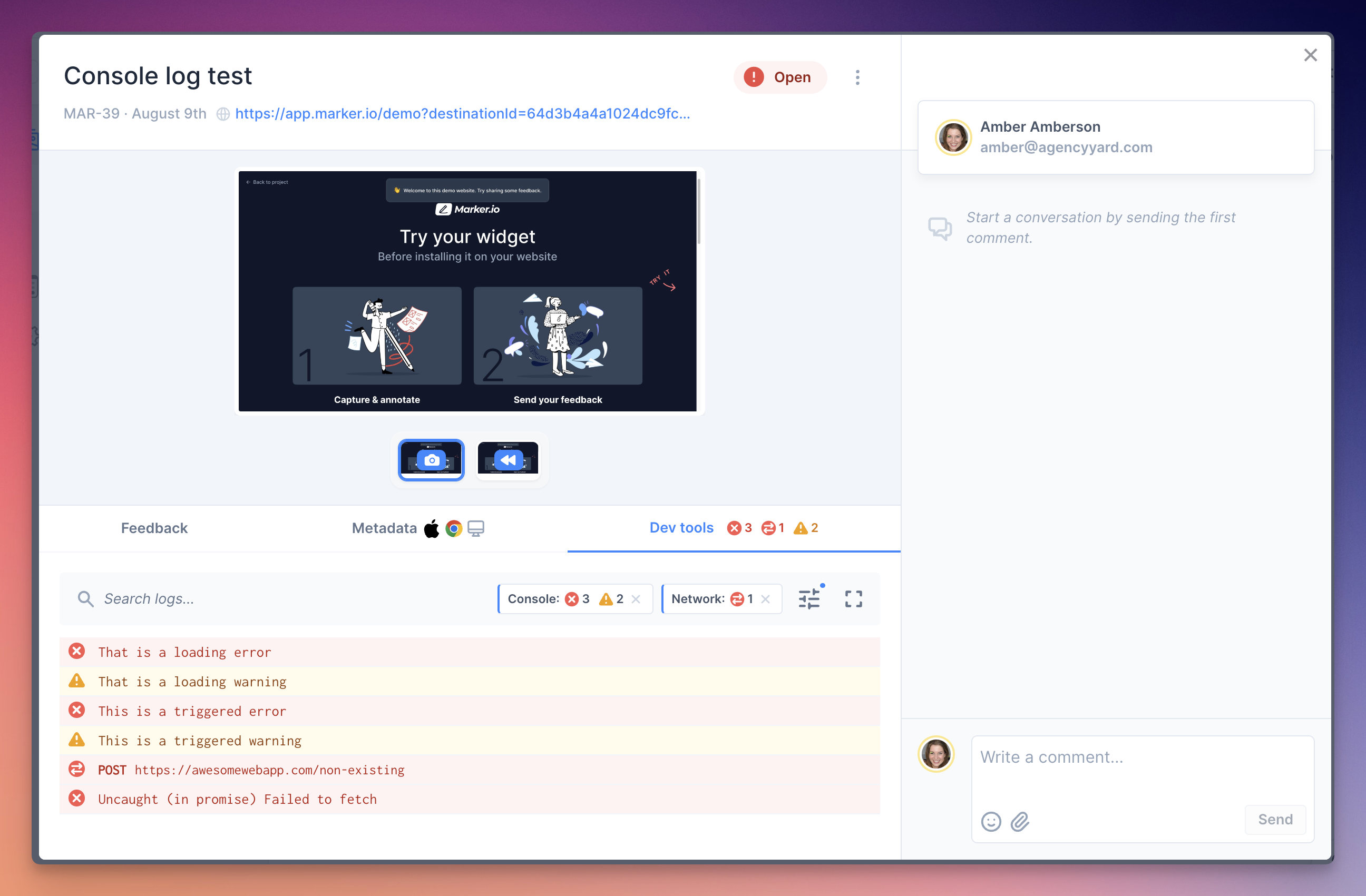
For bugs that are hard to describe in words, session replay lets a developer watch exactly what a reporter did leading up to the issue, instead of trying to reconstruct it from a vague description.
None of this replaces the tools your development team already works in. Marker.io syncs directly with Jira, GitHub, Trello, Linear, and several other integration tools, so a bug report becomes a properly formatted ticket in your existing workflow rather than another tool for developers to check.
Getting this bug fixing tool running doesn't require a big technical lift .
Sites built on WordPress can install the WordPress plugin to turn the widget on without touching any code, and any custom-built website can add a lightweight JavaScript snippet to get the same reporting and bug tracking on demand, whenever a fix is needed.
Ongoing website maintenance and regular bug fixes
Bug fixing on a live website works best as a habit, rather than a one-off scramble after something breaks.
Teams that maintain a site well tend to run recurring QA passes and user acceptance testing before every release, rather than waiting for customers to report problems first.
Keeping that habit consistent gets easier with the right structure in place. Workspace analytics show how quickly your team resolves issues and highlight workflow patterns over time, so you can track progress and spot when bug volume is creeping up before it becomes a real backlog.
Access control is also a valuable feature, so team members and clients each get only the tools they need.
Setting up a more detailed reporting form for your internal QA testers and a simpler one for outside stakeholders keeps regular maintenance from turning into noise and supports better team collaboration across the board.
Fixing bugs on an e-commerce store
Bugs on an e-commerce store carry a different kind of urgency. A broken checkout flow or a wrong price displayed on a product page costs revenue the moment it happens, not just user trust.
Unplanned downtime alone costs the largest companies an average of $300 million a year, according to Splunk's Hidden Costs of Downtime 2026 research, and a single high-profile incident can trigger a stock price drop of 3.4%.

That urgency is exactly why, when it comes to e-commerce, Marker.io is built around collecting feedback from both sides of the store at once.
Internal QA teams get a detailed reporting form for testing before a release goes live, while real customers browsing the live store can flag an issue with a simplified version of the same widget, without ever seeing your internal tools.
Both feed into the same source of truth, so a pricing bug spotted by a shopper and one caught during QA don't end up as two disconnected tickets chasing the same fix.
Automating bug fixing with AI
Bug fixing has traditionally been a manual, one-bug-at-a-time process. That's starting to change, as AI tools get pulled into earlier stages of the workflow.
Teams are using AI to triage incoming reports and spot duplicate or recurring bugs. Some setups now go a step further and let AI draft an actual code fix.
Marker.io’s MCP, which stands for Model Context Protocol, is an open standard that lets AI agents like Claude or Cursor connect to external data and tools.
Once connected, an AI agent can pull the full context of a bug report submitted through Marker.io: the screenshot, the console logs, the network requests, the browser details, all in one pass, without a developer digging any of it up manually.
From there, the agent can investigate the bug and draft a response, or go further and open a pull request with a proposed fix.
Analyzing a large batch of reports at once also makes it far easier to catch patterns a developer reading tickets one by one would likely miss.
However, a human stays in the loop for the final review in most setups – teams focus on the automation of the slow, repetitive parts of big fixing that used to eat up a developer's time before they could even start on the actual fix.
Marker.io's other AI features tackle a different part of the same problem: getting a usable bug report in the first place.
- AI Magic Rewrite turns hastily written descriptions into clear, structured bug reports.
- AI Title Generation uses a written description to generate a relevant title.
- AI Translation lets reporters write in their own language while your development team reads it in theirs.
All these tools help to automate and improve those parts of bug fixing that have nothing to do with actual coding skill.
4 bug fixing best practices
A few habits consistently separate teams that fix bugs quickly and effectively from teams that don't:
- Write a reproducible bug report. Steps to reproduce, expected behavior, and actual behavior matter more than a long description of frustration.
- Fix the root cause, not the symptom. A workaround might buy time, but the same bug tends to resurface in a different form if the underlying cause never gets addressed.
- Test against related test cases. Confirming a fix works is only half the job; confirming it didn't break something else is the other half.
- Keep reporters and developers in the same loop. When bug tracking happens in one place instead of scattered across emails and chat messages, the same bug doesn't get reported and re-investigated twice.
Read our guide on how to write a bug report to make sure there’s no bottleneck at this step in thr process.
Conclusion
Bug fixing is a process, not a single action: reproduce the problem, find what's actually causing it, fix it, test it, and document it.
The teams that fix bugs fastest usually aren't typing any quicker than everyone else; they've just removed the friction between spotting a bug and having everything a developer needs to act on it.
If your team is fixing bugs on a live website, that friction is exactly what Marker.io is built to remove, from the first bug report through to an AI agent helping draft the fix.
Start a free trial to see how much faster bug fixing gets with the right context attached from the start.
Bug fixes FAQs
How do you fix a bug in software?
You reproduce it reliably, isolate the root cause by narrowing down the affected code, write and test a fix, then release and document it. Skipping the reproduction step is the most common reason a fix doesn't actually solve the problem.
What's the difference between a bug fix and a patch?
A bug fix is the underlying code change that corrects the bug. A patch is how that fix gets delivered to users, often as a small, standalone update released outside the normal release schedule when a bug is urgent enough to need one.
How long does it typically take to fix a bug?
It depends entirely on how quickly the bug can be reproduced and diagnosed, not on how complex the eventual fix is. A critical bug with a clear, detailed report can sometimes be fixed within hours, while a bug with a vague report and no clear repro can take a development team days just to track down.
Can AI fix bugs on its own?
Not entirely, at least not yet. AI agents connected through tools like Marker.io MCP can investigate a bug, pull the technical context, and draft a proposed fix or pull request, but most teams have a person reviewing that fix before it ships.
What should I do now?
Here are three ways you can continue your journey towards delivering bug-free websites:
Check out Marker.io and its features in action.
Read Next-Gen QA: How Companies Can Save Up To $125,000 A Year by adopting better bug reporting and resolution practices (no e-mail required).
Follow us on LinkedIn, YouTube, and X (Twitter) for bite-sized insights on all things QA testing, software development, bug resolution, and more.
Will Sigsworth
Will manages organic content at Marker.io. He also works as a marketing advisor and contributor to a number of other SaaS businesses.
Related blog posts



Get started now
Free 15-day trial • No credit card required • Cancel anytime