
WAI-ARIA
What is WAI-ARIA?
WAI-ARIA, short for Web Accessibility Initiative – Accessible Rich Internet Applications, is the World Wide Web Consortium's (W3C) specification for making dynamic web content and complex web applications accessible to assistive technologies. It defines ARIA roles, states, and properties that web developers add to HTML markup, so screen readers and other assistive technologies can understand interactive elements that standard HTML can't describe on its own.
At a glance
Why is WAI-ARIA important when it comes to accessibility?
Screen reader users don't experience a page visually. They rely on the accessibility tree, a structured version of the page that the browser builds from HTML elements, ARIA roles, and ARIA attributes, and hands off to assistive technologies through the user agent.
If a custom widget doesn't expose the right information to that tree, a screen reader user has no reliable way to know what it is or how to operate it, even if it looks perfectly usable on screen.
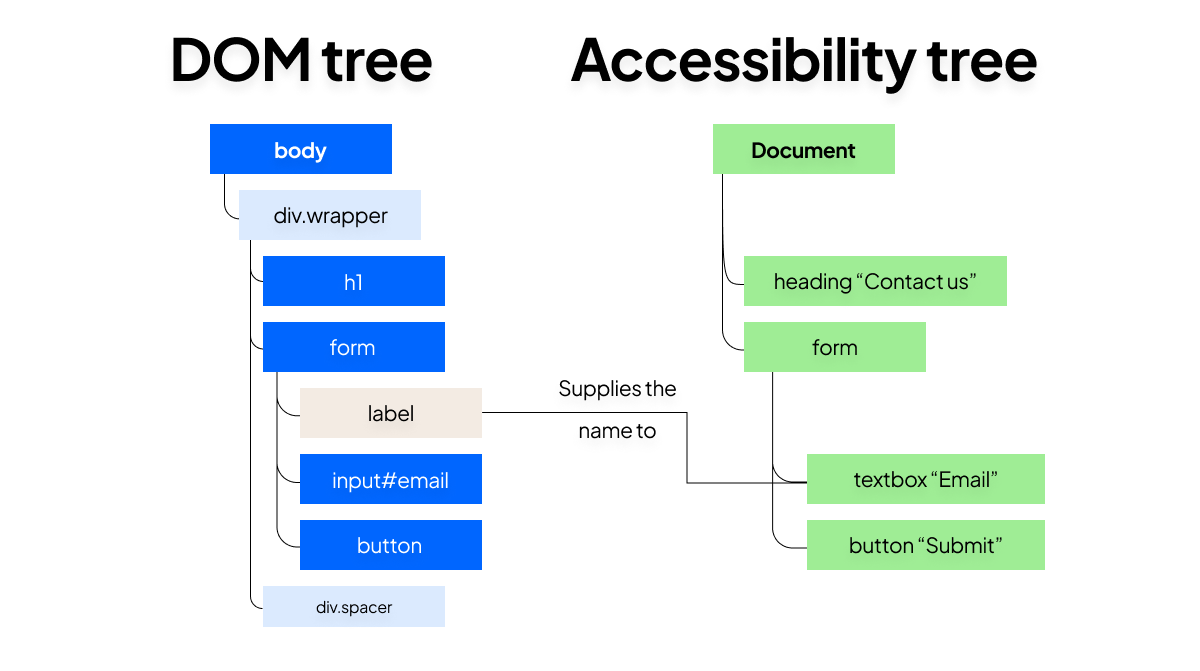
A lot of the modern World Wide Web isn't built from native HTML elements anymore. Date pickers, tab panels, autocomplete fields, and other custom widgets are usually assembled from generic elements and JavaScript, which strips away the proper semantics that native HTML elements provide automatically. WAI-ARIA attributes are frequently the only way to restore that missing context.
Web developers need to get this right – and not just to improve usability. Audits and complaints about accessibility issues usually trace back to the same handful of gaps in interactive ARIA controls: a missing role, a state nobody wired up, or a name that points at nothing.
WAI-ARIA gives teams a standard vocabulary for fixing the kinds of gaps that appear, rather than them having to invent ad hoc solutions for every custom widget a product ships.
WAI-ARIA also underpins a lot of what web content accessibility guidelines require.
WCAG guidelines describe the outcome – an interactive element has to communicate its name, role, and value to assistive technologies – without dictating the markup. WAI-ARIA attributes frequently help teams understand and meet that requirement once a component moves beyond what native HTML elements can express on their own.
Treat accessible, rich internet applications as something you build from the start, rather than something you patch on after launch.
How to use WAI-ARIA to improve accessibility?
By following WAI-ARIA specifications, you can understand which aria-* attributes and role values you should add to HTML markup.
The browser reads this alongside the native HTML semantics already present on an element and exposes the combined result through the accessibility tree. Assistive technologies never read the visual page directly, so an interactive element only communicates correctly if what's exposed to that tree is accurate.
The specification, maintained by the W3C's ARIA Working Group, defines three categories of WAI-ARIA attributes:
- Roles describe what an element is, such as
role="tablist"orrole="checkbox". Widget roles like these describe interactive components; landmark roles likerole="navigation"largely duplicate native HTML elements such as<nav>, while others, liketablist, describe widgets HTML has no equivalent for. - States describe current conditions that change, usually through JavaScript, as a user interacts with the page.
aria-checkedon a checkbox element andaria-expandedon a disclosure button are states. - Properties describe more stable characteristics, like an element's name or its relationship to other elements.
aria-requiredandaria-labelledbyare properties, and they rarely change once the page has loaded.
The attributes that apply to an element depend on its role, whether that's an implicit role carried by a native HTML element or one set explicitly with the role attribute.
A checkbox role needs a corresponding checked state; a dialog role needs a property supplying its accessible name. Applying an attribute that a role doesn't support, or leaving out one it requires, breaks the name, role, and value information that screen readers depend on.
Here is where you will encounter the first rule of ARIA use: if a native HTML element already provides the role, keyboard behavior, and focusable element handling you need, use native semantics instead of rebuilding it with custom widgets and ARIA attributes.
A native <button> already has a button role and keyboard support built in, whereas a styled <div> needs all of that added back by hand.
The ARIA Working Group publishes the Authoring Practices Guide, which shows how to combine roles, states, and properties into complete, tested widget patterns – tabs, comboboxes, dialogs, and accordions among them – rather than leaving every web developer to work out keyboard behavior from the specification alone.
WAI-ARIA has moved through several versions, with 1.2 as the current W3C recommendation and 1.3 in draft at the time of writing, so new roles and attributes continue to be added as browsers and assistive technologies gain support for them.
A WAI-ARIA example
Here's a simplified custom checkbox built from a <div>, the kind of pattern WAI-ARIA exists to support when a native <input type="checkbox"> isn't an option:
<div
  role="checkbox"
  aria-checked="false"
  aria-labelledby="newsletter-label"
  tabindex="0"
></div>
<span id="newsletter-label">Subscribe to the newsletter</span>
const box = document.querySelector('[role="checkbox"]');
function toggle() {
const checked = box.getAttribute('aria-checked') === 'true';
box.setAttribute('aria-checked', String(!checked));
}
box.addEventListener('click', toggle);
box.addEventListener('keydown', (event) => {
if (event.key === ' ') {
event.preventDefault(); // stop Space from scrolling the page
toggle();
}
});role="checkbox"tells assistive technologies what the element isaria-labelledbysupplies its accessible name from existing text contenttabindex="0"makes it a focusable element reachable by keyboardaria-checkedreports its current state, updated by JavaScript whenever someone clicks the checkbox or presses the space bar.
Miss that last step and a screen reader user hears a checkbox that never changes, regardless of what it looks like on screen.
WAI-ARIA vs. WCAG
WAI-ARIA and WCAG get mentioned together constantly, but they solve different problems.
The difference between WCAG and WAI-ARIA comes down to scope. The Web Content Accessibility Guidelines set the destination, the testable bar a website needs to clear to be considered accessible.
WAI-ARIA is one of the tools used to get there, specifically for the custom, scripted, non-semantic parts of a page that standard HTML and CSS alone can't make accessible.
Most WCAG guidelines don't require ARIA at all; plenty of content meets WCAG using nothing but semantic HTML. WAI-ARIA becomes necessary once a site includes the kind of custom widgets that native HTML elements and form controls don't cover.
Common mistakes or misconceptions
- Reaching for ARIA before native HTML. Adding roles and ARIA attributes to a non-semantic
<div>usually creates more code and produces a worse result than using the native HTML element that already has the right semantics built in. - Setting a role without its required states. A role attribute defines what an element is, but assistive technologies also expect the states and properties that role requires. A
checkboxrole with noaria-checkedleaves users without any indication of its condition. - Letting JavaScript update the page without updating ARIA attributes. If a script changes what a widget looks like but forgets to update its state attributes, screen reader users hear information that no longer matches what's on screen.
- Assuming WAI-ARIA changes how a page looks. It doesn't. WAI-ARIA only changes what's exposed to the accessibility tree, not the page's visual presentation, so adding or removing an attribute never affects layout or styling.
Frequently Asked Questions
What does WAI-ARIA stand for?
WAI-ARIA stands for Web Accessibility Initiative – Accessible Rich Internet Applications. The Web Accessibility Initiative is the part of the World Wide Web Consortium responsible for accessibility standards generally, and Accessible Rich Internet Applications is the specification that defines the roles, states, and properties covered on this page.
Is WAI-ARIA the same thing as ARIA?
In everyday use, yes – most web developers say "ARIA" as shorthand for WAI-ARIA, and the two terms refer to the same specification. "ARIA" also shows up as a prefix on the individual attributes themselves, like aria-label or aria-hidden, which is a separate but related use of the term.
Try our website monitor free
Automate website monitoring tasks
and keep your pages compliant