
.png)
How Litecycle resolves 70% of client bug reports overnight with Marker.io MCP & AI agents

Are you ready to cut your bug resolution time in half?
Once an AI tool is live, clients inevitably find things it gets wrong. Litecycle needed to get those issues from the client's screen to a fix as quickly as possible.
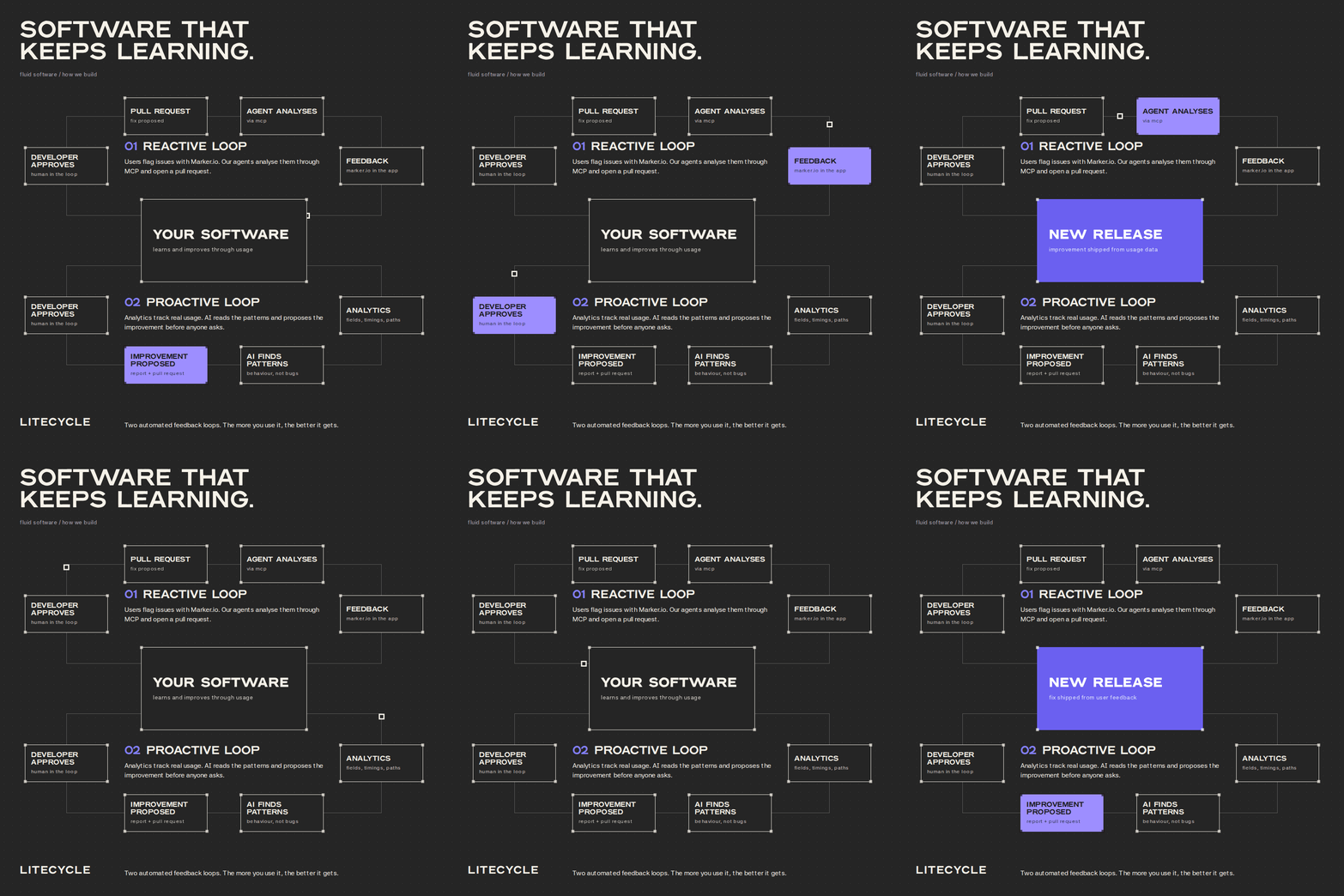
Clients report issues through the Marker.io widget. Overnight, Litecycle's AI agents pull the tickets through the Marker.io MCP, analyse them, and prepare fixes as pull requests for developers to review the next morning.
Tom Celis is the CEO and co-founder of Litecycle, an AI studio in Antwerp that builds and launches AI systems for SMEs.
The team follows agile product development and launches operational AI systems to production in around 12 weeks.
The challenge: production is where the edge cases live
Once a tool is live, clients start finding the edge cases that weren't covered during the initial build. That's expected: Litecycle focuses on the common cases first and handles the exceptions as they come up.
"It's impossible to implement all the edge cases upfront. We focus on the core. Everything else comes through feedback from the customer."
Take a tool that reads invoices and packing lists and enters the data into logistics software. It handles the standard documents on day one. Then a supplier sends a different layout, or a customer needs a field the others don't. Each case can result in a new bug report.
The faster those issues get fixed, the faster Litecycle can improve the tool for the client. After launch, the priority is simple: get each issue from the client's screen to a fix as quickly as possible.
"The time of fixed software, where you finish a product and it's done, is over. You need to close the feedback loop with the customer and go from reported issue to resolution fast."
Who reports the issues
For every launch, the client names a core team of 2 to 4 operations people. They know the process, own it day to day, and are told upfront that the first few weeks will generate a lot of feedback.
Those 3 to 5 weeks of feedback are the plan, not a problem. After that, the solution rolls out to the rest of the organisation.
The solution: Marker.io tickets, handled by agents overnight
Tom has used Marker.io for almost 10 years, across several companies. For Litecycle, it is added to projects as they go into production.
"It's very easy to explain to a customer how to give feedback with the widget, instead of making support tickets in a ticketing system. That's why I've been using it for almost 10 years."
What changed was what happened after the ticket landed.
Litecycle connects OpenAI Codex directly to Marker.io through the MCP. A setup of AI agents runs every night:
- An orchestration agent retrieves new tickets and decides whether work can start.
- If two or three clients report the same bug, the agents consolidate the reports into a single fix.
- Subagents analyse the ticket against the codebase and Litecycle's internal knowledge, then propose a solution.
- The fix is pushed as a pull request.
- In the morning, a developer reviews, approves and commits. The client gets an answer.
"In about 70% of cases the agents can resolve the ticket automatically. In the other 30% the issue is too complex, there are several possible solutions, or we need more information from the customer. Then it escalates to the orchestration agent, which is in contact with the developer."
Nothing is pushed before the orchestration agent approves it. Litecycle also built a skill that feeds the agents company knowledge to improve the quality of proposed fixes.
Why the MCP instead of a Notion or Jira sync
Litecycle runs on Notion internally, and the same workflow could run through Notion’s AI. They chose the MCP because it gives the agents more direct access to the tickets.
"The sync with Notion takes more setup time. Going directly through the MCP is easier and we get more information out of it."
The team also chats with Marker.io from Slack, Claude and Codex to pull stats on reported bugs, resolved bugs and resolution time.
A second loop: proactive feedback
Marker.io covers the reactive loop, what clients report. Litecycle also looks for issues proactively by feeding usage analytics into daily reports that AI analyses for patterns.
If users repeatedly make the same correction or manually add the same information, Litecycle treats that as a signal for improvement. Both sources of feedback then feed into the same development cycle.
"We go from fixed software to a fluid system that keeps improving for the customer. The Marker setup fits perfectly in that picture."

"We go from fixed software to a fluid system that keeps improving for the customer. The Marker setup fits perfectly in that picture."
More success stories

How this dynamic web development team cut out client emails

How this healthcare SaaS company does rapid QA testing

How Checkbox Saved a Week on Their Website Rebrand with Marker.io
Frequently Asked Questions
What is Marker.io?
Marker.io is a website feedback tool. Teams use it for bug tracking and reporting, UAT, and annotation on their websites. It’s the best way to gather feedback and bug reports with screenshots, annotations, and advanced technical metadata. It also integrates perfectly with Jira, Trello, ClickUp, Asana (and more).
Who is Marker.io for, and can I use it for website design feedback?
Marker.io is a website design feedback tool for teams that are responsible for shipping and maintaining websites and need a simple website testing tool to collect visual feedback, manage client feedback, and turn that feedback into actionable tasks.
As well as teams managing website design feedback processes, it’s used by:
- Organizations managing complex or multi-site websites
- Agencies collaborating with clients and stakeholders
- Product, web, design, and QA teams inside companies
Whether you’re building, designing, testing, improving, or running a live site, Marker.io helps teams manage website design feedback, manual QA, user acceptance testing, revisions, and approval without breaking existing workflows.
How easy is it to set up for bug reporting and other website testing?
Embed a few lines of code on your website and start collecting client feedback with screenshots, visual annotation, and advanced technical metadata. We also have a no-code WordPress plugin and a browser extension.
Will Marker.io slow down my website?
No, it won't.
The Marker.io script is engineered to run entirely in the background and should never cause your site to perform slowly.
Can I use Marker.io for QA and user acceptance testing?
Yes, Marker.io is one of the leading QA and user acceptance testing tools. It combines intuitive issue tracking tools with powerful project management integrations to make it easy for users, colleagues, and stakeholders alike to report bugs so your developers and designers can fix them.
Do users need an account to send client feedback?
No, anyone can submit website feedback and send comments without an account.
How much does Marker's website feedback solution cost?
Plans start as low as $39 per month. Each plan comes with a 15-day free trial. For more information, check out the pricing page.
Get started now
Free 15-day trial • No credit card required • Cancel anytime