
The Ultimate Guide to Completing a Successful AEM Migration
How to manage the operational and structural side of an AEM migration: content hierarchy, governance, QA, and how to keep thousands of pages and people aligned.


Use this guide to manage the operational and structural side of an AEM migration: content hierarchy, governance, QA, and how to keep thousands of pages and people aligned.
Most AEM migrations don’t fail because Adobe Experience Manager is “too complex.”
They fail because the organization isn’t prepared for how AEM expects content to be structured, governed, and QA’d – especially in multi-brand, multi-market setups where you’re juggling dozens of sites, stakeholders, languages, and templates.
If you’re running WebOps or Digital Excellence for a large, multi-brand corporate, you’re dealing with the hardest version of this problem. You’re not just planning a migration to AEM; you’re orchestrating a migration journey across brands, markets, and publish environments that all need to go live on the same AEM environment without blowing up your digital presence.
This guide skips the low-level JSON and JCR APIs and focuses on the operational and structural layer: content hierarchy, governance, QA, and how to keep thousands of pages and people aligned.
By the end, you’ll have:
- Clarity for executives on what an “AEM migration” really means for your business.
- Structure for WebOps and DevOps teams across cloud service environments.
- Fewer surprises for engineers as they migrate content and deploy code.
TL;DR: What a Successful AEM Migration Looks Like
Here’s the short version of a successful migration to AEM (including AEM as a Cloud Service):
- You understand AEM’s model first. You define content hierarchy, templates, components, user roles, and multi-tenancy up front – before any content transfer or code development.
- You turn legacy pages into “page archetypes”. You map existing content into 6–12 reusable page models, then decide what becomes templates, components, Content Fragments, and Experience Fragments.
- You pick a hybrid migration strategy. Structured content uses an AEM content migration tool or APIs; key landing pages and brand-critical experiences are rebuilt and polished manually.
- You treat governance and QA as first-class. You create a migration operating model, run comprehensive testing in a staging environment, and use visual feedback tools to track thousands of issues across brands.
1. Understand AEM’s model before you migrate
How AEM structures content (and why old CMSs won’t match)
Most legacy CMSs – especially older, on-premises platforms – blur the lines between layout, content, and reusable UI:
- One “template” often controls layout and content.
- HTML-heavy WYSIWYG areas mix design, copy, and scripts.
- Navigation and promos are hard-coded into pages.
In Adobe Experience Manager, that all gets pulled apart:
- Templates define the page layout and allowed components.
- Components are reusable UI blocks (text, image, teaser, carousel, forms, product cards).
- Page content lives as JCR nodes under paths like: /content/<brand>/<locale>/…
On modern AEM cloud service environments, you’ll likely use Editable Templates and Core Components as your base. Instead of dozens of bespoke templates, you’ll configure a small set of flexible templates plus components that can be reused across brands and markets.
That separation is key to:
- Reducing technical debt and future operational costs.
- Supporting multi-brand and multi-locale digital experiences at scale.
- Enabling safer code refactoring and content transformation later.
The 3 most common mismatches from old CMS → AEM
When many organizations attempt AEM migration for the first time, three patterns cause the most pain:
1. Monolithic pages become many components
A single WordPress or Drupal page often becomes 6–12 AEM components:
- Hero banner
- Rich text block
- Image gallery
- Testimonial block
- CTA strip
- FAQ accordion
If you don’t plan for this during the preparation phase, authors end up with a Frankenstein layout and inconsistent component usage.
2. HTML-rich blocks lead to “giant text component hell”
Legacy CMSs allow embedded HTML for:
- Tabs and accordions
- Timelines and carousels
- Embedded scripts and forms
When it comes to content migration in AEM, you want to avoid dumping all of that into one giant “Text” component. Instead, you should break it down into discrete components that can be reviewed, tested, reused, and governed.
3. Reusable blocks aren’t modeled as Experience Fragments
Global CTAs, promos, and headers/footers often start life as copied content. In AEM Cloud or AEM on-premises, those really belong in:
- Experience Fragments for reusable UI blocks across brands.
- Content Fragments for structured content shared via APIs.
That’s how you get a single repository of reusable assets that can be distributed across sites, channels, or even a content delivery network.
Additional challenges for multi-brand organizations
Multi-brand, multi-market enterprises hit extra complexity:
- Shared vs brand-specific components
- Which components are truly global (e.g., legal footer, cookie banner)?
- Which need brand variations (theme, language, visual variants)?
- Multi-locale inheritance (MSM) decisions
- Which countries inherit structure and content via MSM?
- Where can local teams override mutable content?
- How do you prevent reverse replication from pushing local changes into global content by mistake?
- Central governance vs. brand freedom
- A central WebOps team wants consistency and lower total cost.
- Brands and markets want agility and freedom to test new digital experiences.
- Template sprawl and deprecated features
Without guardrails, every brand asks for “just one tweak” to templates and components. Within a year, you’re maintaining dozens of variations and a long list of deprecated features you can’t easily remove.
Example:
- Before: 40 WordPress templates across 12 brands.
- After: 8 AEM Editable Templates, each with a clear purpose (home, campaign landing, product detail, article, etc.), plus a thoughtful component library.
That’s the mindset you want going into any AEM cloud migration or cloud service migration.
2. Build your migration foundation (AEM-specific audit and mapping)
This is your preparation phase. It looks like overhead, but it’s where you save the most time and avoid painful lessons learned later.
Audit existing content into AEM “page archetypes”
Instead of migrating every page 1:1, you define page archetypes.
Here’s how:
- Inventory existing content: pull URLs, templates, and page types from your existing CMS. Group them by purpose: home, product overview, brand story, support, blog, etc.
- Identify 6–12 repeating models: These become your “archetypes” (e.g., “Campaign landing”, “Product detail”, “Brand hub”).
- Map each archetype to AEM. For each archetype, define: AEM template used, component list needed, data sources (PIM, DAM, APIs), user groups and user roles responsible for ownership and maintenance.
Page archetype mapping sheet
Your sheet might include columns like:
- Archetype name
- Legacy template / layout
- AEM template
- Required components
- Experience Fragments used
- Content Fragments used
- Brand(s) using this archetype
- Local markets using this archetype
- Special rules (SEO, legal, sensitive information handling)
You can build this as a spreadsheet and share it across the IT team, WebOps, and agencies.
Define which elements become AEM components
Next, you decide what becomes a component vs. a fragment vs. single-use layout.
Think across four buckets:
Core Components: Use them wherever possible to stay close to AEM best practices:
- Text
- Image
- Carousel
- Tabs
- Accordion
- Teaser
- Navigation
Custom components: For brand-specific or highly structured elements:
- Product cards tied to PIM
- Complex comparison tables
- Multi-step forms
- Interactive timelines
These are where code development, OSGi configurations, and background tasks get more involved.
Content Fragments
For structured content that feeds many surfaces:
- FAQs
- Store locations
- Product specs
- Regulatory content
These are powerful in an AEM cloud environment when used with a content delivery network.
Experience Fragments
For reusable UI blocks:
- Global banners
- Cross-brand promos
- Footers, headers
- “Contact us” strips
Experience Fragments are critical for multi-brand AEM migration because they allow global teams to manage immutable content blocks while keeping brand styling flexible.
Build your component inventory
Create a component inventory early in the migration process:
Ask:
- Which old CMS elements repeat? These are your candidate components or fragments.
- Which need rewriting or restructuring? Anything that relies on custom HTML, inline styles, or fragile scripts will need content transformation.
- Which must be reusable across brands? Mark these clearly so your AEM content migration tool or scripts can recognize them and map them to Experience Fragments.
- Which require brand variations? Decide if you’ll handle this via:
- Theming and configuration
- Per-brand policies
- Separate components or templates (as a last resort)
This inventory becomes your source of truth for DevOps teams, agencies, and authors.
Identify high-risk content
Flag high-risk items early so you can plan extra QA and comprehensive testing:
- Embedded HTML in WYSIWYG fields
- Hard-coded navigation and internal links
- Forms and tracking scripts
- Timelines, carousels, and tabs coded inside rich text
- Product catalogs and any content touching sensitive information or regulated content
- Pages relying on reverse replication or complex on-premises behaviors
These typically need a combination of content transfer, content transformation, and sometimes code refactoring.
3. Choose your AEM migration strategy (3 real paths)
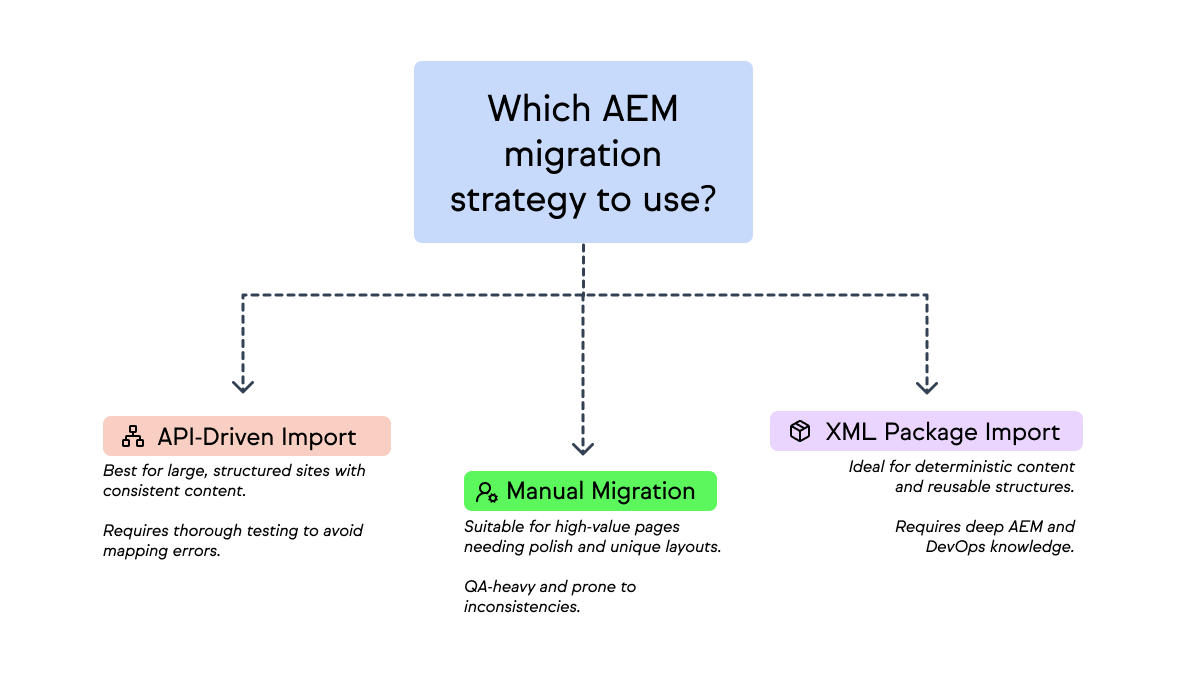
There are many theoretical approaches, but in practice, AEM content migration usually fits into three strategies – often combined in one project.
Strategy A: API-driven import (JSON → Servlet → JCR)
You build an integration layer that:
- Exports data (e.g., JSON) from your legacy CMS.
- Sends it to an AEM servlet or API.
- Maps JSON fields to JCR nodes and properties, creating pages and components under the right content hierarchy.
Good for:
- Large, structured sites.
- Product catalogs and article libraries.
- Multi-brand content where structure is consistent.
Risks:
- Misaligned JSON and component fields.
- Missing properties or dialogs.
- Incorrect mapping to templates or paths in the AEM environment.
You’ll want thorough, comprehensive testing here: unit tests, practice analyzer reports from AEM as a Cloud Service, and multiple dry runs in lower cloud service instance tiers.
Strategy B: XML package import (.content.xml → deployment)
Here, you generate AEM content packages (.zip) with .content.xml representations of pages and components, then install them via:
- Adobe Cloud Manager or a CI pipeline in AEM cloud.
- Package Manager on AEM on premise or managed services.
Good for:
- Deterministic content that needs to be identical across environments.
- Reusable structures like Experience Fragments and Content Fragments.
- Immutable content maintained centrally.
Risks:
- Requires deep AEM and DevOps knowledge.
- Tightly couples content and code deployment.
- Each go live date needs careful planning to avoid overwriting mutable content.
Strategy C: Manual / assisted migration
You rebuild high-value pages manually in AEM:
- Authors use templates and components in a staging environment.
- WebOps provides playbooks and example pages.
- Visual QA tools help authors iterate quickly.
Good for:
- Brand and campaign landing pages that need polish.
- Unique layouts where automation is more risky than helpful.
- Cases where existing content is too messy to migrate cleanly.
Risks:
- QA-heavy and time-consuming.
- Subject to author mistakes and inconsistent practices.
- Needs strong governance around templates and components.
How enterprises really migrate
In real-world AEM migration projects, enterprises use a hybrid approach:
- Templates + Components: engineered and tested once, with code and OSGi configurations handled via Cloud Manager.
- Structured sections: migrated via APIs or an AEM content migration tool.
- Key landing pages: rebuilt manually with close collaboration between brand teams and WebOps.
- Multi-brand/global sections: centralized through Experience Fragments, Content Fragments, and shared AEM assets in a single repository.
This balance helps you:
- Ensure seamless integration between legacy systems and AEM cloud service.
- Control total cost over time.
- Keep migration risk focused on a manageable subset of high-stakes pages.
4. Governance: the part that breaks most AEM migrations
Governance is where many organizations stumble. Technology is usually not the blocker, process is.
Decide ownership per brand, per section, per component
Before you migrate content, define clear ownership:
- Templates: Who approves new templates? Who decides when to update or retire them?
- Global components and Experience Fragments: Who controls global CTAs, footers, and legal content? How are brand requests for changes evaluated?
- Content sections: Who owns product content vs brand storytelling vs support content?
- Migration completeness: Who signs off that a site is ready to launch? How are gaps and blockers tracked?
Map all of this to user groups and user roles in AEM, and mirror it in your issue tracker so every migration task has a clear owner.
Create a “Migration Operating Model”
Treat migration as a program, not just a project.
Key roles to define:
- WebOps lead: Owns the migration process, cloud service migration strategy, and governance.
- Content owners per brand/market: Accountable for content quality, approvals, and final step sign-off.
- AEM engineers: Handle code, tools, integrations, and security considerations.
- QA lead: Designs the testing strategy, accessibility, SEO, regression, and device/browser matrices.
- Vendors / agencies: Support code development, manual content transfer, and design execution.
Make sure you document who requests new components, how template changes are evaluated, how multi-brand and multi-tenancy requirements are handled, and escalation paths when conflicts arise.

Prevent template sprawl (the #1 AEM anti-pattern)
Template sprawl is a classic AEM anti-pattern that inflates operational costs and technical debt.
Set clear rules:
- Max number of templates per site or brand.
- When to introduce a new component: Only when it’s used across multiple archetypes or brands and cannot be solved with configuration.
- When NOT to create a new component: When a design variation can be solved via styling, policies, or additional fields.
- What must be global vs brand-specific. Legal, privacy, and compliance content – global or centrally managed. Visual theming and some CTAs – brand-level. Highly localized campaigns – market-level, with guardrails.
Governance is how you stay ahead of sprawl and ensure AEM remains future proof, instead of becoming another legacy platform in 3–5 years.
5. QA: How to validate an AEM migration at enterprise scale
Migration isn’t done when content has been imported. It’s done when thorough testing says you’re safe to go live across brands and markets.
Why AEM migrations fail QA
Common failure points:
- Inconsistent component usage across brands.
- Missing dialog values or broken default configurations.
- Assets not migrated to DAM/AEM assets correctly.
- Inconsistent responsive behavior and layout issues.
- MSM inheritance breaks between master and local sites.
- Dispatcher or content delivery network cache not invalidating.
- Old URL redirects missing or misconfigured.
- Background tasks or scheduled jobs failing silently.
Many of these issues show up late because QA only happens near the go-live date, instead of alongside migration.
With Marker.io, you can run QA testing throughout the entire migration process. Try Marker.io for free today.
The enterprise QA workflow
Structure your QA across levels by asking yourself and your team these questions:
- Component-level QA: Does each component behave correctly in isolation? Are required fields enforced? Is metadata handled correctly?
- Template-level QA: Does each archetype render correctly with real content? Are components used as intended? Are accessibility and performance acceptable?
- Brand-level QA: Are brand styles and themes correctly applied? Are Experience Fragments rendering the right variants?
- Regression checks: Are global navigation, footers, and search behaving as expected? Forms, tracking, and integrations? Reverse replication or other specialized behaviors if you’re migrating from AEM on-premises.
- Accessibility checks: Alt text practices, keyboard navigation, color contrast and focus states.
- Metadata and SEO checks: Title, description, OG tags, and structured data. Canonicals and hreflang for multi-locale setups. Redirect coverage and crawlability.
How multi-brand teams track thousands of issues
At enterprise scale, you’ll have:
- Hundreds of pages per brand.
- Dozens of authors, QA analysts, and engineers.
- Multiple AEM cloud service environments (dev, stage, prod).
To keep this sane:
- Use Jira, Monday, Asana, or similar to manage ownership and workflows.
- Assign issues to Content owners, Authors, AEM devs or DevOps teams.
To avoid endless screenshots in email:
- Use visual feedback tools (like Marker.io) to capture on-page issues directly from publish environments or staging.
- Automatically attach URL and environment, Browser and device info, as well as Console logs and network data.
- Push those into your issue tracker, so the IT team gets actionable bug reports instead of vague complaints.
This dramatically speeds up the migration process and reduces back-and-forth.
6. SEO and URL management – the most visible failure point)
If something goes wrong here, your C-suite will notice quickly.
Map legacy URLs to AEM paths
Start with a URL inventory:
- Export all legacy URLs.
- Map each one to: A new AEM path, or a redirect target, or a “retired” status with justification.
Keep in mind that AEM’s JCR pathing (e.g., /content/<brand>/<locale>/...) influences how URLs are generated.
Also, routing and dispatcher rules must align with your SEO strategy: clean, readable URLs that don’t leak internal structures.
Redirects
Plan redirects as part of the migration journey:
- Define a redirect plan early.
- Use bulk mapping and automation where possible.
- Test redirects in every staging environment and publish environments, not just in production.
You want to ensure seamless integration between old URLs and new AEM paths so users and search engines experience seamless integration with minimal disruption.
Metadata mapping
Clarify how AEM handles page titles, descriptions, OG tags, Twitter cards, and structured data (JSON-LD).
Watch out for:
- Component-level metadata: Some components might inject schema, open graph data, or canonical tags. If duplicated or misconfigured, this can cause SEO issues.
- Multi-brand and multi-locale rules: Ensure brand-level and market-level requirements are reflected in templates and components, not handled manually page by page.
7. Launch plan and post-migration governance
You’ve migrated content, run tests, and have your redirect plan. Now you need a controlled path to your go-live date – and a way to avoid chaos afterward.
Pre-launch test phases
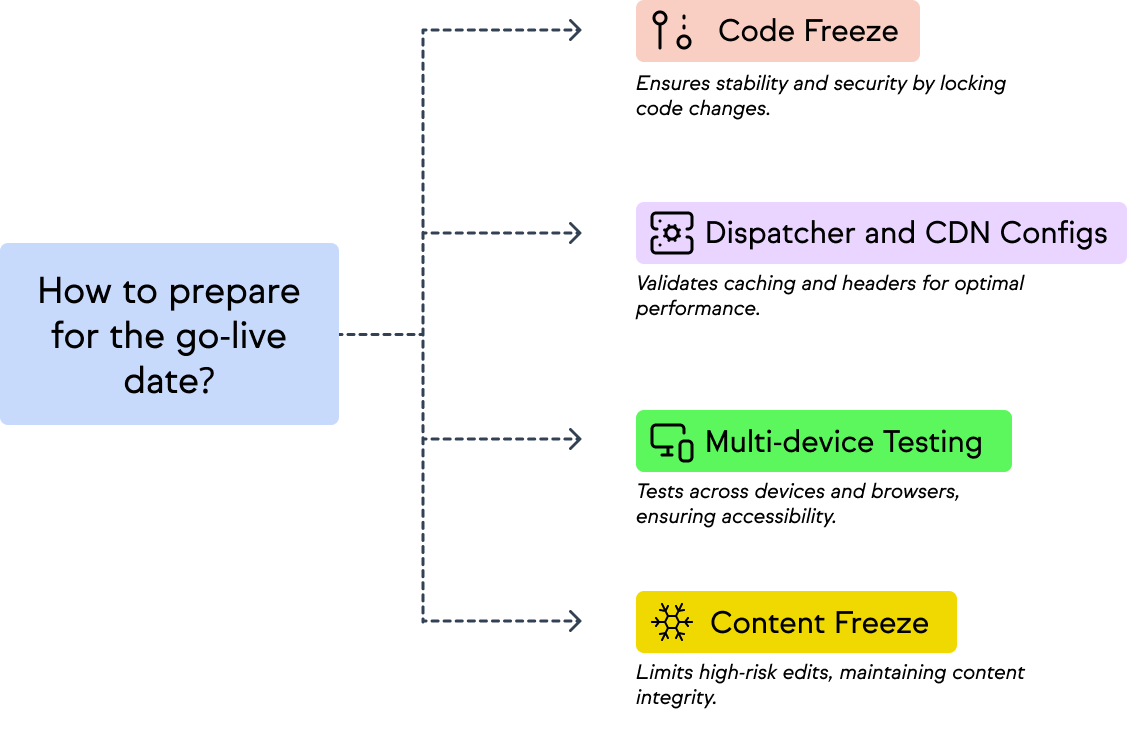
Standardize your launch checklist:
- Code freeze: Lock changes to code and OSGi configurations. Focus on stability and security, not new features.
- Content freeze: Limit high-risk edits on key sections. Allow content owners to work in controlled areas only.
- Dispatcher and CDN configs: Validate caching, invalidation, and headers. Confirm behavior across cloud and on premise integrations if you’re in a hybrid setup.
- Multi-device testing: Test across your agreed device/browser matrix. Include markets where connectivity is slower and mobile usage is higher.
Author training
AEM is powerful – but only if authors know how to use it. Train authors and brand teams on:
- Templates and components: How to choose the right template and how to avoid “giant Text component hell.”
- Experience Fragments: How to reuse and request updates to global blocks.
- Content Fragments: How to manage structured content and avoid duplication.
- Publishing workflows: Approvals, scheduling, and rollback.
- Media management: Working with aem assets and DAM best practices.
Training reduces misuse, minimizes mutable content edits in the wrong place, and protects your manager as a cloud / AEM as a Cloud Service setup from unexpected breakages.
How to avoid regression chaos post-launch
Post-launch, it’s easy to slip into old habits and rebuild technical debt.
To avoid that:
- Run ongoing QA cycles, especially after major code deployments or new component releases.
- Govern component updates:
- Changes should be requested, reviewed, and tested.
- Avoid ad-hoc modifications that affect multiple brands or markets without oversight.
- Control template changes
- Require approval from WebOps/Digital Excellence.
- Document changes and their impact on migration and future sites.
- Define multi-brand update workflows
- Clarify how global teams push updates to local markets.
- Use MSM and Experience Fragments to propagate updates safely.
Over time, this governance keeps your AEM cloud, Adobe Cloud Manager pipelines, and overall migration project sustainable.
Key takeaways
To wrap up, here are the key takeaways for WebOps and Digital Excellence teams planning AEM content migration:
- AEM migrations are cross-functional transformations, not just engineering projects. Success depends as much on governance, user roles, and workflows as it does on code and tools.
- Multi-brand enterprises need structure and guardrails. Page archetypes, component inventories, and clear ownership help you control multi-tenancy and prevent template sprawl.
- Hybrid approaches win. Use automation for structured content migration, manual rebuilds for flagship experiences, and cloud service migration tooling for stable, repeatable deployments.
- QA and feedback are where migrations live or die. Invest in visual feedback, comprehensive testing, and background tasks monitoring so issues are caught early, not post-launch.
- Think future proof, not just “done.” A successful migration reduces technical debt, improves security, and gives you an AEM environment that can evolve with your brands’ digital experiences – instead of becoming your next legacy CMS.
Handled this way, your AEM migration becomes a repeatable, scalable practice that helps your brands stay ahead, protect their digital presence, and make the most of Adobe Experience Manager and Adobe Cloud over the long term.
Once you’ve completed your AEM migration, you may want to redesign your site to make use of the new platform. If so, our Practical Website Redesign Checklist can help.
What should I do now?
Here are three ways you can continue your journey towards delivering bug-free websites:
Check out Marker.io and its features in action.
Read Next-Gen QA: How Companies Can Save Up To $125,000 A Year by adopting better bug reporting and resolution practices (no e-mail required).
Follow us on LinkedIn, YouTube, and X (Twitter) for bite-sized insights on all things QA testing, software development, bug resolution, and more.
Emile-Victor Portenart
Emile-Victor is Marker.io's CPO. Passionate about design and film photography.
Related blog posts

Get started now
Free 15-day trial • No credit card required • Cancel anytime