
How to Write Steps to Reproduce a Bug, With Examples
Learn how to write clear, precise steps to reproduce a bug – covering what to include, what to skip, and how the right tools make it easier.


A bug report lands in a developer’s queue. It says the checkout is broken, the dashboard looks wrong, or the app freezes after login. There’s no clear path to reproduce the bug, no environment details, and no obvious point where the problem occurs.
The developer either burns time guessing or sends the bug ticket back with follow-up questions. Either way, bug fixing is delayed before it has really started.
That delay has a cost, both in time and in money, and poor reproduction steps compound the problem. They slow down confirmation, diagnosis, and verification – meaning more time and money spent on fixing the issue.
This guide explains what the steps to reproduce a bug usually are, how to write them clearly, what supporting evidence a good bug report includes, and examples of what steps you would use to reproduce different types of bug.
What “steps to reproduce” means
The steps to reproduce a bug refer to the sequence of actions a person can take to trigger the same bug from a known starting point. They’re usually written as a numbered sequence of user actions, such as opening a URL, logging in, selecting a filter, clicking a button, entering test data, or saving a file.
The goal is simple: anyone reading the report should be able to follow the same path and see the same actual result. That person might be a developer, a software tester, a product manager, a support teammate, or a non-technical stakeholder helping with user acceptance testing.
Reproduction steps are just part of the whole bug report. An effective bug report includes a descriptive title, expected result, actual result, environment details, screenshots or screen recordings, relevant logs, severity, and any additional context. The steps sit inside that larger report and remove ambiguity from the bug reproduction process.
Why clear reproduction steps matter
Reproducibility determines fixability. If developers cannot reproduce the bug, they cannot confirm it, identify the root cause, or verify that the fix works. A bug that cannot be reproduced often stalls in the backlog, even when everyone agrees that something went wrong.
Vague steps also create wasted time, which means wasted money when issues can’t be fixed. According to Lokalise’s 2025 Developer Delay Report, 25% of developers spend more time debugging than actually writing code. Meanwhile, Tricentis’ 2025 Quality Transformation Report found that 42% of global organizations believe poor software quality costs them $1 million or more annually.
Lokalise’s report also highlighted bugs as the top cause of delay for developers.

Clear steps also make triage more accurate. A visual glitch on one browser in a test environment is different from an error that prevents every end user from completing checkout in a production environment. The exact steps, environment, and observed result help the team judge severity, priority, scope, and whether similar issues might exist elsewhere.
Because clear steps are only as good as the information behind them, the best bug reports start before the numbered list is even written.
Before you write the steps
Before you write bug reports, pause long enough to confirm the issue and gather relevant information. This is the point where many reports become either useful or frustrating.
- Confirm that the bug is reproducible
Try to trigger the same bug again using the same flow. If it happens every time, say so. If it only happens sometimes, record the reproduction rate, such as “reproduced three times out of ten attempts.”
Intermittent bugs are still worth reporting, but the rate tells developers how much confidence to place in the repro steps.
- Identify the minimum path
If the bug occurred halfway through a long test case, strip out anything that isn’t needed to make the problem occur. A shorter path is easier for another person to follow, easier to automate later, and easier for QA testers to double-check after a fix. The minimum path might be five steps instead of twenty.
- Establish the environment
For a website bug, capture the browser and version, operating system and version, device type, screen resolution, and page URL. For software bugs, add the application version, build number, development environment or test environment, and any relevant test platforms. These technical details should go alongside the steps, rather than being buried inside every action.
- Note preconditions
If the user must be logged in, have a Pro account, use a specific role, load certain test data, or complete a setup action first, state that before the steps begin. Preconditions explain the starting state. Steps explain the actions taken from that state.
How to write the steps to reproduce a bug
Strong steps to reproduce a bug follow a simple format. They describe what the reporter did, in order, using the same language the interface uses.
Use a numbered list
Steps are sequential, so use numbers rather than bullets. Numbering makes the order obvious and gives everyone a clean way to discuss the report.
A developer can ask whether the error appears after step four instead of trying to describe the exact point in a paragraph.
Write one action per step
Each step should describe one discrete user action. Do not combine login, navigation, filtering, and saving into a single line. If the bug depends on a specific sequence, combining actions hides the detail the developer needs.
Weak: Log in, open the dashboard, change the filters, and export the report.
Strong:
- Log in as a Manager user.
- Open the Dashboard page.
- Set Date range to Last 30 days.
- Click Export CSV.
Be specific, not long-winded
Name the exact element being used.
- “Click Submit on the checkout page” is better than “Click the button”
- “Select Status: Archived” is better than “Change the filter”
Use page names, field labels, menu labels, and visible copy as they appear on screen.
Specific does not mean long. Avoid filler and interpretation. Describe the action, not the theory. The root cause belongs to debugging; the report should focus on what was done and what happened.
Write in plain language
Not everyone who reports a bug is a developer. Steps should be readable by an end user, product manager, client, or QA tester. Avoid internal shorthand unless it’s standard across the team. Use the product’s own labels and keep each sentence direct.
Separate expected and actual results
After the numbered steps, include two fields: expected result and actual result. The expected result describes what should happen according to the spec, design, or normal user flow. The actual result describes what happened instead.
These fields tell developers exactly where behaviour diverges. A good report could say: “Expected result: the confirmation modal opens and the file is saved. Actual result: the modal does not open, the file is not saved, and a validation error appears under the Name field.”
Writing the steps to reproduce a bug: example
A practical example of the steps to reproduce a bug shows the difference between describing a problem and making it reproducible. Here are two common cases, one for a website and one for a software product.
Website bug: checkout validation
Weak version
Title: Checkout form is wrong
Steps to reproduce:
- Go to checkout.
- Fill out the form.
- Click submit.
Expected result: It should show the right error.
Actual result: It does not work.
This report is hard to use. It doesn’t say which checkout page, which field, which input, which browser, or what wrong means.
Strong version
Title: Checkout page accepts invalid ZIP code after country is changed to Canada
Preconditions:
- User has one item in cart.
- User is on the checkout page.
- Browser is Chrome 121 on macOS 14.
Steps to reproduce:
- Open the checkout page.
- Set Country to United States.
- Enter 90210 in the ZIP code field.
- Change Country to Canada.
- Leave 90210 in the Postal code field.
- Click Continue to shipping.
Expected result: The form shows a validation error because 90210 is not a valid Canadian postal code.
Actual result: The form accepts the value and moves the user to the shipping step.
This version gives exact steps, test data, preconditions, and a clear expected result and actual result.
Software bug: dashboard filter
Weak version
Title: Dashboard filter returns wrong results
Steps to reproduce:
- Open dashboard.
- Use filters.
- Results are wrong.
Expected result: Correct data.
Actual result: Wrong data.
This example might be accurate, but it’s not enough for bug reproduction. A developer cannot tell which filter, which date range, which account, or what result is actually wrong.
Strong version
Title: Desktop dashboard shows open tasks when Status filter is set to Closed
Preconditions:
- User is signed in to version 4.8.2.
- Workspace contains at least one closed task and one open task.
- Test data includes task IDs T-104 and T-109.
Steps to reproduce:
- Open the Projects dashboard.
- Select Project: Website Redesign.
- Open the Status filter.
- Select Closed.
- Click Apply filters.
- Review the task list.
Expected result: The list only shows closed tasks, including T-104.
Actual result: The list shows closed task T-104 and open task T-109.
The difference is specificity. The strong version separates preconditions from user actions, gives the exact steps, names the test data, and states how the actual result differs from the expected result.
That same structure works whether the bug occurred on a splash screen, a checkout form, a dashboard, or a desktop app.
Clear steps are the core of the report, but developers usually need more than steps alone.
What to include alongside the steps
Even perfect reproduction steps can leave a developer reaching for more context. Supporting evidence provides the visual and technical details that words alone cannot.
Screenshot or annotated image
A screenshot shows the page or screen at the point of failure. Annotations such as arrows, highlights, and text labels direct attention to the exact problem area. For visual bugs, one image can save a thousand words.
Session replay or screen recording
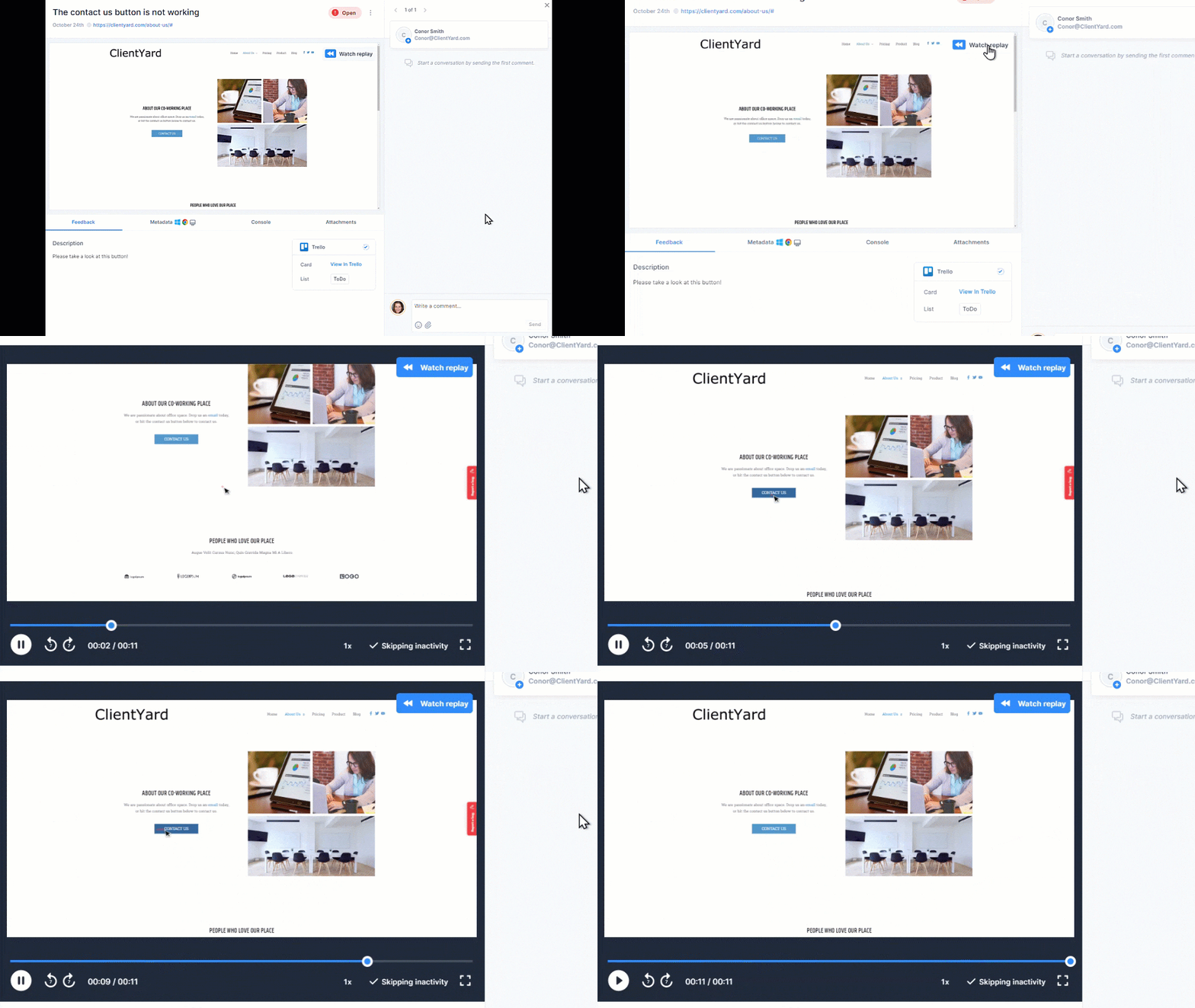
A recording shows the user actions that led to the bug, which is especially useful when the issue depends on timing, scrolling, navigation, or a multi-step flow.
Marker.io’s session replay captures the last few minutes of a user journey, giving teams a replay that shows what happened before the report was submitted.
Console logs
For website and web application bugs, console logs capture browser errors, failed requests, warnings, and other signals that can point toward the root cause.
Once console logs are enabled in Marker.io, reported issues automatically include relevant logs, helping developers reproduce and fix bugs more quickly.
Environment details
Include browser, browser version, operating system, device type, screen size, URL, app version, and build number. This context makes reports more actionable, especially for developers.
Severity and priority
Severity describes impact. Priority describes urgency. A broken payment flow is usually more severe than a typo, but release timing, customer impact, and business context determine priority.
Tools like Marker.io reduce the manual burden by capturing screenshots, technical logs, browser, OS, webpage, screen size, and session replay automatically when a reporter submits a website bug.
Handling intermittent bugs
Intermittent bugs are bugs that only appear some of the time. They are frustrating because the problem occurs, then disappears when someone tries to inspect it. The worst case is a report that says it happened once but includes no logs, no environment, and no evidence.
Write the report anyway, but be explicit. State the reproduction rate, such as: “Reproduced two times out of five attempts.”
Document the environment as precisely as possible, including network conditions, account type, session state, and any test data used. Note patterns if you see them: time of day, browser, device, input values, slow network, or whether the issue occurs after a long session.
Attach screen recordings, session replays, screenshots, and log files wherever possible. These artifacts preserve the state of the system at the time the bug occurred, even if the reporter cannot reproduce it again immediately.
You can also ask another tester to attempt reproduction independently, because a fresh set of user actions can sometimes identify the missing trigger.
Tools that make bug reproduction easier
A major reason bug reports are incomplete is that reporters do not know what technical information to gather. Even when they do know, collecting browser data, logs, URLs, screenshots, and screen recordings by hand is tedious. Non-technical team members often describe what they saw, but leave out the evidence developers need to reproduce the bug.
A good website bug reporting tool should reduce that overhead.
Look for the automatic capture of environment details, screenshot and annotation support, session replay, console log capture, and direct integrations with the project management tools your team already uses. Marker.io describes is a website feedback, bug reporting, QA, and UAT tool that captures screenshots, annotations, and advanced technical metadata, and integrates with tools such as Jira, Trello, ClickUp, Asana, and others.
The same principle applies to software bugs. Whatever tool your team uses should make it easier to collect relevant information, not harder. Reporters should focus on writing accurate steps and describing the actual result. The tool should handle as much additional context as possible.
Conclusion
Well-written, clear bug reproduction steps save time for everyone involved in testing and development. Just follow this guidance:
- Reproduce before reporting
- Find the minimum path
- Write one action per step
- Use plain language
- Separate preconditions from the numbered steps
- State the expected result and actual result clearly
- Attach evidence that helps developers see what happened and diagnose the root cause faster
A precise bug report helps developers fix the issue, helps QA testers validate the fix, and helps product managers triage the bug against other work. It turns a vague problem into a testable path.
For website bug reporting, Marker.io makes that process easier by auto-capturing the technical context developers need alongside every visual report, including screenshots, environment metadata, technical logs, and session replay.
Marker.io’s AI features also speed up the process, helping bug reporters write clear instructions with auto-translation and editing options.
Your team spends less time chasing information and more time fixing bugs. Start a free trial with website bug tracker Marker.io.
FAQs about writing steps to reproduce a bug
How do you write steps to reproduce a bug that only happens sometimes?
State that the bug is intermittent, include the reproduction rate, and document the environment in detail.
Add any patterns you noticed, such as browser, device, time of day, network conditions, account state, or test data. Attach logs, screenshots, and session replay if available, so developers can inspect what happened even if the problem does not occur every time.
What is the difference between steps to reproduce, expected result, and actual result?
- Steps to reproduce describe the exact user actions that trigger the bug
- The expected result explains what should happen after those actions
- The actual result explains what happened instead
Developers need all three to understand the path, identify the wrong behaviour, and confirm whether the fix works.
Do the steps to reproduce a bug need to be technical?
No. The steps should be precise, but they do not need to be written in technical language. Use the labels and actions visible in the interface. Put technical details such as browser, operating system, device type, logs, and build number in the supporting context fields rather than forcing them into the steps.
What should I do now?
Here are three ways you can continue your journey towards delivering bug-free websites:
Check out Marker.io and its features in action.
Read Next-Gen QA: How Companies Can Save Up To $125,000 A Year by adopting better bug reporting and resolution practices (no e-mail required).
Follow us on LinkedIn, YouTube, and X (Twitter) for bite-sized insights on all things QA testing, software development, bug resolution, and more.
Will Sigsworth
Will manages organic content at Marker.io. He also works as a marketing advisor and contributor to a number of other SaaS businesses.
Related blog posts




Get started now
Free 15-day trial • No credit card required • Cancel anytime