

How Edge turned 113 support tickets into an action plan in 10 minutes
Ready to set up Marker.io MCP?
Following a migration, a subset of Edge's users hit friction with the in-house assessment tool. Tickets started pouring in and with a major holiday around the corner, the team needed a clear action plan fast.
Marker.io's MCP server was connected to Claude Code, letting the agent process the full backlog in a single pass. In under ten minutes, Shahraiz had a structured report and dashboard with criticality ratings, categorized issues, flagged duplicates, and surfaced patterns — the kind of analysis that would otherwise take days of manual triage.
The problem they were solving
When Edge migrated users from a legacy application to a new experience, a subset ran into issues. Each person’s profile was different and no single error or exception was giving us enough to establish the overall pattern. Working with global talent, getting on a call with someone to see exactly where things are breaking down isn’t always an option.
Luckily, since the app was already integrated with Marker.io, talent could seamlessly report issues. Rich feedback started pouring in. Every ticket carried real detail - screenshots, replays, console logs and more. It was all there.
The trouble was, there was too much of it - about 113 tickets too much. As a product leader, Shahraiz needed to be able to extract signal from the noise to forge a clear, actionable plan for his team right before the start of a major holiday.
What they built
Having recently read about the MCP feature in an email from Marker.io, Shahraiz Tabassam, Head of Product at Edge, decided to take it for a spin. Using the intuitive instructions, he connected the Marker.io MCP server to Claude Code.
The flow looked like this:
Shahraiz gave Claude the context it needed and pointed it at the full ticket backlog, prioritizing recent issues and giving it clear instructions on how to output the results:
"Go through the <Marker Project Name> project's tickets in Marker.io (all of them), prioritizing the tickets in the past <duration> and categorize the issues you find into a quick dashboard as well as a marker-<projectName>-categorized-issues[date].md markdown file. Highlight impact, instances, factor in network / request / device data as well as attached screenshots to formulate your understanding and establish patterns."
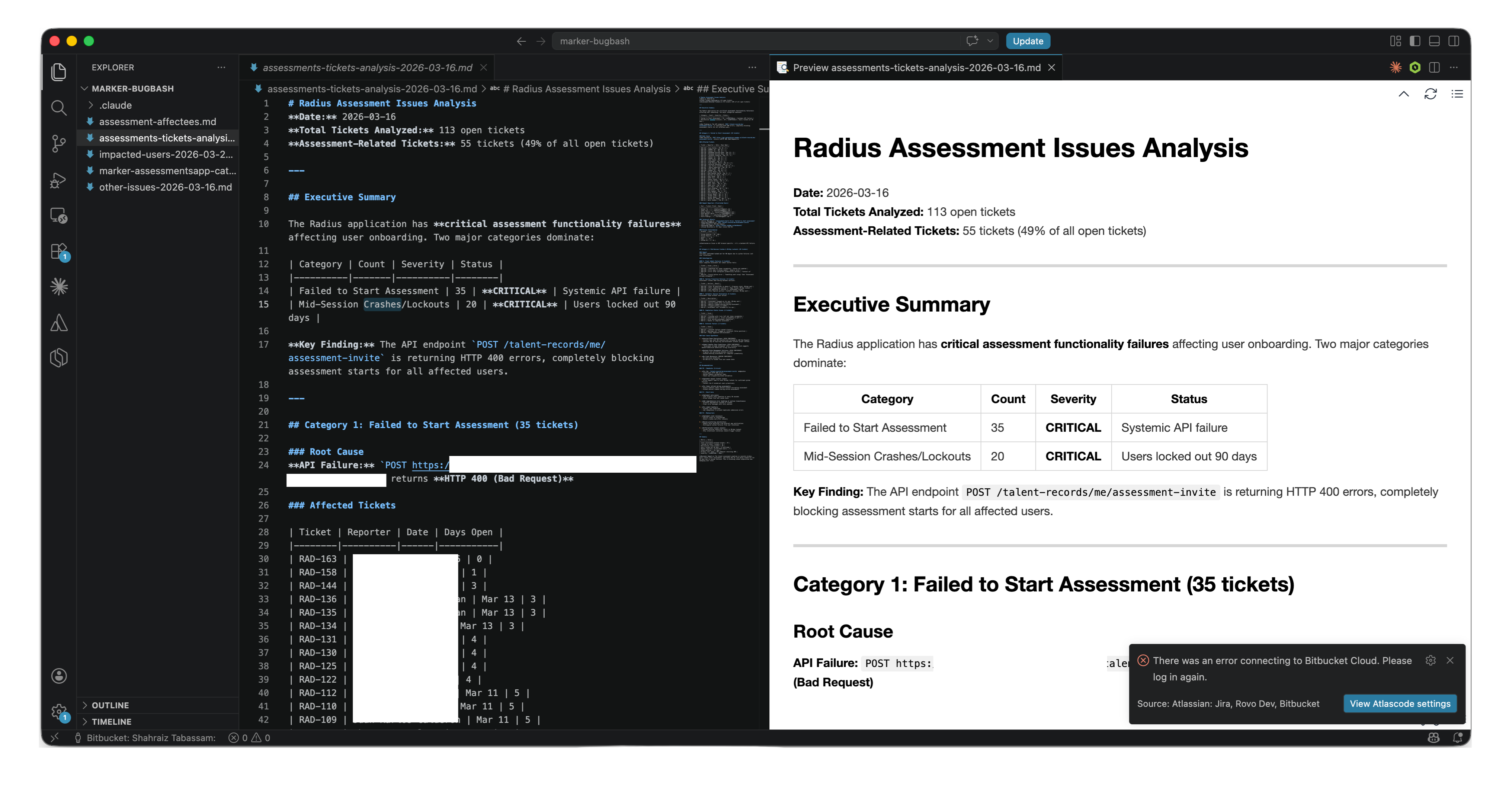
Claude queried the MCP server and pulled tickets, screenshots, and network data the same way a developer would. The output came back as a structured report: executive summary, criticality ratings, issues grouped by category, duplicates flagged, repeat reporters called out, technical patterns surfaced.
.png)
A second pass produced a list of user emails categorized by issues to help developers dive in deeper, understand patterns in their profiles that lead to breakages. Later, this also enabled PMs to reach out to the relevant people swiftly and verify if the fixes were working as expected.
"Create an ISSUES-[date].md file containing all the issues you have identified, assigning each one a numerical code, title and short description in tabular form. Then create files for each of the issues in ISSUES-[date].md such that ISSUE-01.csv only contains users that were affected by issue 01 and so on, include name, email address as columns so the team can reach out to them."
Taking things a step further, Shahraiz did a third pass running it across non-assessment issues to surface blind-spot problems across the new experience - the kind you only see about when you’re looking across, everything at once, something the powerful combination of Marker.io and Claude has unlocked for the Product team at Edge.
Where they are now
The release shipped on the back of that first report, unblocking roughly 130 users in a single night. The targeted list of users enabled developers to investigate and perform profile cleanups dynamically where needed, without working through tickets to find the right information.
Thanks to the third pass, the blind-spot issues were flagged, prioritized and added to the roadmap before they grew.
Shahraiz is already exploring additional workflows for auto-replying to tickets about known or already-fixed issues and seeing how bringing in context from other sources can help take intelligent triage and resolution to the next level.
Why this is worth stealing
In 2026, teams everywhere have gotten leaner. The ones pulling ahead aren't working harder, they're spending their attention on things only humans can decide.
The MCP server lets a product team turn raw ticket volume into a narrative and a plan, freeing engineers to fix things rather than find them. The same pattern handles triage, deduplication, blind-spot detection and more, all from one connection. The bottleneck shifts from reading tickets to deciding which ones to act on.
The question is, what will you build (or fix) next?

"It was like hearing everything from everyone, all at once, and actually being able to act on it. This kind of clarity in that timescale just hasn't been possible before."
More success stories

How Tomorrow Today wired GitHub and Marker.io into one Claude Code turn

How Brad Feld plugged Marker.io into the operating system of his company
How Edge turned 113 support tickets into an action plan in 10 minutes
Get started now
Free 15-day trial • No credit card required • Cancel anytime
Frequently Asked Questions
What is MCP?
Model Context Protocol. It's an open standard that lets AI agents connect to external tools and data. The Marker.io MCP server makes your bug reports available to any MCP-compatible agent.
What is Marker.io?
Which AI agents work with it?
Claude (Desktop and Code), Cursor, Windsurf, and any other client that supports MCP.
What can the agent access?
Everything captured in a Marker.io bug report: screenshots, URL, console logs, network requests, browser and OS details, and user description.
Do I need to be a developer to set it up?
You need to be comfortable running a setup command in your AI client. Our setup guide walks through it step by step. Most users are up and running in under 5 minutes.
Is it secure?
Yes. The MCP server uses your Marker.io credentials and only exposes data from projects you have access to. Nothing is shared outside your workspace.
Is it included in my plan?
Yes, the MCP server is available to all Marker.io customers at no extra cost.
Can the AI agent fix bugs on its own?
The agent can read reports, draft responses, and open pull requests. You decide how much autonomy to give it. Most teams keep a human in the loop for the final review.