
Website Project Management 101: Ultimate Guide
In this post, we outline website project management strategies, tools, and methodologies to deliver web projects on time and keep clients happy.


In this post, we outline ways to manage website projects with effective methodologies and tools.
A solid website project management strategy ensures smooth operations, happy clients, and on-time delivery.
Let’s dive in.
TL;DR:
- Website project management covers every stage of a web build, from scoping and website planning through to launch and post-launch maintenance.
- Choosing the right project management methodology – Agile, Waterfall, Kanban, or Scrum – sets the foundation for a successful website project.
- Define your project scope, clear objectives, and costs before work starts. It's the best (maybe the only) way to prevent scope creep and protect timelines.
- A solid project plan with milestones, resource allocation, and time tracking keeps your project team aligned and meeting deadlines.
- The right project management tools, like Marker.io for bug reporting and Jira for task management, make all the difference.
What is website project management?
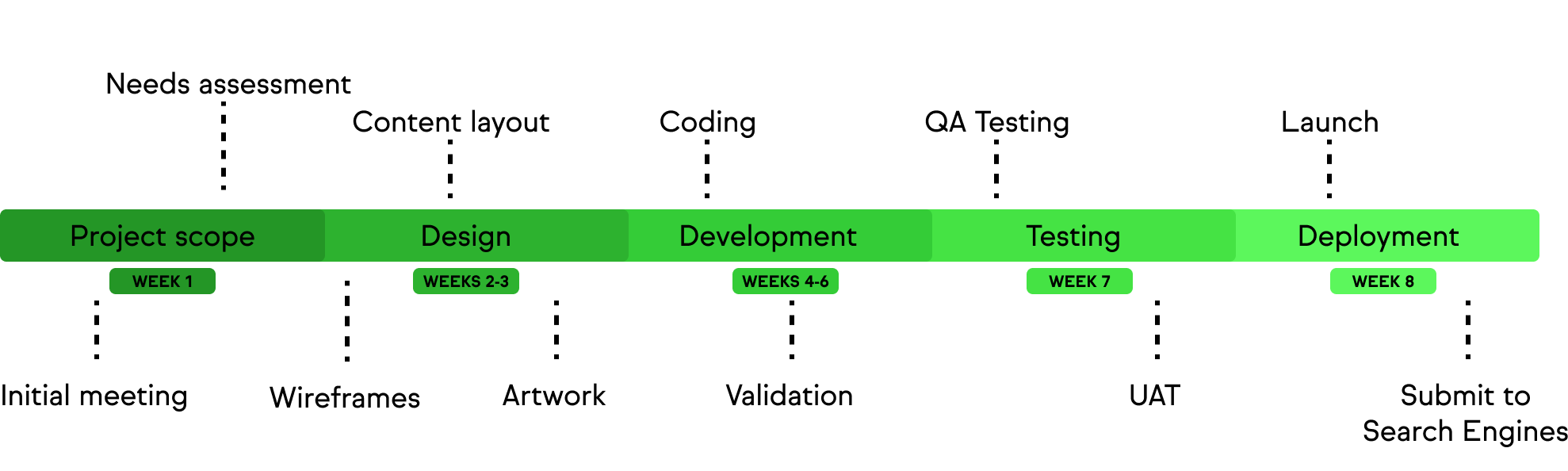
Website project management involves planning, designing, building, and testing a new website.
A smart project management strategy:
- Defines the scope and timeline
- Assigns tasks to the relevant team members
- Ensures everyone has the tools they need for the work
- Manages resources effectively
A well-implemented plan saves everyone time and money.
Workflows are optimized. Time is saved. Everything is delivered in the right order with valuable client input where it’s needed.
Here’s how to implement a website development project in the best way possible.
How to flawlessly deliver web dev projects, every time
The steps we’ll outline in this post include:
- Choosing a web dev methodology that works for you (e.g., Agile, Kanban, etc.)
- Defining the scope and objectives
- Creating a project plan
- Timeline and milestones
- QA testing
- Launching after final client feedback
- The right tools for every stage
1. Choose a methodology
There are numerous web dev methodologies and approaches that are already popular. The approach you choose depends on personal preferences and trial-and-error.
Here are four of the most popular project management methodologies.
Agile methodology
Agile is one of the most popular website project management methodologies and hasAgile has been widely used in software, app, and website development for over 20 years.
For web projects, Agile is an excellent approach because it’s:
- Flexible and iterative, working on the assumption that a project will evolve over time
- Emphasizes customer feedback, so clients have input at every crucial stage
- Built around smaller milestones, breaking down large tasks into bite-size iterations that are easier to manage and track
Waterfall methodology
The waterfall methodology uses a linear, logical sequence to roadmap a website project, often with a Gantt chart.
For websites, Waterfall works because it:
- Is linear and sequential
- Includes clear project phases, milestones, and endpoints
- Is easy to track, meaning project managers and agency owners can monitor progress using PM software and keep clients in the loop
Kanban methodology
Kanban is another popular web project management methodology, and nearly every PM tool comes with this framework built-in.
Kanban comes from a Japanese concept to break down tasks into boards and moves them upon completion.
It’s useful for website development projects because:
- Kanban makes it easier to visualize all tasks and project progress
- There’s an emphasis on efficient resource utilization
- Project managers can set work-in-progress (WIP) timescales and limits on time/resources for tasks.
Scrum methodology
Scrum relies on iterative processes and sprints to complete tasks and projects.
With this approach, you can:
- Manage projects using an iterative approach with sprints
- Appoint a “Scrum master” to oversee these iterative sprints
- Ensure that every sprint lasts no more than 2 weeks
After choosing the right methodology, define the project's scope and objectives, then use this to create a project plan, timeline, and cost estimates.
2. Define scope and objectives
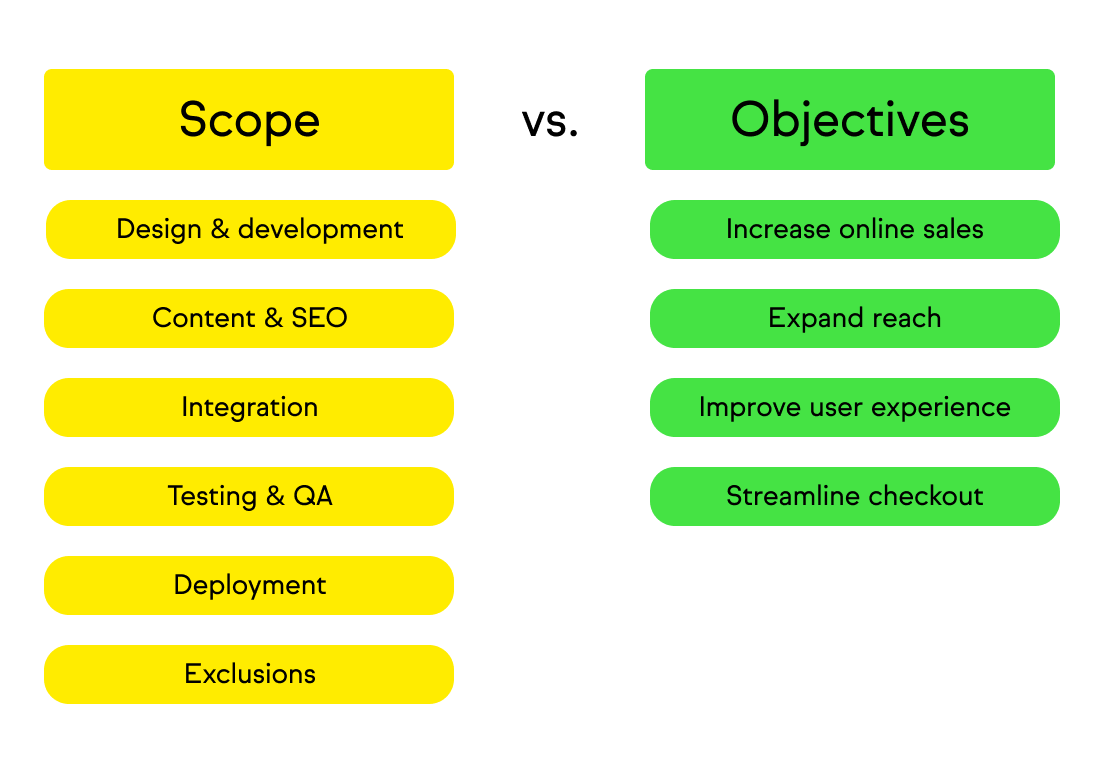
Define the scope and clear objectives of a website development project based on what the stakeholders want.
The project management team then outlines the overall scope, including pages, site size, functionality, and features.
With this information, you can create a project plan, timeline, and milestones.
Creating a project plan
A project plan helps teams define goals and measurable objectives with the client.
Identify key deliverables, such as:
- Number of pages
- Core functionalities
- Integrations
Timeline and milestones
With the project plan, you can add various deliverables and milestones to your timeline.
Never assume everything will go exactly to plan or be on time. Set realistic deadlines so you can plan for the unforesable, and use time tracking to catch slippage early.
Use a PM tool to track progress with key milestones and know when to report back to the client with updates.
3. Project cost estimate
Most website development projects start with cost estimates during discovery and onboarding.
An accurate cost estimation prevents any issues further down the road when work has already started.
Before work begins, ensure the client signs off on final costs based on the following:
- Number of pages
- Features and functionality
- Overall time it will take to design and build a website
- Number of iterative feedback stages
- Testing stages and time/costs involved in QA and beta testing
- Anything else that contributes to the cost of developing a website
Resource allocation matters here, too. Knowing which team members are committed to which tasks, and for how long, helps you build a resource plan that's realistic from day one.
4. Building website structure and design
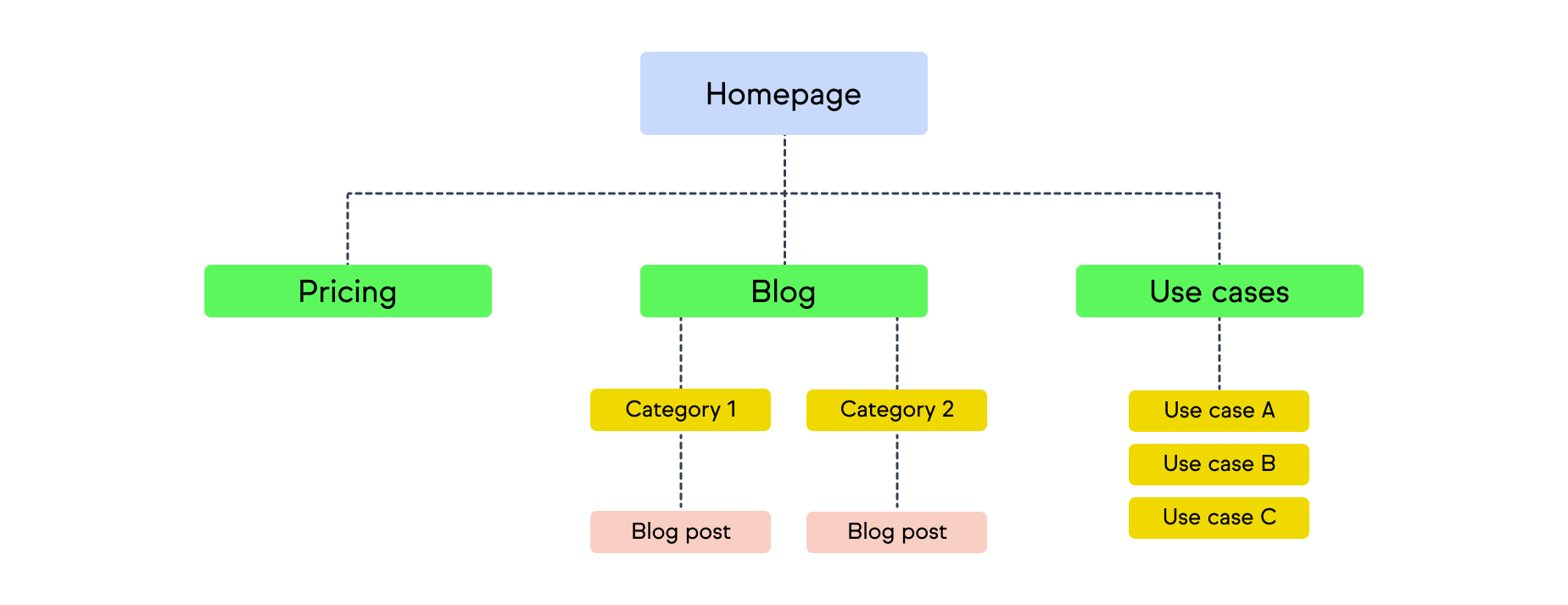
A project manager can now oversee the design and development phases.
Prototyping and wireframing
Early design work is usually divided into two task sprints.
First, wireframing and early stakeholder input: does it match their vision? Are the structure, colors, logos, calls-to-action, and fonts correct?
Based on feedback, designers create page templates, and developers turn these into a finished website.
Website development
The website development stage is when designs are turned into functional web pages.
It’s important that the design team collaborates closely with the development team during this part of the process.
Once the website is ready, it can move into the quality assurance (QA) testing stage.
5. QA testing, stakeholder management, and client feedback
Once a website is ready, start with some internal website QA testing to make sure the more obvious bugs have been dealt with.
Then, it’s ready to go into staging so you can present it to stakeholders.
Website feedback is crucial to ensure stakeholders are happy, final changes can be made, and the website is ready to launch.
Depending on the project scope, you might look to conduct user acceptance testing (UAT) as well.
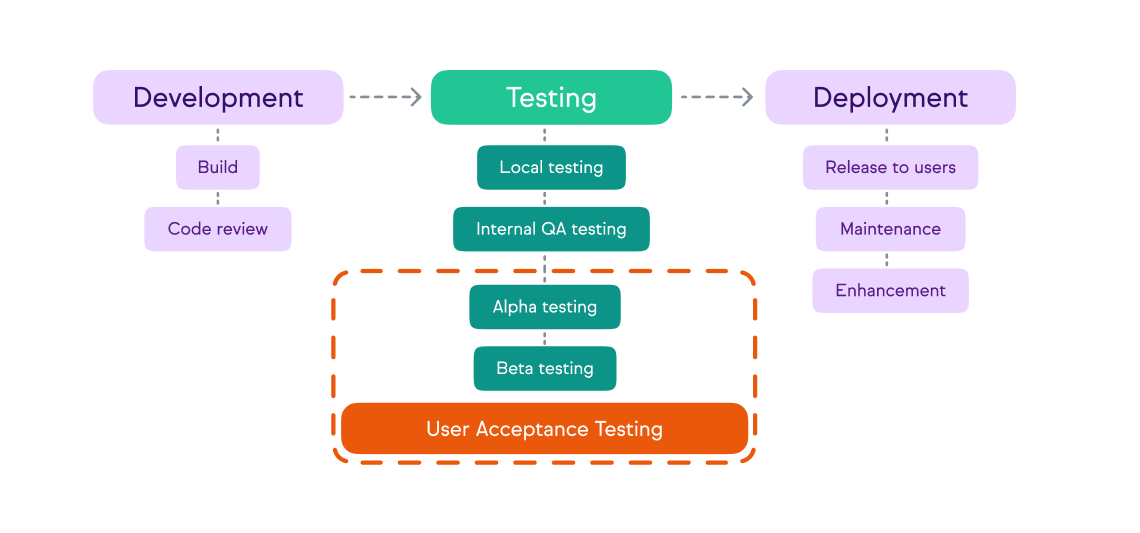
This is usually the last stage before launching a website and getting the client's sign-off.
Using a tool like Marker.io for bug reporting and bug tracking makes the process smoother and cuts out the back-and-forth that slows every dev team down.
6. Website launch
Launching a new website is the final phase of any web dev project, and it's the crucial moment before and after it goes live.
Here are the steps you need to take to launch a new site:
- Do a quick final content review
- Ensure all forms and links function properly in a production environment
- Ensure SSL certificates and other security plugins are working
- Double-check that your domain is pointed to the correct server (as well as DNS settings)
- Monitor error logs post-launch
- Once a new website is live, let the client know – send them the link and await any final (post-launch) feedback
Pro Tip: Don’t launch a new website or app on a Friday afternoon. Do this earlier in the week, ideally in the morning. You can then react in time if anything needs fixing or rolling back, not to mention getting support for any third-party services that could break.
Now, let’s take a look at a couple of useful tools you might need for your website project management tech stack.
7. Post-launch maintenance and continuous improvement
Launching the site isn't the end of the project lifecycle.
A successful website project includes a clear plan for what happens after go-live: who monitors performance, who handles bug fixes, and how feedback gets triaged.
Build post-launch maintenance into your project scope from the start, not as an afterthought. At this point, you also capture lessons learned for future projects, so each website build gets smoother than the last.
Website project management checklist
Before you kick off your next website project, run through this step-by-step checklist for website project management to make sure nothing slips through the cracks.
Planning and scoping
Design and development
QA and testing
For a more detailed checklist for the QA stage, you can use our ultimate QA checklist.
Launch
Post-launch
Website project management tools
Most web dev agencies will already use PM software and bug reporting tools, but here are two worth considering if you don't already have them in your tech stack.
1. Bug reporting: Marker.io
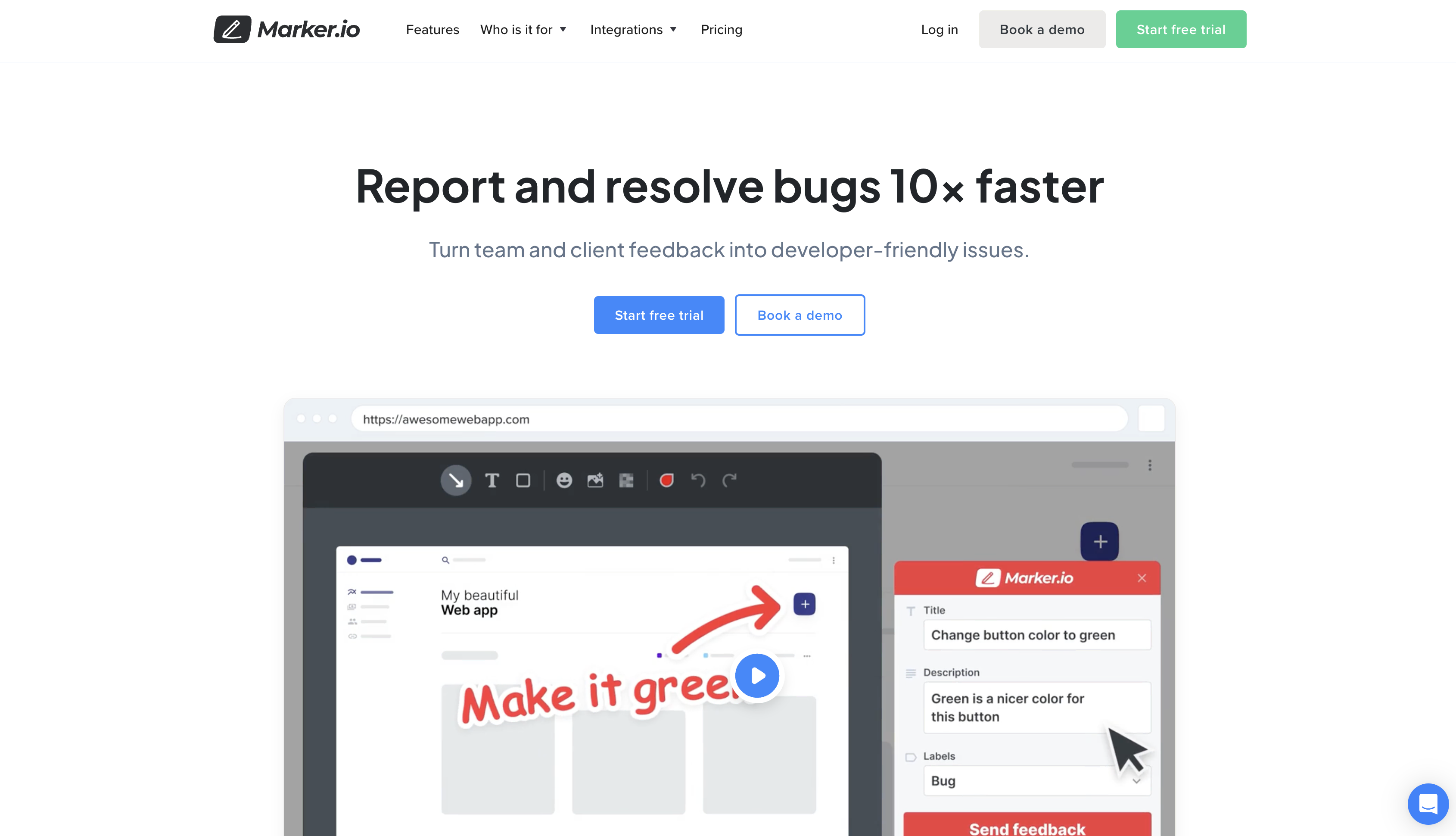
QA is no fun. But it’s a crucial step for delivering quality websites, which makes Marker.io a vital piece of website project management software for digital marketing agencies and businesses.
With Marker.io, you can:
- Gather comprehensive bug reports, with automatic environment and network logs capture
- Receive visual feedback, including screenshots and annotations
- Ensure every bug report syncs automatically with your project management tool (e.g., Jira, GitHub, Trello, Asana, and others)
- Use session replay to see what a user was doing before they sent a report
- Dramatically cut down on back-and-forth with reporters
Marker.io is a one-click bug reporting tool that lives as a small widget on any website or app.
For your clients, reporting a bug is a simple, three-step process:
- Click the button when they’ve found a bug.
- Fill out the feedback form and input details.
- Click on “Report Feedback,” and you're done!
Once integrated, everything reported through Marker.io goes straight into your project management tool.
It saves a ton of time compared to fragmented feedback via email, Slack, Zoom, and other channels.
Save hours on bug tracking, try Marker.io for free today.
2. Project management software: Jira
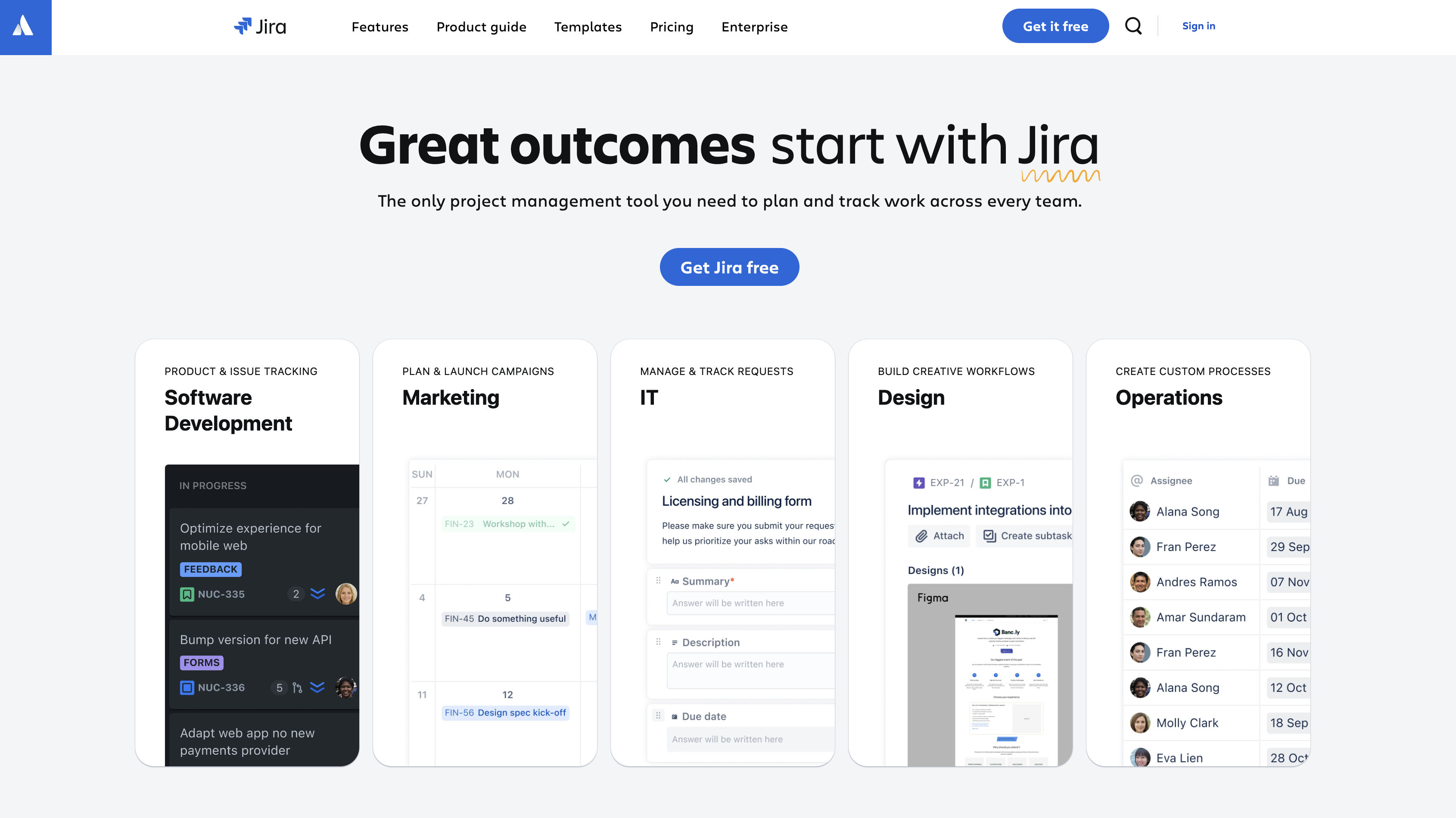
Jira is a powerful project management tool widely used by software development teams.
It comes with:
- Agile project management capabilities for the entire software development lifecycle
- Templates to streamline web dev projects, like Kanban boards, Gantt charts, timelines, and roadmaps
- Integrations with various dev and collaboration tools via the Atlassian Marketplace
Pricing: from $7.91 per user/month (free for smaller teams of up to 10).
Discover how to integrate Jira with Marker.io here. Other PM tools include Trello, Asana, and ClickUp.
These collaboration tools are more effective than juggling task management with Excel, Slack, and email.
Useful website project planning templates
Here are two useful templates we recommend: a bug report template and a project plan template.
You can download both of them below.
Bug report template
Bug report templates ensure you’ve got all of the information you need to find, replicate, and fix bugs.
Project managers can create these or use bug reporting software with built-in templates.
For every bug report, you need the following crucial elements:
- ID/name – Keep it brief and use correct terms. Best practice is to include the name of the feature where you found an issue.
- Description/summary – Explain the bug in a few words. Share it in easy-to-understand language.
- Environment – Websites may behave differently from one environment to another.
- Console logs – Logs make it a lot easier to reproduce and resolve any bug.
- Source URL – Make it easy for your developers to spot the problem by including the URL of the page where you found the bug.
- Visual proof – Screenshots or videos help developers understand problems faster.
- Steps to reproduce – Describe in detail the steps taken before encountering the bug.
- Expected result vs. actual result – Explain what results you expected, being as specific as possible.
Need a better checklist? Check out PerfectBugReport.io, an interactive checklist to help you write better bug reports.
Project plan template
A project plan template helps organize tasks, dependencies, timelines, and responsibilities.
Download this template to use in any PM suite and adjust for each client.
Wrapping up…
We hope you’ve found this agency guide to website project management useful.
Let us know if there are other steps you use or if we’ve missed anything!
What should I do now?
Here are three ways you can continue your journey towards delivering bug-free websites:
Check out Marker.io and its features in action.
Read Next-Gen QA: How Companies Can Save Up To $125,000 A Year by adopting better bug reporting and resolution practices (no e-mail required).
Follow us on LinkedIn, YouTube, and X (Twitter) for bite-sized insights on all things QA testing, software development, bug resolution, and more.
Nathan Vander Heyden
Nathan is Head of Marketing at Marker.io. He used to work as a SEO consultant for various SaaS companies—today, he's all about helping Web Ops teams find more efficient ways to deliver bug-free websites.
Related blog posts


Get started now
Free 15-day trial • No credit card required • Cancel anytime