Identify Your Reporters via Snippet Code

Identify Your Reporters via Snippet Code

Thanks to the new product update, the Marker.io widget can now identify your reporters through some code. Find out how!

Gary Gaspar
Gary Gaspar
Marker.io Updates
Last updated: Jun 01, 2021
Identify Your Reporters via Snippet Code
Contents

    If you're collecting feedback from known users (like your own paid customers), this update is for you!

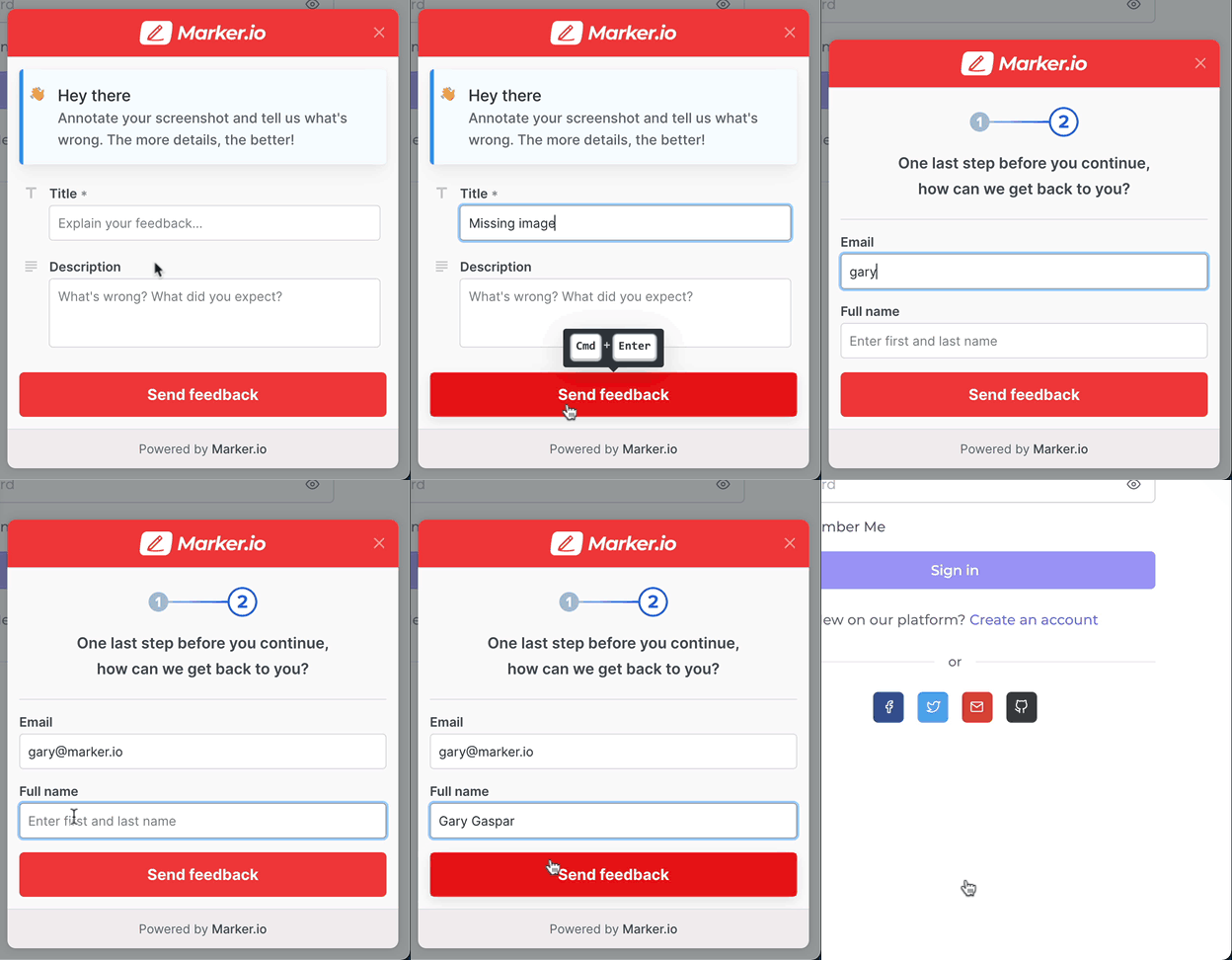
    With this new update, you won't have to ask reporters to provide their email and name when they report feedback for the first time. Once we have the information, we store it in local storage so they don't have to put it in every time, whether you add the identify library snippet or not.

    Let's see how it works 👇

    Without Identify JS call

    Until you implement our new identify call into your code, reporters will need to provide their email and name when they submit their feedback for the first time.
    With Identify JS call

    With this new update, you can ask your your developers to pass your reporter's information programatically by following this technical documentation.

    To achieve this, just add some extra JavaScript code to your existing Marker.io's embed code.

    Once implemented by your developer, you can take a look into your page's code and see your reporter's info.

    This means that the reporter will not need to fill out their personal info when reporting feedback.

    This whole step happens in the background!

    Do I need a developer?

    WordPress

    If you're using a CMS like WordPress and activate our new WordPress feedback plugin, Marker.io will grab your WordPress logged-in user's email and name automatically. No-code required!

    Custom

    For custom websites and web-apps, yes, you will need a developer. You can ask them to implement it by sending them the link to this technical documentation.

    Conclusion

    This new update is one more step in the direction of enabling you to collect better feedback and bug reports from clients and team members.

    What should I do now?

    Here are three ways you can continue your journey towards delivering bug-free websites:

    2.

    Read Next-Gen QA: How Companies Can Save Up To $125,000 A Year by adopting better bug reporting and resolution practices (no e-mail required).

    3.

    Follow us on LinkedIn, YouTube, and X (Twitter) for bite-sized insights on all things QA testing, software development, bug resolution, and more.

    Gary Gaspar

    Gary Gaspar

    Gary is Marker.io's CEO. He's passionate about startups, growth and business. Before Marker.io, he ran a web design agency. Outside of work, he's the biggest basketball fan!

    Frequently Asked Questions

    What is Marker.io?

    Marker.io is a website feedback tool, bug reporting, UAT, and annotation tool for websites. It’s the best way to gather feedback and bug reports with screenshots, annotations, and advanced technical metadata. It also integrates perfectly with Jira, Trello, ClickUp, Asana (and more).

    Who is Marker.io for, and can I use it for website design feedback?

    Marker.io is a website feedback tool for teams that are responsible for shipping and maintaining websites, and need a simple website testing tool to collect visual feedback, manage client feedback, and turn that feedback into actionable tasks.

    As well as teams managing website design feedback processes, it’s used by:

    - Organizations managing complex or multi-site websites
    - Agencies collaborating with clients and stakeholders
    - Product, web, design, and QA teams inside companies

    Whether you’re building, designing, testing, improving, or running a live site, Marker.io helps teams manage website design feedback, manual QA, user acceptance testing, revisions, and approval without breaking existing workflows.

    How easy is it to set up for bug reporting and other website testing?

    Embed a few lines of code on your website and start collecting client feedback with screenshots, visual annotation, and advanced technical metadata. We also have a no-code WordPress plugin and a browser extension.

    Will Marker.io slow down my website?

    No, it won't.

    The Marker.io script is engineered to run entirely in the background and should never cause your site to perform slowly.

    Can I use Marker.io for QA and user acceptance testing?

    Yes, Marker.io is one of the leading QA and user acceptance testing tools. It combines intuitive issue tracking tools with powerful project management integrations to make it easy for users, colleagues, and stakeholders alike to report bugs so your developers and designers can fix them.

    Do users need an account to send client feedback?

    No, anyone can submit website feedback and send comments without an account.

    How much does Marker's website feedback solution cost?

    Plans start as low as $39 per month. Each plan comes with a 15-day free trial. For more information, check out the pricing page.

    Get started now

    Free 15-day trial  •  No credit card required •  Cancel anytime